PowerEdge: UEFI Error in POST, HWC8010 or HWC8011
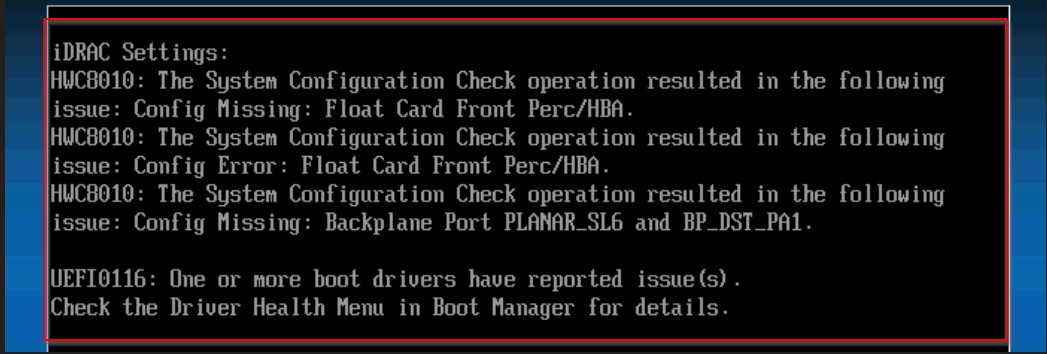
Summary: HWC8010 or HWC8011 UEFI Errors in POST for iDRAC Hardware configuration validation typically occurs due to firmware updates, and the addition or removal of hardware components. It is recommended to review logs and investigate any recent changes before applying this solution. ...
This article applies to
This article does not apply to
This article is not tied to any specific product.
Not all product versions are identified in this article.
Symptoms
Note: This article is intended for a public audience and aims to provide a solution for the HWC8010 UEFI Error in POST for iDRAC Hardware Configuration Validation. The symptoms listed are the most common indicators of this issue.
- HWC8010 or HWC8011 UEFI Errors in POST for iDRAC Hardware Configuration Validation
- The system is unable to boot and displays the HWC8010 error code.
- Error occurs after a firmware update, and the addition or removal of hardware components.
- Error persists after rebooting the system.
Cause
- Changes in the system's hardware or firmware configuration primarily cause HWC8010 UEFI Error in POST for iDRAC Hardware Configuration Validation.
- External factors, such as environmental conditions or user actions can also contribute to the issue. For example, an interrupted firmware update process or unauthorized hardware modifications can trigger the error.
- Specific error messages or codes, such as the HWC8010 code, are associated with the cause and can be found in the system logs.
- Often, the error is a result of a firmware update, with no hardware changes made to the system.
Note: This analysis focuses on the technical details essential to understanding the problem and excludes any instructions or procedures for solving the issue.
Resolution
- Review the system logs to identify any recent firmware updates, hardware changes, or chassis openings.
- If a firmware update was initiated prior to the error, reboot to F2 > iDRAC Settings > Hardware Configuration Validation and change the option to Yes to accept the current configuration as valid, select Save, and Exit.
- If the issue persists, contact Dell Support for further assistance.

Affected Products
iDRAC9, PowerEdge XR2, Poweredge C4140, PowerEdge C6400, PowerEdge C6420, PowerEdge C6520, PowerEdge C6525, PowerEdge C6600, PowerEdge C6615, PowerEdge C6620, PowerEdge FC640, PowerEdge HS5610, PowerEdge HS5620, PowerEdge M640
, PowerEdge M640 (for PE VRTX), PowerEdge MX750c, PowerEdge MX760c, PowerEdge R250, PowerEdge R260, PowerEdge R350, PowerEdge R360, PowerEdge R450, PowerEdge R550, PowerEdge R650, PowerEdge R650xs, PowerEdge R6515, PowerEdge R6525, PowerEdge R660, PowerEdge R660xs, PowerEdge R6615, PowerEdge R6625, PowerEdge R740, PowerEdge R740XD, PowerEdge R740XD2, PowerEdge R7415, PowerEdge R7425, PowerEdge R750, PowerEdge R750XA, PowerEdge R750xs, PowerEdge R7515, PowerEdge R7525, PowerEdge R760, PowerEdge R760XA, PowerEdge R760xd2, PowerEdge R760xs, PowerEdge R7615, PowerEdge R7625, PowerEdge R840, PowerEdge R860, PowerEdge R940, PowerEdge R940xa, PowerEdge R960, PowerEdge T140, PowerEdge T150, PowerEdge T160, PowerEdge T340, PowerEdge T350, PowerEdge T360, PowerEdge T40, PowerEdge T440, PowerEdge T550, PowerEdge T560, PowerEdge T640, PowerEdge XE2420, PowerEdge XE7100, PowerEdge XE7420, PowerEdge XE7440, PowerEdge XE8545, PowerEdge XE8640, PowerEdge XE9640, PowerEdge XE9680, PowerEdge XR11, PowerEdge XR12, PowerEdge XR4000z, PowerEdge XR4510c, PowerEdge XR4520c, PowerEdge XR5610, PowerEdge XR7620, PowerEdge XR8610t, PowerEdge XR8620t
...
Article Properties
Article Number: 000228171
Article Type: Solution
Last Modified: 29 Sept 2025
Version: 6
Find answers to your questions from other Dell users
Support Services
Check if your device is covered by Support Services.