Microsoft Teams Screen Border Area Flickers During an Optimized Video Call on Citrix VDI
Summary: Information about Microsoft Teams having video flickering when calling on Citrix Virtual Desktop Infrastructure (VDI).
This article applies to
This article does not apply to
This article is not tied to any specific product.
Not all product versions are identified in this article.
Symptoms
Microsoft Teams screen border area flickers during a video call on Citrix VDI (Citrix Workspace version 24.5.10) when Teams optimization is enabled.
Initially Microsoft Teams starts with the client in a full window, during the call, the video switches to a smaller window, and the nonintersecting area flickers.
Examples of the flicker on the border area of the Microsoft Teams screen: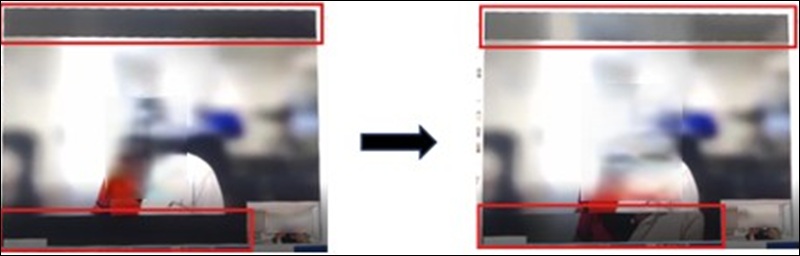
Affected Platforms:
Dell Pro 14 Essential PV14250Dell Pro 14 Essential PV14255Dell Pro 14 PC14250Dell Pro 14 PC14255Dell Pro 15 Essential PV15250Dell Pro 15 Essential PV15255Dell Pro 16 PC16250Dell Pro 16 PC16255Dell Pro 16 Plus PB16250Dell Pro 16 Plus PB16255Dell Pro Micro Plus QBM1250Dell Pro Micro QCM1250Dell Pro Micro QCM1255
Cause
Citrix VideoProcess uses RGB format as input instead of the typical YUV format. This is specific to the DX9p multimedia component within the AMD graphics driver.
Resolution
AMD Graphics Driver
Update the AMD graphics driver to version 32.0.12046.3001, A01 or newer to resolve this issue.
Affected Products
Dell Pro 16 Plus PB16250, Dell Pro 16 Plus PB16255, Dell Pro 14 PC14250, Dell Pro 14 PC14255, Dell Pro 16 PC16250, Dell Pro 16 PC16255, Dell Pro 14 Essential PV14250, Dell Pro 14 Essential PV14255, Dell Pro 15 Essential PV15250
, Dell Pro 15 Essential PV15255, Dell Pro Micro Plus QBM1250, Dell Pro Micro QCM1250, Dell Pro Micro QCM1255
...
Article Properties
Article Number: 000390709
Article Type: Solution
Last Modified: 14 Nov 2025
Version: 1
Find answers to your questions from other Dell users
Support Services
Check if your device is covered by Support Services.