Dell EMC Unity: How to configure NIS/Netgroup for NFS export on Unity (User Correctable)
Summary: How to configure NIS/Netgroup Local file/Netgroup for NFS export on Unity
This article applies to
This article does not apply to
This article is not tied to any specific product.
Not all product versions are identified in this article.
Instructions
Prerequisite:
NIS/Negroup in Unity.
Unity works with NIS server for netgroup->host name resolution , The working mechanism is as below. (Please refer attached tcpdump NIS.cap more more detail)
Local/Netgroup in Unity:
Procedure (Define netgroup in NIS server):
Step 1 - Configuration on Unity
Note
Step 2 - Configuration on NIS server (I use CentOS6.2 & its native NIS software as NIS server)
Test
Mount NFS share from a host which does not belong to netgroup mfgnasroot, access deny.
- Configure netgroup for NFS shares on Unity.
- Use NIS server for netgroup->host name resolution. This KB uses CentOS 6.2's native NIS server for test. Other NIS server should have its owner configuration method, but the theory should be the same.
- The network port for NIS/NFS/RPC is allowed.
NIS/Negroup in Unity.
Unity works with NIS server for netgroup->host name resolution , The working mechanism is as below. (Please refer attached tcpdump NIS.cap more more detail)
- When NFS client tries to mount NFS shares on Unity, Unity gets the IP address of NFS client.
- Unity sends "YP match call" to NIS server with NFS client IP address to NIS server, and NIS server replies "YP match reply" with the host name.
- If NIS server doesn't have correct host name entry (on step 2), Unity sends DNS PTR query to DNS server, query the PTR record of host name.
- Unity sends "YP match call" to NIS server with NFS client host name to NIS server and NIS server replies "YP match call" with the netgroup name.
Local/Netgroup in Unity:
- When NFS client tries to mount NFS shares on Unity, Unity gets the IP address of NFS client.
- Unity tried to match IP address with the host name in local hosts within nas server.
- If local hosts file doesn't have correct host name entry (on step 2), Unity sends DNS PTR query to DNS server, query the PTR record of host name.
- Unity tried to match host name with the host name in local netgroup within nas server.
Notes:
Unity supports defining the netgroup in local netgroup file from Unity OE 4.1.x
Unity does NOT support local netgroup file before Unity OE 4.1.x
Unity supports defining the netgroup in local netgroup file from Unity OE 4.1.x
Unity does NOT support local netgroup file before Unity OE 4.1.x
Procedure (Define netgroup in NIS server):
Step 1 - Configuration on Unity
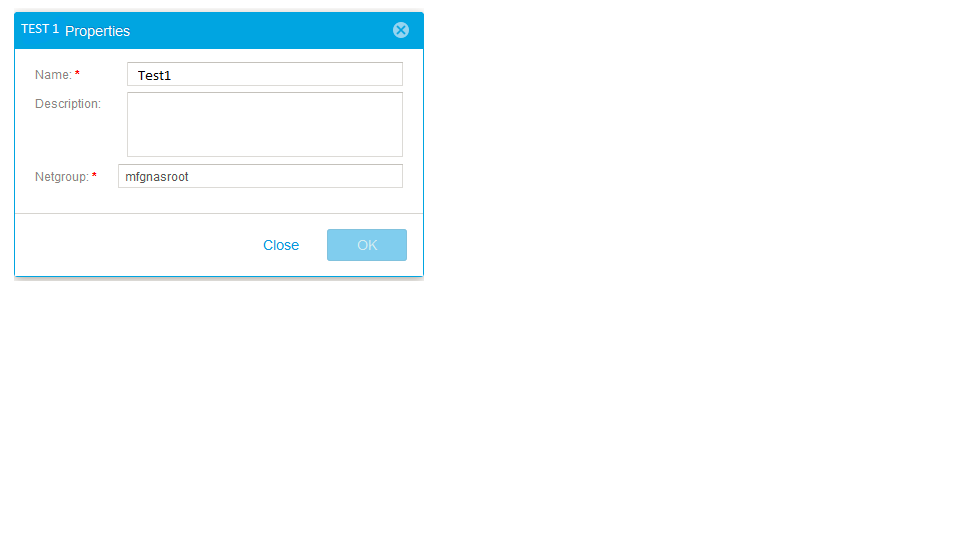
- In Hosts menu, add a Netgroup Test1 with netgroup mfgnasroot
Note
- The define "Netgroup" name mfgnasroot must match the netgroup name in NIS server.
- Do NOT use _ in Netgroup name, Having _ in the netgroup name may cause some issues.
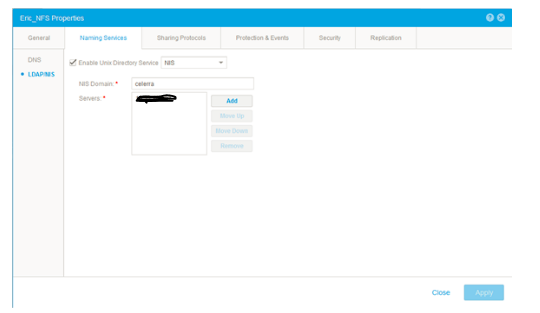
- Navigate to "File -> NAS Servers -> NAS server Properties -> Naming Services-LDAP/NIS" and add a NIS server with "celerra" define as the "NIS Domain" as shown in below screenshot.
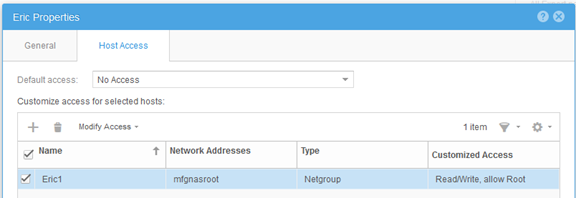
- In "File -> NFS Shares -> Share Properties -> Host Access" add netgroup Test with root privilege
Step 2 - Configuration on NIS server (I use CentOS6.2 & its native NIS software as NIS server)
- Confirm the packets below are installed.
# rpm -qa|egrep -i "^yp|^rpc"
ypserv-2.19-22.el6.x86_64
ypbind-1.20.4-29.el6.x86_64
yp-tools-2.9-12.el6.x86_64
rpcbind-0.2.0-8.el6.x86_64
ypserv-2.19-22.el6.x86_64
ypbind-1.20.4-29.el6.x86_64
yp-tools-2.9-12.el6.x86_64
rpcbind-0.2.0-8.el6.x86_64
- Define NIS domain name
# cat /etc/sysconfig/network
NETWORKING=yes
HOSTNAME=nis.example.com
GATEWAY=xxx.xxx.xxx.xxx
NISDOMAIN=celerra
NETWORKING=yes
HOSTNAME=nis.example.com
GATEWAY=xxx.xxx.xxx.xxx
NISDOMAIN=celerra
- Add the hostname and its IP address in "/etc/hosts" (blue colour), ypinit uses "/etc/hosts" file to build YP database.
# cat /etc/hosts
127.0.0.1localhost localhost.localdomain localhost4 localhost4.localdomain4
::1localhost localhost.localdomain localhost6 localhost6.localdomain6
xxx.xxx.xxx.xxx 5700CS139.example.com
xxx.xxx.xxx.xxx VNX5400_107.example.com
xxx.xxx.xxx.xxx nis.example.com nis
127.0.0.1localhost localhost.localdomain localhost4 localhost4.localdomain4
::1localhost localhost.localdomain localhost6 localhost6.localdomain6
xxx.xxx.xxx.xxx 5700CS139.example.com
xxx.xxx.xxx.xxx VNX5400_107.example.com
xxx.xxx.xxx.xxx nis.example.com nis
- Add the hostname in "/etc/netgroup" file and add the NIS domain name as shown below (NFS mount would fail if the NIS domain field is left as blank)
# cat /etc/netgroup
mfgnasroot (5700CS139.example.com,,celerra) (VNX5400_107.example.com,,celerra)
mfgnasroot (5700CS139.example.com,,celerra) (VNX5400_107.example.com,,celerra)
- Confirm ypbind, ypserver and rpcbind services are running.
# service ypbind status
ypbind (pid16711) is running...
# service ypserv status
ypserv (pid16758) is running...
# service rpcbind status
rpcbind (pid1274) is running...
ypbind (pid16711) is running...
# service ypserv status
ypserv (pid16758) is running...
# service rpcbind status
rpcbind (pid1274) is running...
- Initialise YP database.
# /usr/lib64/yp/ypinit -m
At this point, we have to construct a list of the hosts which will run NIS servers.nis.example.com is in the list of NIS server hosts. Continue adding hostname for the other hosts, one hostname entry per line and when completed with the list, type a <control D>.
next host to add:nis.example.com
next host to add:
The current list of NIS servers looks like this:
nis.example.com
Is this correct?[y/n: y]y
We need a few minutes to build the databases...
Building /var/yp/celerra/ypservers...
Running /var/yp/Makefile...
gmake[1]: Entering directory `/var/yp/celerra'
Updating passwd.byname...
Updating passwd.byuid...
Updating group.byname...
Updating group.bygid...
Updating hosts.byname...
Updating hosts.byaddr...
Updating rpc.byname...
Updating rpc.bynumber...
Updating services.byname...
Updating services.byservicename...
Updating netid.byname...
Updating protocols.bynumber...
Updating protocols.byname...
Updating mail.aliases...
Updating netgroup...
Updating netgroup.byhost...
Updating netgroup.byuser...
gmake[1]: Leaving directory `/var/yp/celerra'
nis.example.com has been set up as a NIS master server.
Now you can run ypinit -s nis.example.com on all slave server.
At this point, we have to construct a list of the hosts which will run NIS servers.nis.example.com is in the list of NIS server hosts. Continue adding hostname for the other hosts, one hostname entry per line and when completed with the list, type a <control D>.
next host to add:nis.example.com
next host to add:
The current list of NIS servers looks like this:
nis.example.com
Is this correct?[y/n: y]y
We need a few minutes to build the databases...
Building /var/yp/celerra/ypservers...
Running /var/yp/Makefile...
gmake[1]: Entering directory `/var/yp/celerra'
Updating passwd.byname...
Updating passwd.byuid...
Updating group.byname...
Updating group.bygid...
Updating hosts.byname...
Updating hosts.byaddr...
Updating rpc.byname...
Updating rpc.bynumber...
Updating services.byname...
Updating services.byservicename...
Updating netid.byname...
Updating protocols.bynumber...
Updating protocols.byname...
Updating mail.aliases...
Updating netgroup...
Updating netgroup.byhost...
Updating netgroup.byuser...
gmake[1]: Leaving directory `/var/yp/celerra'
nis.example.com has been set up as a NIS master server.
Now you can run ypinit -s nis.example.com on all slave server.
Test
Mount NFS share from a host which does not belong to netgroup mfgnasroot, access deny.
[root@nis ~]# mount xxx.xxx.xxx.xxx:/Test /mnt
mount.nfs: access denied by server while mounting xxx.xxx.xxx.xxx:/Test
mount.nfs: access denied by server while mounting xxx.xxx.xxx.xxx:/Test
Mount NFS share from a host which belongs to netgroup mfgnasroot, access success.
[root@5700CS139 nasadmin]# mount xxx.xxx.xxx.xxx:/Test /mnt
[root@5700CS139 nasadmin]# cd /mnt
[root@5700CS139 mnt]# touch 139
[root@VNX5400_107 nasadmin]# mount xxx.xxx.xxx.xxx:/Test /mnt
[root@VNX5400_107 nasadmin]# cd /mnt
[root@VNX5400_107 mnt]# touch 107
[root@5700CS139 nasadmin]# cd /mnt
[root@5700CS139 mnt]# touch 139
[root@VNX5400_107 nasadmin]# mount xxx.xxx.xxx.xxx:/Test /mnt
[root@VNX5400_107 nasadmin]# cd /mnt
[root@VNX5400_107 mnt]# touch 107
Procedure (Define netgroup in local file):
Step 1 - Configuration on Unity

Note

Example of hosts file:
# The hosts file contains a list of IP addresses with their corresponding hostnames.
#
# Each line of the hosts file defines a host and has the format:
# IP_address hostname aliases
# where:
# - IP_address is the host's IP address.
# - hostname is the official name of the host.
# - aliases provides for name changes, alternate spellings, shorter hostnames, or generic hostnames (for example, localhost).
#
# Fields are separated by any number of blanks or tab characters or both.
#
xxx.xxx.xxx.xxx opennms.example.com opennms
xxx.xxx.xxx.xxx vnx5400-1cs0.example.com vnx5400-1cs0
xxx.xxx.xxx.xxx vnx5400-1cs1.example.com vnx5400-1cs1
Example of netgroup file:
# The netgroup file contains a list of network group names with the list of hostnames for hosts belonging to the group.
# In addition to mapping hosts to network groups, it also maps users to network groups.
#
# Each line of the netgroup file defines a group and has the format:
# groupname member1 member2 ...
#
# Each member is either the name of another group or indicates specific hosts, users, and domains, referred to as a triple, as follows:
# (hostname,username,domainname)
#
# Any of the triple's three fields can be blank, meaning all the values in that field are included.
# A dash (-) in any of the fieldsmeans there are no valid values.
# For example, the following line defines a group called ouruniverse that consists of all hosts and users in the NIS domain ourdomain.
# ouruniverse (,,ourdomain)
#
# The following lines define a group called ourhosts that includes all of the hosts but none of the users in the domain,
# and a group called ourusers that includes all users but no hosts.
# ourhosts (,-,ourdomain)
# ourusers (-,,ourdomain)
#
# The following line defines a group called ouruniverse that consists of two hosts hostatlanta and hostboston.
# ouruniverse (hostatlanta,,),(hostboston,,)
#
# Note: IP addresses are not allowed.
#
# A netgroup file can include as many lines as required; however, each line must be less than 1 KB in length.
# If necessary, a line can be continued on another line by using the backslash (\) as a continuation character.
# A triple, however, cannot be split across two lines.
#
# Note: If you use a backslash (\) as a continuation character, it must be the last character on the line. It cannot be followed by spaces.
mfgnasroot (opennms,,example.com),(vnx5400-1cs1,,example.com),(vnx5400-1cs0,,example.com)

Test
Mount NFS share from a host which does not belong to netgroup mfgnasroot, access deny.
Step 1 - Configuration on Unity
- In Hosts menu, add a Netgroup Eric1 with netgroup mfgnasroot
Note
- The define "Netgroup" name mfgnasroot must match the netgroup name in local file netgroup.
- Do NOT use _ in Netgroup name, Having _ in the netgroup name may cause some issues.
- Navigate to "File -> NAS Servers -> NAS server Properties -> Naming Services-Local Files". Please retrieve the current hosts file & netgroup file; Update them with Notepad++; Save them in Unix format; Upload them in the final.
Example of hosts file:
# The hosts file contains a list of IP addresses with their corresponding hostnames.
#
# Each line of the hosts file defines a host and has the format:
# IP_address hostname aliases
# where:
# - IP_address is the host's IP address.
# - hostname is the official name of the host.
# - aliases provides for name changes, alternate spellings, shorter hostnames, or generic hostnames (for example, localhost).
#
# Fields are separated by any number of blanks or tab characters or both.
#
xxx.xxx.xxx.xxx opennms.example.com opennms
xxx.xxx.xxx.xxx vnx5400-1cs0.example.com vnx5400-1cs0
xxx.xxx.xxx.xxx vnx5400-1cs1.example.com vnx5400-1cs1
Example of netgroup file:
# The netgroup file contains a list of network group names with the list of hostnames for hosts belonging to the group.
# In addition to mapping hosts to network groups, it also maps users to network groups.
#
# Each line of the netgroup file defines a group and has the format:
# groupname member1 member2 ...
#
# Each member is either the name of another group or indicates specific hosts, users, and domains, referred to as a triple, as follows:
# (hostname,username,domainname)
#
# Any of the triple's three fields can be blank, meaning all the values in that field are included.
# A dash (-) in any of the fieldsmeans there are no valid values.
# For example, the following line defines a group called ouruniverse that consists of all hosts and users in the NIS domain ourdomain.
# ouruniverse (,,ourdomain)
#
# The following lines define a group called ourhosts that includes all of the hosts but none of the users in the domain,
# and a group called ourusers that includes all users but no hosts.
# ourhosts (,-,ourdomain)
# ourusers (-,,ourdomain)
#
# The following line defines a group called ouruniverse that consists of two hosts hostatlanta and hostboston.
# ouruniverse (hostatlanta,,),(hostboston,,)
#
# Note: IP addresses are not allowed.
#
# A netgroup file can include as many lines as required; however, each line must be less than 1 KB in length.
# If necessary, a line can be continued on another line by using the backslash (\) as a continuation character.
# A triple, however, cannot be split across two lines.
#
# Note: If you use a backslash (\) as a continuation character, it must be the last character on the line. It cannot be followed by spaces.
mfgnasroot (opennms,,example.com),(vnx5400-1cs1,,example.com),(vnx5400-1cs0,,example.com)
- In "File -> NFS Shares -> Share Properties -> Host Access" add netgroup Eric1 with root privilege
Test
Mount NFS share from a host which does not belong to netgroup mfgnasroot, access deny.
[root@VNX5400-1CS0 ~]# mount xxx.xxx.xxx.xxx:/unity_nfs /mnt
mount: xxx.xxx.xxx.xxx: /unity_nfs failed, reason given by server: Permission denied
mount: xxx.xxx.xxx.xxx: /unity_nfs failed, reason given by server: Permission denied
Mount NFS share from a host which belongs to netgroup mfgnasroot, access success.
[root@opennms ~]# mount xxx.xxx.xxx.xxx:/unity_nfs /mnt
[root@opennms ~]# umount /mnt
[root@opennms ~]# mount xxx.xxx.xxx.xxx:/unity_nfs /mnt
[root@opennms ~]# cd /mnt
[root@opennms mnt]# touch opennms
[root@opennms mnt]# ll
total 102528
-rw-r--r-- 1 root root 104857600 Jun 12 23:51 emctest
drwxr-xr-x 6 root root 8192 Jun 13 02:42 eric
drwxr-xr-x 2 root root 8192 Jun 5 06:11 lost+found
-rw-r--r-- 1 root root 0 Jul 13 2017 opennms
[root@opennms ~]# umount /mnt
[root@opennms ~]# mount xxx.xxx.xxx.xxx:/unity_nfs /mnt
[root@opennms ~]# cd /mnt
[root@opennms mnt]# touch opennms
[root@opennms mnt]# ll
total 102528
-rw-r--r-- 1 root root 104857600 Jun 12 23:51 emctest
drwxr-xr-x 6 root root 8192 Jun 13 02:42 eric
drwxr-xr-x 2 root root 8192 Jun 5 06:11 lost+found
-rw-r--r-- 1 root root 0 Jul 13 2017 opennms
Additional Information
- Do not use "_" in netgroup name when adding a netgroup on Unity GUI. Otherwise an error message of "failed invalid DNS name..." will be returned.
- For multiple IP addresses in netgroup, create host/subnet entries in Host menu if one needs to define IP addresses/range for NFS share.
Affected Products
Dell EMC Unity FamilyProducts
Dell EMC Unity Family, Dell EMC Unity HybridArticle Properties
Article Number: 000022455
Article Type: How To
Last Modified: 16 Jun 2025
Version: 3
Find answers to your questions from other Dell users
Support Services
Check if your device is covered by Support Services.