Connectrix: Cisco MDS: Unable to Launch Device Manager, Receive Error "Busy Network, no route, or snmpd is unresponsive"
Summary: This issue is seen when the user tries to launch the device manager that is using the web browser. The page reports the error "Busy Network, no route or snmpd is unresponsive" due to the SNMP timeout. ...
This article applies to
This article does not apply to
This article is not tied to any specific product.
Not all product versions are identified in this article.
Symptoms
Error:
Busy network, no route, or snmpd is unresponsive.
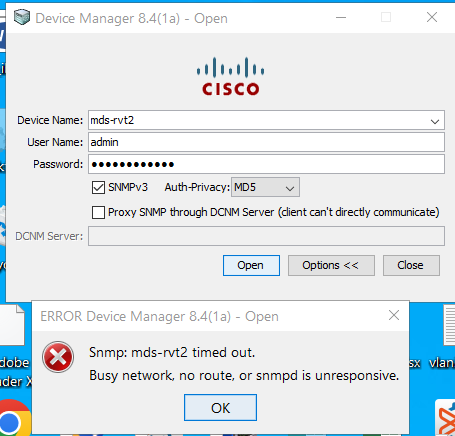
Figure 1: Screenshot of the error message: Busy network, no route, or snmpd is unresponsive.
Cause
This issue is due to the stuck background process between the Supervisor cards, and it has to be refreshed. This issue is seen after switch upgrades.
Resolution
Follow the steps below:
- Check the output of the below command:
# show snmp user
If the user privilege of the SNMP user is set to YES, change the SNMP user privilege to NO.
If after changing the SNMP privilege the issue is unresolved, follow step 2.
- If the privilege is set to NO, then check if the user has DCNM installed in their environment.
If yes, restart the service and try to launch Device Manager to check if the issue resolves.
If after restarting the service the issue is unresolved, follow step 3.
- If none of the above steps resolves the issue or are unsuitable to the scenario, perform a system switchover to resolve the issue.
NOTE:
- For Blade chassis model, Switch #reload has to be performed under a planned maintenance window which is disruptive since the switch reloads.
- For Director chassis: Use the below command which is a nondisruptive command:
#system switchover
Additional Information
NOTE: Increasing the SNMP timeout does not resolve the issue.
Affected Products
Connectrix MDS-Series HardwareArticle Properties
Article Number: 000218149
Article Type: Solution
Last Modified: 03 Jun 2025
Version: 3
Find answers to your questions from other Dell users
Support Services
Check if your device is covered by Support Services.