PowerProtect. NTP: Проблема с часовым поясом - ErrorResponse [code=404, reason=Указанный идентификатор часового пояса недействителен
Summary: Сервер Network Time Protocol Server сообщает об ошибке 404 недопустимого часового пояса при попытке установить GMT +1
This article applies to
This article does not apply to
This article is not tied to any specific product.
Not all product versions are identified in this article.
Symptoms
Ошибка.
В журнале: sysmgr.log путь: /var/log/brs/sysmgr/sysmgr.log
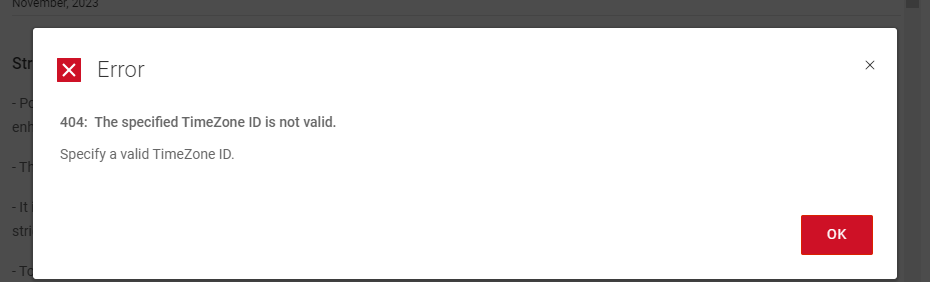
404: The specified Timezone ID is not valid.
Specify a valid Timezone ID
В журнале: sysmgr.log путь: /var/log/brs/sysmgr/sysmgr.log
./var/log/brs/sysmgr/sysmgr.log:2024-02-15T16:10:00.069Z ERROR [] [https-jsse-nio-8453-exec-5] [00000000-0000-4000-a000-000000000000][][][TRACE_ID:8b4e########d560][] [c.e.b.s.r.v.AbstractRESTMessageHandler.buildErrorResponse(343)] -  ErrorResponse: ErrorResponse [code=404, reason=The specified TimeZone ID is not valid., remediation=Specify a valid TimeZone ID., timestamp=1708013400069, path=/api/v2/timezones]
./var/log/brs/sysmgr/sysmgr.log:2024-02-15T16:14:01.311Z ERROR [] [https-jsse-nio-8453-exec-1] [00000000-0000-4000-a000-000000000000][][][TRACE_ID:b1dc2e25b3180d91][] [c.e.b.s.r.v.AbstractRESTMessageHandler.buildErrorResponse(343)] -  ErrorResponse: ErrorResponse [code=404, reason=The specified TimeZone ID is not valid., remediation=Specify a valid TimeZone ID., timestamp=1708013641311, path=/api/v2/timezones]
./var/log/brs/sysmgr/sysmgr.log:2024-02-15T18:08:25.154Z ERROR [] [https-jsse-nio-8453-exec-7] [00000000-0000-4000-a000-000000000000][][][TRACE_ID:96cc9d32f169b1a9][] [c.e.b.s.r.v.AbstractRESTMessageHandler.buildErrorResponse(343)] -  ErrorResponse: ErrorResponse [code=404, reason=The specified TimeZone ID is not valid., remediation=Specify a valid TimeZone ID., timestamp=1708020505154, path=/api/v2/timezones]
./var/log/brs/sysmgr/sysmgr.log:2024-02-15T18:08:25.234Z ERROR [] [https-jsse-nio-8453-exec-8] [00000000-0000-4000-a000-000000000000][][][TRACE_ID:a1c2########a87f][] [c.e.b.s.r.v.AbstractRESTMessageHandler.buildErrorResponse(343)] -  ErrorResponse: ErrorResponse [code=404, reason=The specified TimeZone ID is not valid., remediation=Specify a valid TimeZone ID., timestamp=1708020505234, path=/api/v2/timezones]
Cause
Недопустимый идентификатор часового пояса
Resolution
1. Проверьте состояние часового пояса.
timedatectl status
2. Проверьте имя или IP-адрес сервера NTP.
Хронические источники -V
cat /etc/chrony.conf
3. Выполните запрос, чтобы найти нужное имя часового пояса в списке.
timedatectl list-timezones | grep -i Торонто
4. Установите часовой пояс.
timedatectl set-часовой пояс Америка/Торонто
5. Проверьте состояние часового пояса.
timedatectl status
timedatectl status
Sample Output:

admin@ppdm196:~> timedatectl status
      Local time: Fri 2024-02-02 09:08:07 PST
  Universal time: Fri 2024-02-02 17:08:07 UTC
        RTC time: Fri 2024-02-02 17:08:07
       Time zone: PST8PDT (PST, -0800)
 Network time on: no
NTP synchronized: yes
 RTC in local TZ: no
2. Проверьте имя или IP-адрес сервера NTP.
Хронические источники -V
Sample Output:

admin@ppdm:~> chronyc sources -v

  .-- Source mode  '^' = server, '=' = peer, '#' = local clock.
 / .- Source state '*' = current best, '+' = combined, '-' = not combined,
| /             'x' = may be in error, '~' = too variable, '?' = unusable.
||                                                 .- xxxx [ yyyy ] +/- zzzz
||      Reachability register (octal) -.           |  xxxx = adjusted offset,
||      Log2(Polling interval) --.      |          |  yyyy = measured offset,
||                                \     |          |  zzzz = estimated error.
||                                 |    |           \
MS Name/IP address         Stratum Poll Reach LastRx Last sample
===============================================================================
^* DC.amer.lan                   2   6   377    30   -559us[  +64us] +/-   54ms
cat /etc/chrony.conf
Sample Output:

admin@ppdm:~> cat /etc/chrony.conf
server 192.168.9.100 iburst
3. Выполните запрос, чтобы найти нужное имя часового пояса в списке.
timedatectl list-timezones | grep -i Торонто
Sample Output:

admin@ppdm:~> timedatectl list-timezones  | grep -i toronto
America/Toronto
4. Установите часовой пояс.
timedatectl set-часовой пояс Америка/Торонто
Sample Output:

admin@ppdm196:~> timedatectl set-timezone America/Toronto
==== AUTHENTICATING FOR org.freedesktop.timedate1.set-timezone ===
Authentication is required to set the system timezone.
Authenticating as: root
Password:
==== AUTHENTICATION COMPLETE ===
admin@ppdm196:~> timedatectl status
      Local time: Fri 2024-02-02 12:09:06 EST
  Universal time: Fri 2024-02-02 17:09:06 UTC
        RTC time: Fri 2024-02-02 17:09:06
       Time zone: America/Toronto (EST, -0500)
 Network time on: no
NTP synchronized: yes
 RTC in local TZ: no
5. Проверьте состояние часового пояса.
timedatectl status
Пример вывода:

admin@ppdm196:~> timedatectl status
      Местное время: пт 2024-02-02 09:08:07 PST
  Всемирное время: Пт 2024-02-02 17:08:07 UTC
        Время RTC: птс 2024-02-02 17:08:07
       Часовой пояс: PST8PDT (PST, -0800)
 Сетевое время включено: нет
Синхронизированный NTP: да
 RTC в локальном ТЗ: нет
Article Properties
Article Number: 000222172
Article Type: Solution
Last Modified: 23 Oct 2024
Version: 3
Find answers to your questions from other Dell users
Support Services
Check if your device is covered by Support Services.