Dell Docks Do Not Function Correctly when Connected to Precision Workstations
Summary: Customers may report intermittent issues with no display on external monitors and no LAN functionality when using a Dell dual connector dock.
This article applies to
This article does not apply to
This article is not tied to any specific product.
Not all product versions are identified in this article.
Symptoms
Affected Platforms:
- Precision 7670
- Precision 7770
- Precision 7680
- Precision 7780
Affected Products:
- Dell Performance Dock - WD19DCS
- Dell Performance Dock - WD19DC
Steps to re-create:
- The host computer BIOS setting Power - USB Wake Support- Wake on Dell USB-C Dock is set as ON.
- No external power (AC adapter barrel or type-C) has been connected to the host computer for at least two hours.
- Connect an external monitor to the dock WD19DCS or WD19DC (a single external monitor or multiple monitors connected to the dock through HDMI, DP, or Type-C DP port).
- Power on the computer with the Dock is connected to left side (two Thunderbolt4 with USB Type-C ports).
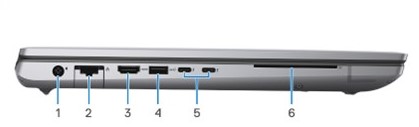
Figure 1: (English Only) Precision 7780 left view
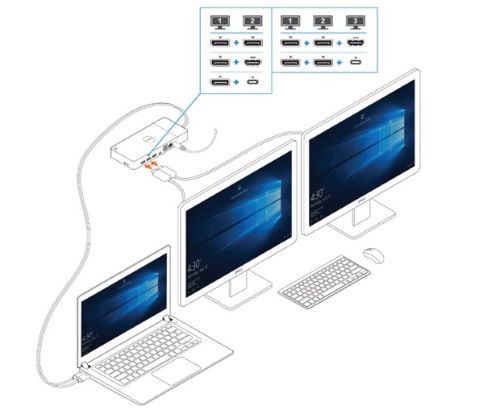
Figure 2: (English Only) Connecting the external displays
Cause
Not Applicable
Resolution
Updating the BIOS to the following versions prevent this issue from occurring:
- Precision 7680 and Precision 7780 BIOS: 1.12.1 or later
- Precision 7670 and Precision 7770 BIOS: 1.21.1 or later
Affected Products
Dell Performance Dock - WD19DC, Dell Performance Dock – WD19DCS, Precision 7670, Precision 7680, Precision 7770, Precision 7780Article Properties
Article Number: 000225065
Article Type: Solution
Last Modified: 21 May 2026
Version: 6
Find answers to your questions from other Dell users
Support Services
Check if your device is covered by Support Services.