Resolution for Common Issues in SupportAssist for Home PCs
Summary: This article provides information about the resolution of common issues for SupportAssist for Home PCs.
This article applies to
This article does not apply to
This article is not tied to any specific product.
Not all product versions are identified in this article.
Symptoms
Cause
Not applicable
Resolution
Fails to install or launch:
- Uninstall SupportAssist from Control Panel
- Go to the Search bar and type Control Panel
- Search and click Program and Features
- Right-click Dell SupportAssist for Home PCs and select Uninstall
- After uninstalling is completed, refresh to validate if uninstallation is successful
Note: If you get any error message or the service failing to start. Contact Dell Tech support team.
- Restart computer
- Go to Search and type Services
- Verify, the below services are not present
- Dell Data Vault Collector
- Dell Data Vault Processor
- Dell Data Vault Service API
- Dell SupportAssist
- Dell TechHub
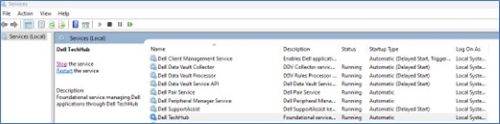
Restart computer and install the latest version of SupportAssist from Home PCs from the Dell website.
If you are still unable to install or encounter any failure. Contact Dell Tech support team.
Fails to update or driver scan fails:
- Verify if the services are disabled:
- Go to the Search bar and type Services
- Search and start the service below
- Dell Client Management Service
- Dell SupportAssist
- Right click above service and click Properties (a new window opens).
- Select Automatic (Delayed Start) from the startup type dropdown

- Click Apply followed by Start button (you observe Service status: Running now)
 Note: If you get any error message or the service failing to start. Contact Dell Tech support team.
- If the service is not disabled and running, still update scan is not running or failing
- Go to Search and type Services
- Search and restart the services below
- Dell Client Management Service
- Dell SupportAssist

- Even after services restart, still update scan is not running or failing
- Stop both the services below:
- Dell Client Management Service
- Dell SupportAssist

- Go to
C:\ProgramData\Delland remove theUpdateServicefolder - Go to
C:\Program Files (x86)\Delland remove theUpdateServicefolder
- Go to Services and start both the services
- Dell Client Management Service
- Dell SupportAssist
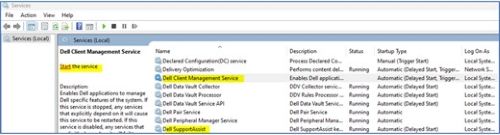 Note: If you get any error message or the service failing to start. Contact Dell Tech support team.
- Stop both the services below:
Hardware scan does not start or fails to complete
- If the service is not disabled and running, still hardware scan is not running or failing
- Go to Search and type Services
- Search and restart the below Service
- Dell TechHub
- Right click above service and click Properties (A new window opens).
- Select Automatic (Delayed Start) from the Startup type dropdown
 ;
; - Click Apply followed by Start button (you observe Service status: Running now)
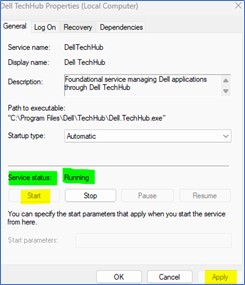 Note: If you get any error message or the service failing to start. Contact Dell Tech support team.
- If the service is not disabled and running, still hardware scan is not running or failing
- Go to Search and type Services
- Search and restart the below Service
- Dell TechHub

- Dell TechHub
- Even after services restart, still hardware scan is not running or failing
- Stop both of the below Services
- Dell TechHub
- Go to
C:\Program Files\Delland removeDTPfolder
- Go to Services
- Start:
- Dell TechHub

- Dell TechHub
- Stop both of the below Services
Affected Products
SupportAssist for Home PCsArticle Properties
Article Number: 000317292
Article Type: Solution
Last Modified: 05 May 2025
Version: 1
Find answers to your questions from other Dell users
Support Services
Check if your device is covered by Support Services.