VxRail: Intelligent Multi-System job status Error on APEX AIOps
Summary: This knowledge base article provides a common list of Error messages and recommended solutions for CloudIQ Pre-Check, Download or Update operations.
This article applies to
This article does not apply to
This article is not tied to any specific product.
Not all product versions are identified in this article.
Symptoms
Perform cluster Pre-Check, Download, or Update operations on CloudIQ, if the operation fails, go to APEX AIOps - > Admin - > Jobs
Select a job, view Job Details, it displays the detailed error message. For example: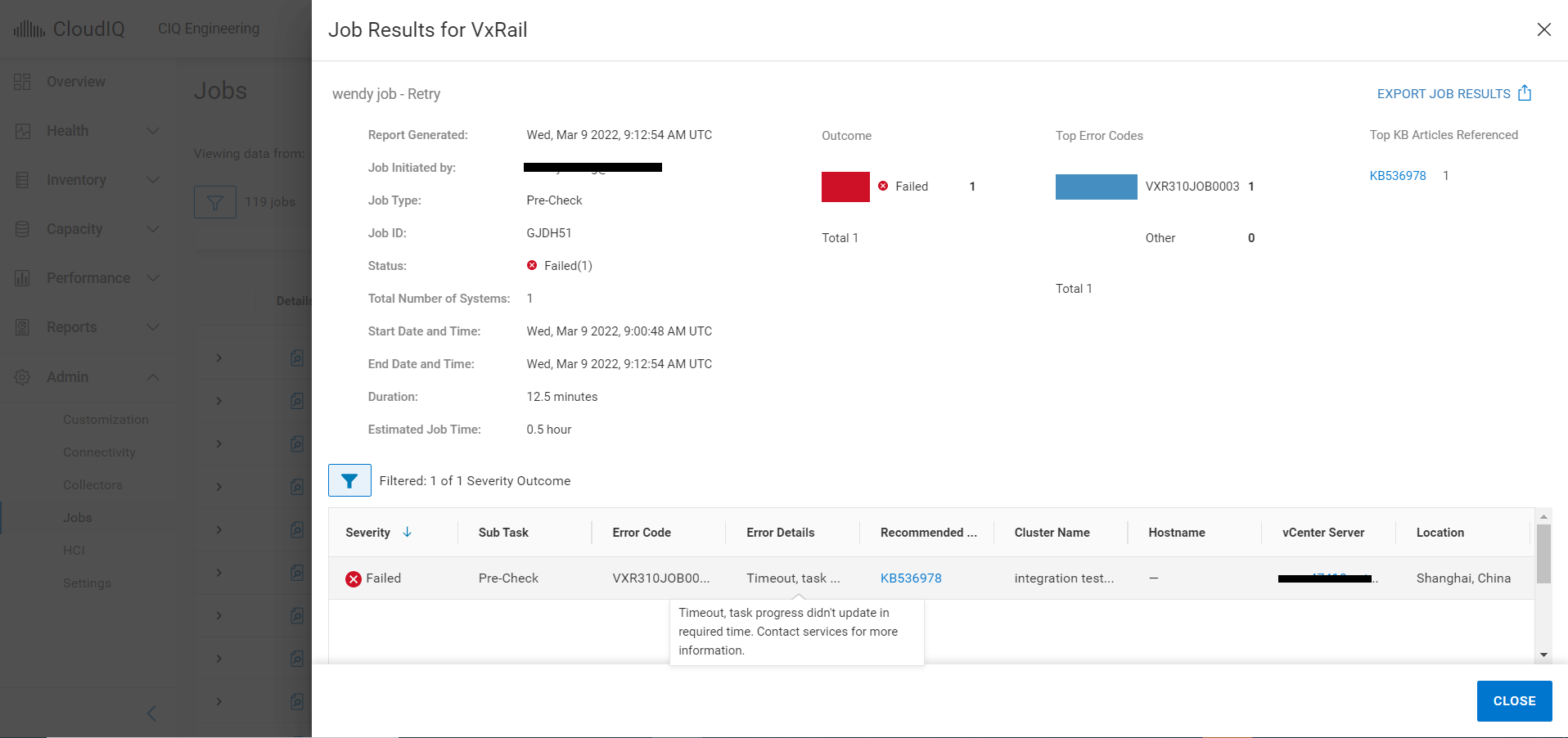
Below is a common list of error codes and their detailed error messages.
| # | Error Code | Impacts | Error Details | |
| 1 | VXR310JOB0008 | All | Internal error, failed to submit task to upgrade service. Contact services for more information. | |
| 2 | VXR310SRS0001 | All | Internal error, failed to upload file to DELL EMC SRS DL. Try again later or contact services for more information. | |
| 3 | VXR310SRS0002 | All | Internal error, failed to assign file from DELL EMC SRS. Try again later or contact services for more information. | |
| 4 | VXR310JOB0007 | Update | The job cannot be started at this time. Try again later. If this problem persists, contact your support provider | |
| 5 | VXR310JOB0003 | All | Timeout, task progress didn't update in required time. Contact services for more information. | |
| 6 | VXR310JOB0009 | Download | Internal error, failed to retrieve LCM bundle info. Contact services for more information. | |
| 7 | VXR310JOB0005 | All | Internal error, duplicated task for cluster. Contact services for more information. | |
| 8 | VXR310JOB0004 | Download | Internal error, total downloaded size did not match excepted bundle size. Contact services for more information. | |
| 9 | VXR310JOB0002 | All | Internal error, failed to generate task script on cloud side. Contact services for more information. | |
| 10 | VXR310ADC0004 | Download | Internal error, pack bundle on VxRail Manager failed. Contact services for more information. | |
| 11 | VXR310ADC0003 | Update | Internal error, upgrade script run into error on VxRail Manager. Contact services for more information. | |
| 12 | VXR310ADC0002 | Pre-Check | Internal error, radar script run into error on VxRail Manager. Contact services for more information. | |
| 13 | VXR314ADC0006 | Update | Intelligent multi-cluster system updates are not supported because the ADC component is not at the latest version. | |
| 14 | VXR314ADC0005 | Pre-Check | Intelligent multi-cluster system updates are not supported because the ADC component is not at the latest version. | |
| 15 | VXR314ADC0001 | All | Intelligent multi-cluster system updates are not supported because the ADC component is not at the latest version. | |
| 16 | VXR104LCM0001 | Download | Cluster VxM /data/store2 free space should be larger than twice the bundle size. | |
Cause
Error #1 - #3, may be caused by unstable issue between APEX AIOps and VxRail manager, APEX AIOps is not able to send operation command to VxRail manager. It would impact all job types.
Error #4 - #5, may be caused by connectivity lost in VxRail manager side.
Other errors, may be caused by APEX AIOps backend infrastructure issue or VxRail environment issue.
Resolution
For error #1-#3
Retry or re-create the job after a few minutes. If the error persists, contact Technical Support for help.
For error #4-#5
Please engage Dell Technical Support to run a SCG helper tool to check if there is any connectivity issue (KB 000208247).
For other errors
Please contact Technical Support to help.
Retry or re-create the job after a few minutes. If the error persists, contact Technical Support for help.
For error #4-#5
Please engage Dell Technical Support to run a SCG helper tool to check if there is any connectivity issue (KB 000208247).
For other errors
Please contact Technical Support to help.
Affected Products
CloudIQ, VxRail SoftwareArticle Properties
Article Number: 000197490
Article Type: Solution
Last Modified: 08 Jul 2025
Version: 11
Find answers to your questions from other Dell users
Support Services
Check if your device is covered by Support Services.