Alienware Command Center has Recurring Access Violation Errors
Summary: This article provides more information about Alienware Command Center (AWCC) 5.x/6.x generating recurring 0xc0000005 (Access Violation) errors.
This article applies to
This article does not apply to
This article is not tied to any specific product.
Not all product versions are identified in this article.
Symptoms
Affected Products:
- Alienware Command Center 5.x and 6.x
- Alienware 7.1 Gaming Headset AW510H
- Alienware Wireless Gaming Headset AW988
Steps to recreate:
- Install AWCC 5.x or 6.x
- Connect an Alienware (AW) AW510H or AW988H headset
- Launch Control panel > Apps and Features to find out all headset components
- Uninstall them manually (all headset components).
Expected outcome: AW headset components should be removed completely.
Actual outcome: AW Headset components are removed, but AWHeadset Service32 and AWHeadset Service64 are still running in Task Manager.
Cause
Older versions of Awheadsetsvc32 were found to have memory scaling issues, eventually leading to a process fault due to resource exhaustion.
The service crash associated with these EOL headsets is a fault offset at 0x00024ce0 within AWHeadsetSvc32.exe.
Resolution
Workaround:
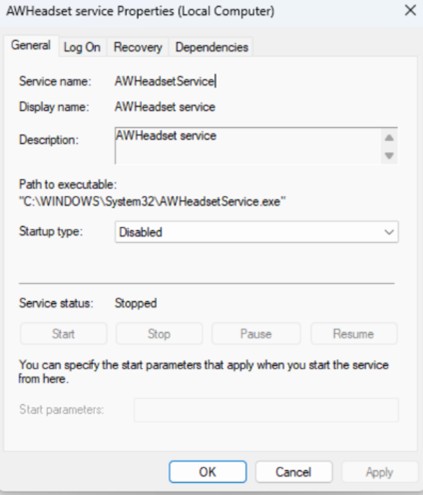
Disabling the headset service in Windows Services and restarting the computer mitigates the issue (the headset service no longer runs)
How to disable headset service:
- Press the Windows Key + R to open Windows Services.
- Locate AWHeadset Service.
- Right-click the service and select Properties.
- Open the General tab.
- Set the Startup type to Disabled.
- Restart the computer.
Note: Plugging in AW988H or AW510H does not trigger automatic download or installation of AWCC components.
Affected Products
Alienware Command Center, Alienware 7.1 Gaming Headset AW510H, Alienware Wireless Gaming Headset AW988Article Properties
Article Number: 000443746
Article Type: Solution
Last Modified: 24 May 2026
Version: 3
Find answers to your questions from other Dell users
Support Services
Check if your device is covered by Support Services.