PowerEdge: Windows scheduled tasks do not start automatically
Summary: Windows scheduled tasks do not start automatically (no errors on the task or within the event viewer). However, the task can be run manually without issue.
This article applies to
This article does not apply to
This article is not tied to any specific product.
Not all product versions are identified in this article.
Symptoms
Windows Server Backup Fails, because the scheduled task does not start automatically.
The task can be started manually, which allows the backup to run. New scheduled tasks may also not start automatically.
Cause
The device is connected to an Uninterruptible Power Supply (UPS) using power and USB, which installs a Battery driver (visible through Device Manager).
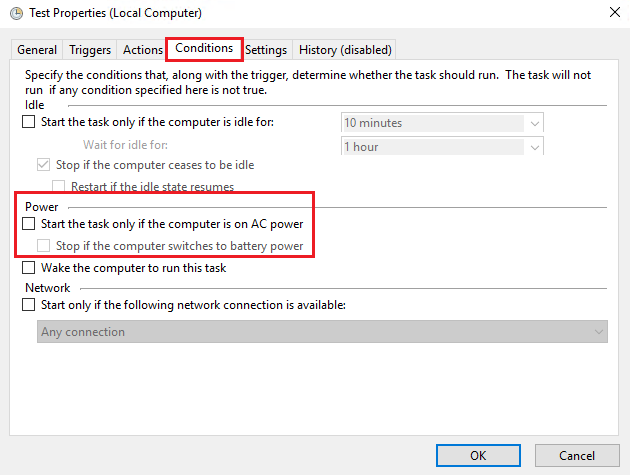
Scheduled tasks with the option to "Start the task only if the computer is on AC power" dose not start automatically.
Resolution
In Task Scheduler, open the task’s Properties, go to the Conditions tab, and clear "Start the task only if the computer is on AC power."
Affected Products
Microsoft Windows Server 2016, Microsoft Windows Server 2019, Microsoft Windows Server 2022, Microsoft Windows 2012 Server, Microsoft Windows 2012 Server R2, OEMR R440, OEMR R450, OEMR R540, OEMR R550, OEMR R5500, OEMR R640, OEMR R6415, OEMR R650
, OEMR R650xs, OEMR R6515, OEMR R6525, OEMR R660, OEMR R660xs, OEMR R6615, OEMR R6625, OEMR R740, OEMR R740xd, OEMR R740xd2, OEMR R7415, OEMR R7425, OEMR R750, OEMR R750xa, OEMR R750xs, OEMR R7515, OEMR R7525, OEMR R760, OEMR R760xa, OEMR R760XD2, OEMR R760xs, OEMR R7615, OEMR R7625, OEMR R840, OEMR R860, OEMR R940, OEMR R940xa, OEMR R960, OEMR XL R5500, OEMR XR4510c, OEMR XR4520c, OEMR XR5610, OEMR XR8610t, OEMR XR8620t, PowerEdge R440, PowerEdge R450, PowerEdge R540, PowerEdge R550, PowerEdge R640, PowerEdge R6415, PowerEdge R650, PowerEdge R650xs, PowerEdge R6515, PowerEdge R6525, PowerEdge R660, PowerEdge R660xs, PowerEdge R6615, PowerEdge R6625, PowerEdge R740, PowerEdge R740XD, PowerEdge R740XD2, PowerEdge R7415, PowerEdge R7425, PowerEdge R750, PowerEdge R750XA, PowerEdge R750xs, PowerEdge R7515, PowerEdge R7525, PowerEdge R760, PowerEdge R760XA, PowerEdge R760xd2, PowerEdge R760xs, PowerEdge R7615, PowerEdge R7625, PowerEdge R840, PowerEdge R860, PowerEdge R940, PowerEdge R940xa, PowerEdge R960, PowerEdge XR4510c, PowerEdge XR4520c, PowerEdge XR5610, PowerEdge XR8610t, PowerEdge XR8620t, Precision R5500
...
Article Properties
Article Number: 000200860
Article Type: Solution
Last Modified: 16 Jul 2025
Version: 3
Find answers to your questions from other Dell users
Support Services
Check if your device is covered by Support Services.