Dell APEX Cloud Platform: Failed to upload Hardware Update package to staging node
Summary: Update failing with "Failed to upload Hardware Update package to staging node"
This article applies to
This article does not apply to
This article is not tied to any specific product.
Not all product versions are identified in this article.
Symptoms
Update failing with "Failed to upload Hardware Update package to staging node"
Dell APEX Cloud Platform (ACP) UI reports:
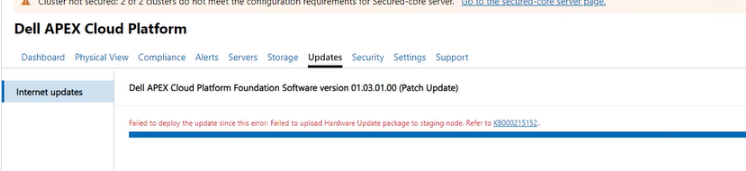
Life-Cycle Manager (LCM) logs can report different errors like this:
Error 1:
Failed to upload /lcm/data/store/unpacked/SBE_Dell_APEXCP_4.1.2411.28880068.xml to //<stagenode name>/c$ /ClusterStorage/Infrastructure_1/Shares/SU1_Infrastructure_1/stagedSbe/SBE_Dell_APEXCP_4.1.2411.28880068.xml: exit status 1, output is /bin/bash: -c: line 0: unexpected EOF while looking for matching `''  /bin/bash: -c: line 1: syntax error: unexpected end of file
Failed to copy sbe xml file to node: exit status 1
Error 2:
Failed to upload /lcm/data/store/unpacked/SBE_Dell_APEXCP_4.1.2411.28880068.xml to //<staging node name>/c$ /ClusterStorage/Infrastructure_1/Shares/SU1_Infrastructure_1/stagedSbe/SBE_Dell_APEXCP_4.1.2411.28880068.xml: exit status 1, output is Kinit for <lcm mgmt username>to access <staging node name> failed: Preauthentication failed session setup failed: NT_STATUS_LOGON_FAILURE
Failed to copy sbe xml file to node: exit status 1
Cause
Management account password contains some special characters.
Resolution
Cancel the update and Change the password using KB215549
Affected Products
APEXArticle Properties
Article Number: 000281279
Article Type: Solution
Last Modified: 06 Feb 2025
Version: 1
Find answers to your questions from other Dell users
Support Services
Check if your device is covered by Support Services.