NetWorker: Las conexiones AUTHC fallan con el error HTTP 400 o 403
Summary: Las conexiones al servicio de autenticación de NetWorker (AUTHC) fallan. Los errores informados son HTTP 400 (solicitud incorrecta) o HTTP 403 (prohibido)
Symptoms
The NetWorker nsrlogin El comando falla con HTTP 400 o 403:
nsrlogin -u administrator
130136:nsrlogin: Please enter password:
117849:nsrlogin: Authentication library error: CONNECT tunnel failed, response 403
Server Message : Make sure that server is running
O:
nsrlogin -u Administrator
130136:nsrlogin: Please enter password:
117849:nsrlogin: Authentication library error: CONNECT tunnel failed, response 400
Server Message : Make sure that server is running
La autenticación de NetWorker y otros intentos de conectarse al servicio de autenticación fallan con errores similares.
nsrauthtrust -H NETWORKER_SERVER_NAME -P 9090
125927:nsrauthtrust: Failed to retrieve certificate: CONNECT tunnel failed, response 403
Las actualizaciones de NetWorker Management Console (NMC) y la interfaz de usuario web de NetWorker (NWUI) (Windows) y los scripts posteriores a la actualización (Linux) informan fallas de conexión en el puerto AUTHC.
Cause
Este problema ocurre fuera de NetWorker. The NetWorker nsrlogin El comando también informó "Connect Tunnel Failed" porque hay un proxy HTTPS configurado en el entorno. Esto se puede validar mediante el comando curl el comando:
curl https://NETWORKER_SERVER_ADDRESS:9090
curl -v https://NETWORKER_SERVER_ADDRESS:9090
* Rebuilt URL to: https://NETWORKER_SERVER_ADDRESS:9090/
* Uses proxy env variable no_proxy == 'HTTP_PROXY_HOSTNAME'
* Uses proxy env variable https_proxy == 'http://HTTP_PROXY_HOSTNAME:8080'
*   Trying HTTP_PROXY_IP...
* TCP_NODELAY set
* Connected to HTTP_PROXY_HOSTNAME (HTTP_PROXY_IP) port 8080 (#0)
* allocate connect buffer!
* Establish HTTP proxy tunnel to NETWORKER_SERVER_ADDRESS:9090
> CONNECT NETWORKER_SERVER_ADDRESS:9090 HTTP/1.1
> Host: NETWORKER_SERVER_ADDRESS:9090
> User-Agent: curl/7.61.1
> Proxy-Connection: Keep-Alive

< HTTP/1.1 403 Forbidden
< Server: squid/3.5.20
< Mime-Version: 1.0
< Date: Thu, 03 Jul 2025 15:36:25 GMT
< Content-Type: text/html;charset=utf-8
< Content-Length: 3548
< X-Squid-Error: ERR_ACCESS_DENIED 0
< Vary: Accept-Language
< X-Cache: MISS from HTTP_PROXY_HOSTNAME
< X-Cache-Lookup: NONE from HTTP_PROXY_HOSTNAME:8080
< Via: 1.1 HTTP_PROXY_HOSTNAME (squid/3.5.20)
< Proxy-Connection: Keep-Alive
* Received HTTP code 403 from proxy after CONNECT
* Closing connection 0
* Curl: (56) Received HTTP code 403 from proxy after CONNECT
O:
curl -v https://NETWORKER_SERVER_ADDRESS:9090
* Uses proxy env variable https_proxy == 'http://HTTP_PROXY_HOSTNAME:443'
*   Trying HTTP_PROXY_IP:443...
* Connected to HTTP_PROXY_HOSTNAME (HTTP_PROXY_IP) port 443 (#0)
* allocate connect buffer!
* Establish HTTP proxy tunnel to NETWORKER_SERVER_ADDRESS:9090
> CONNECT NETWORKER_SERVER_ADDRESS:9090 HTTP/1.1
> Host: NETWORKER_SERVER_ADDRESS:9090
> User-Agent: curl/7.76.1
> Proxy-Connection: Keep-Alive
>
< HTTP/1.1 400 Bad Request
< Server: openresty
< Date: Thu, 03 Jul 2025 14:11:12 GMT
< Content-Type: text/html
< Content-Length: 154
< Connection: close
<
* Received HTTP code 400 from proxy after CONNECT
* CONNECT phase completed!
* Closing connection 0
El error específico devuelto puede variar según el proveedor de proxy específico y la configuración utilizada. Lo común es que verá que la comunicación con el puerto de autenticación de NetWorker (AUTHC) (valor predeterminado 9090) se redirige a través de un host proxy HTTPS. El error devuelto es un error HTTP 4xx; 400 (solicitud incorrecta) o 403 (prohibido).
Resolution
El uso de un proxy HTTPS específicamente para el tráfico de autenticación en el puerto 9090 no se documenta ni se prueba explícitamente como una configuración compatible. Por lo general, los componentes de NetWorker esperan una comunicación directa entre los servicios, especialmente para la autenticación.
Elimine la configuración de proxy HTTP/HTTPS en NetWorker Server. Esto también se debe quitar de cualquier host de NetWorker que se comunique con el puerto 9090 en NetWorker Server. Consulte: Procesos y puertos de NetWorker
En NetWorker Server, ejecute lo siguiente:
unset https_proxy
unset http_proxy
curl salida de conexión. Si no se pueden identificar las variables, consulte la documentación del administrador del sistema o del proveedor del proxy. Es posible que se requieran cambios adicionales para deshabilitar las solicitudes de proxy HTTPS. Estas configuraciones son externas al software o a las configuraciones de NetWorker.
Una vez que las variables no estén configuradas, intente nsrlogin otra vez. Si se realiza correctamente, ejecute nsrlogout.
[admin@lnx-srvr01 root]$ nsrlogin -u Administrator
130136:nsrlogin: Please enter password:
Authentication succeeded

[admin@lnx-srvr01 root]$ nsrlogout
Esto indica que la comunicación con el servicio AUTHC de NetWorker es funcional. Se espera que otros procesos relacionados con la autenticación o la comunicación de NetWorker a través del puerto 9090 se realicen correctamente.
Additional Information
La variable unset solo anula la configuración de la variable para la sesión de shell actual. Si se establecen como variables del sistema o del perfil, se cargan automáticamente cuando se abre un terminal, se reinicia el sistema o se inicia una nueva sesión de shell. Se deben realizar las siguientes acciones para evitar que las variables se carguen en la siguiente sesión o reinicio.
Windows: compruebe las variables SYSTEM o USER y elimine las variables utilizadas para definir un host proxy HTTP/HTTPS.
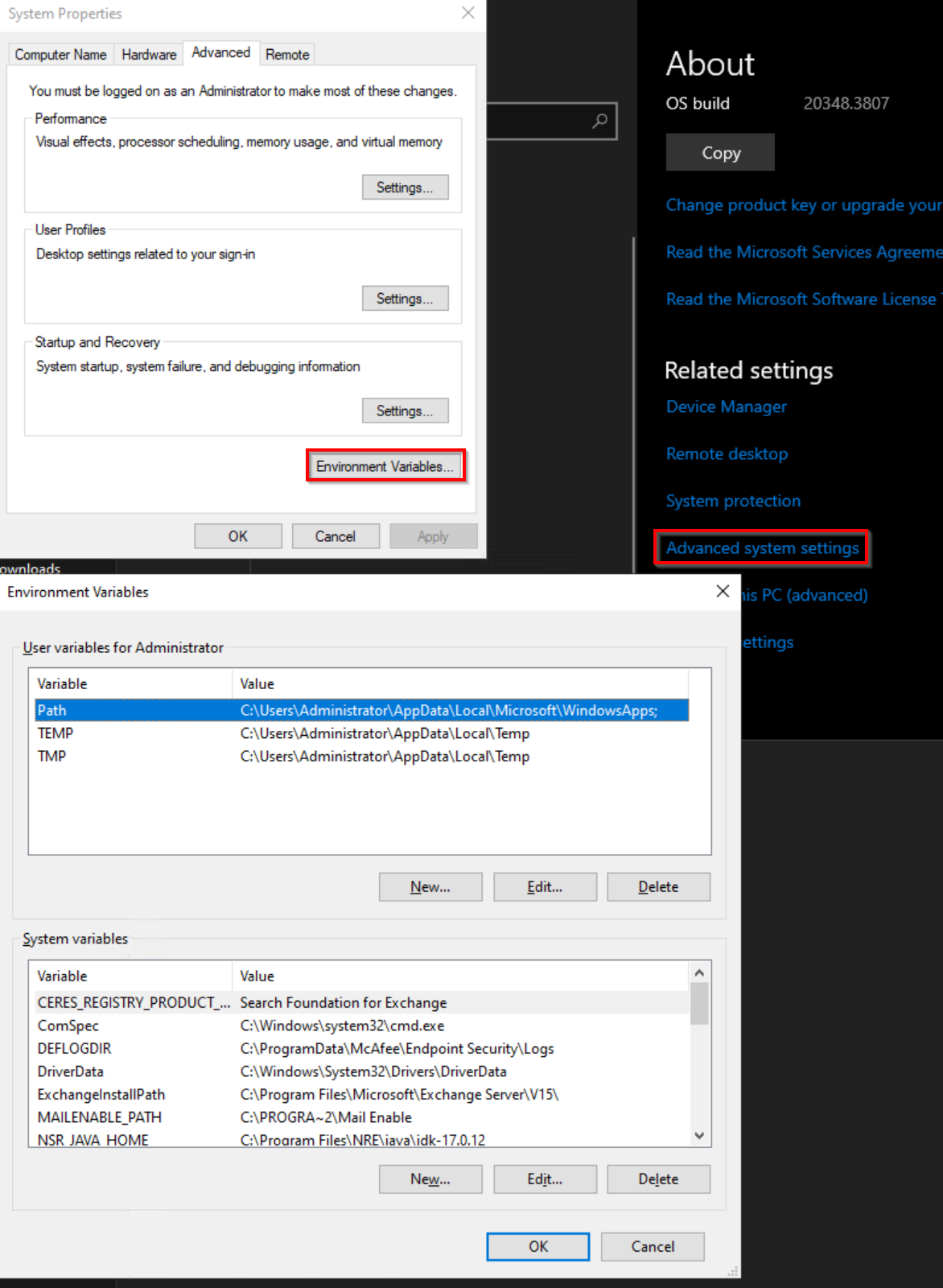
Linux: Compruebe los siguientes archivos en busca de configuraciones de variables HTTP/HTTPS y elimínelos:
- ~/.bashrc
- ~/.bash_profile
- ~/.perfil
- /etc/environment
- /etc/profile
- /etc/profile.d/*.sh