Een Dell Encryption Sweep forceren op Windows
Summary: In dit artikel wordt beschreven hoe u een versleutelingssweep op een eindpunt kunt forceren met behulp van Dell Encryption Enterprise (voorheen Dell Data Protection | Enterprise Edition) of Dell Encryption Personal (voorheen Dell Data Protection | Personal Edition). ...
This article applies to
This article does not apply to
This article is not tied to any specific product.
Not all product versions are identified in this article.
Symptoms
Betreffende producten:
- Dell Encryption Enterprise
- Dell Data Protection | Enterprise
- Dell Encryption Personal
- Dell Data Protection | Personal Edition
Betreffende besturingssystemen:
- Windows
Cause
Niet van toepassing
Resolution
Dell Encryption Enterprise en Dell Encryption Personal kunnen gebruikmaken van Windows System Probe (WSProbe.exe) om een sweep van de hele machine te forceren om ervoor te zorgen dat het nieuwste versleutelingsbeleid wordt nageleefd.
Waarschuwing: Versleutelingssweeps kunnen leiden tot een lichte prestatievermindering. Dell Technologies raadt u aan alleen het volgende bedrijf uit te voeren:
WSProbe.exe indien nodig.
U voert WSProbe.exe als volgt uit:
- Ga naar:
C:\Program Files\Dell\Dell Data Protection\Encryption.
Opmerking:
- De map kan verschillen als deze tijdens de installatie wordt gewijzigd.
WSProbe.exeis alleen in versie 7.3 en hoger van de software. Neem voor oudere versies contact op met Dell Data Security ProSupport.
- Dubbelklik
WSProbe.exete installeren.
Opmerking: Als u CLI gebruikt, moet de stationsaanduiding worden opgegeven (bijvoorbeeld:
WSProbe.exe C:\).
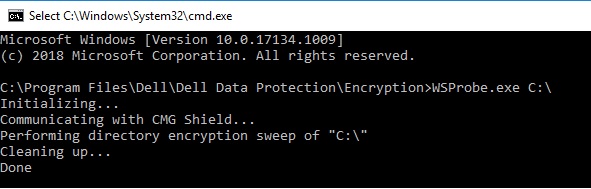
Afbeelding 1: (Alleen In het Engels) Type WSProbe.exe C:\
Als u contact wilt opnemen met support, raadpleegt u de internationale telefoonnummers voor support van Dell Data Security.
Ga naar TechDirect om online een aanvraag voor technische support te genereren.
Voor meer informatie over inzichten en hulpbronnen kunt u zich aanmelden bij het Dell Security Community Forum.
Affected Products
Dell EncryptionArticle Properties
Article Number: 000130499
Article Type: Solution
Last Modified: 03 Apr 2024
Version: 11
Find answers to your questions from other Dell users
Support Services
Check if your device is covered by Support Services.