如何在 Windows 上强制执行 Dell Encryption 扫描
Summary: 本文介绍如何使用 Dell Encryption Enterprise(以前称为 Dell Data Protection |Enterprise Edition)或 Dell Encryption Personal(以前称为 Dell Data Protection |个人版)。
This article applies to
This article does not apply to
This article is not tied to any specific product.
Not all product versions are identified in this article.
Symptoms
受影响的产品:
- Dell Encryption Enterprise
- Dell Data Protection |企业
- Dell Encryption Personal
- Dell Data Protection | Personal Edition
受影响的操作系统:
- Windows
Cause
不适用
Resolution
Dell Encryption Enterprise 和 Dell Encryption Personal 可能会使用 Windows 系统探测器 (WSProbe.exe) 强制扫描整个机器,以确保符合最新的加密策略。
警告:加密扫描可能会导致轻微的性能下降。Dell Technologies 建议仅运行
WSProbe.exe 根据需要。
要运行WSProbe.exe,请执行以下操作:
- 请转至
C:\Program Files\Dell\Dell Data Protection\Encryption.
提醒:
- 如果在安装过程中进行了更改,目录可能会有所不同。
WSProbe.exe仅在软件版本 7.3 及更高版本中提供。对于较早版本,请联系 Dell Data Security ProSupport。
- 双击
WSProbe.exe。
提醒:如果使用 CLI,则应指定驱动器号(例如,
WSProbe.exe C:\)。
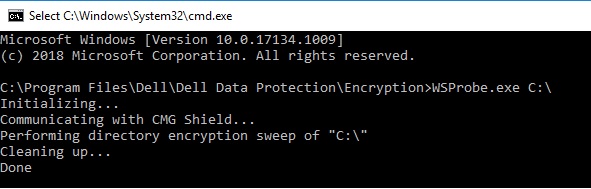
图 1:(仅限英文)类型 WSProbe.exe C:\
要联系支持部门,请参阅 Dell Data Security 国际支持电话号码。
转至 TechDirect,在线生成技术支持请求。
要获得更多见解和资源,请加入戴尔安全社区论坛。
Affected Products
Dell EncryptionArticle Properties
Article Number: 000130499
Article Type: Solution
Last Modified: 03 Apr 2024
Version: 11
Find answers to your questions from other Dell users
Support Services
Check if your device is covered by Support Services.