WiFi Speed Slows When Alienware Aurora Laptop Lid is Closed
Summary: The following article provides information about a wireless speed issue after closing the Alienware Aurora Laptops lid.
This article applies to
This article does not apply to
This article is not tied to any specific product.
Not all product versions are identified in this article.
Symptoms
Closing the laptop lid makes the WiFi run slower
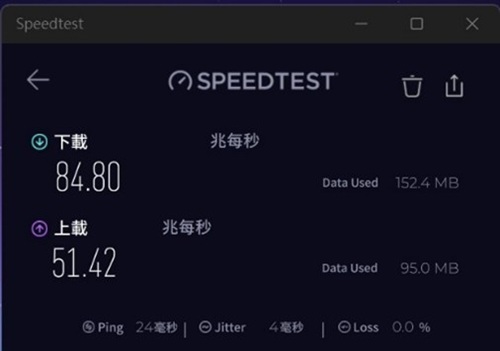
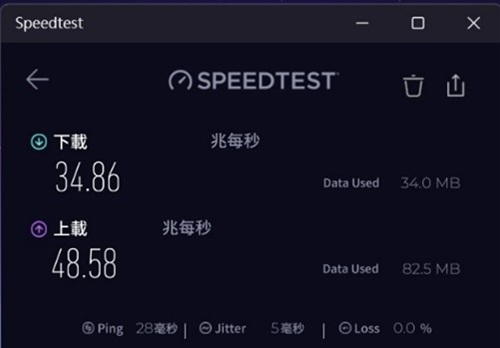
The wireless data transmission rate drops when the laptop lid is closed. This happens when the laptop is use but connects to an external monitor with a keyboard and mouse is plugged in. The wireless speed is about 25 percent slower when the lid is closed, compared to when the lid is open.
Note: The speed differences are more apparent with a faster Internet connection. (Using WiFi 6, WiFi 6e, or WiFi 7 standards.)
Speed test with the lid open:
Speed test with the lid closed:
This is affecting the following Alienware laptops:
Alienware Aurora 16 AC16250Alienware Aurora X16 AC16251
Cause
The antenna placement when the lid is open or closed corresponds to the transmission rates that are achievable. (The wireless antenna is at the top edge of the LCD panel and lid.)
Resolution
Note: The antenna is working as designed, it is not a problem with the WiFi.
Dell Technologies recommend that the laptop is used with the lid open. The lid should be kept open even when using an external monitor with a keyboard and mouse plugged in.
This is due to the design of the laptop. There are air intake vents above the integrated keyboard. Closing the lid can restrict airflow and adversely affect the laptops performance and noise levels.

Affected Products
Alienware 16 Aurora AC16250, Alienware 16X Aurora AC16251Article Properties
Article Number: 000364824
Article Type: Solution
Last Modified: 05 Sept 2025
Version: 1
Find answers to your questions from other Dell users
Support Services
Check if your device is covered by Support Services.