PowerProtect Data Manager: Resolving Virtual Machine TSDM Backup Failure with SPIF Filters Change Failure
Summary: PowerProtect Data Manager (PPDM) Virtual Machine (VM) Transparent Snapshot Data Mover (TSDM) backup failed due to missing VM Disk (VMDK) descriptor file.
This article applies to
This article does not apply to
This article is not tied to any specific product.
Not all product versions are identified in this article.
Symptoms
PPDM VM TSDM backup failed to create a Lightweight Delta (LWD) snapshot.
vmdm.2024-10-16.0.log.gz: 2024-10-15T17:10:46.013Z INFO [] [vproxyMonitor] [00000000-0000-4000-a000-000000000000][][][TRACE_ID:992f3fb9cacd7edf;JOB_ID:b32a2490186c996c][] [c.e.b.v.v.u.VPEActivityHelper.accept(113)] - Update task: 5ce8f9cf-029b-4e57-9a61-814bb27721ba, BackupJobSession(state=Running, id=d00c8938-1fbb-4f03-aa59-759927247b2b, target=20.151-WinJump), progress: 0%, desc: Unable to create LWD snapshot. vCenter task 'task-25605' failed.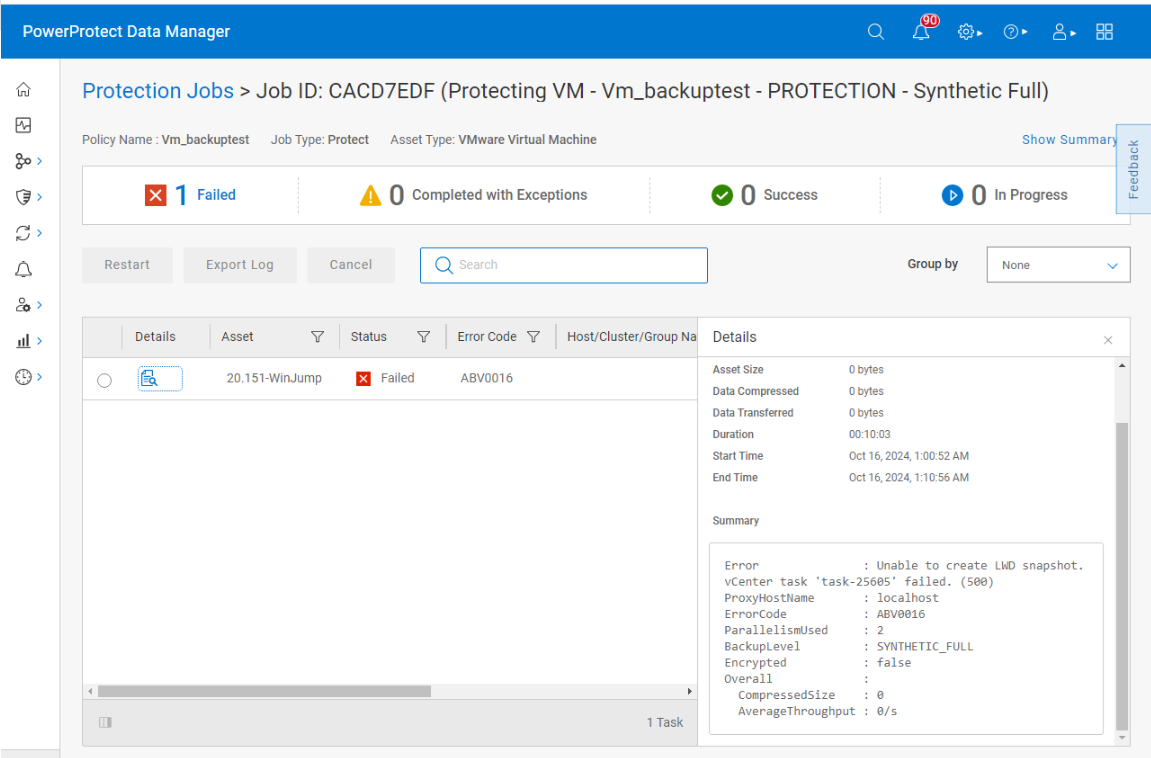
If you move the VM outside of the policy and add it back, the configuring protection for the VM fails with Unable to ENABLE LWD on 20.151-WinJump - SPIF filters change failure: Object not found..Failed to attach IO Filter vmwarelwd: Object not found.
vmdm.log: 2024-11-08T02:09:29.110Z WARN [] [vpe-thread-31] [00000000-0000-4000-b000-000000000000][][][TRACE_ID:8179bb6842a67a5b;JOB_ID:8ce42f4c78a9bac6][] [c.e.b.v.v.u.SdmEnableProtectUtil.configureProtect(465)] -  Unable to ENABLE LWD on 20.151-WinJump
vmdm.log: 2024-11-08T02:09:29.110Z WARN [] [vpe-thread-31] [00000000-0000-4000-b000-000000000000][][][TRACE_ID:8179bb6842a67a5b;JOB_ID:8ce42f4c78a9bac6][] [c.e.b.v.v.u.SdmEnableProtectUtil.configureProtect(478)] -  DpSetProtection error message: SPIF filters change failure: Object not found..Failed to attach IO Filter vmwarelwd: Object not found.
vmdm.log: 2024-11-08T02:09:29.110Z WARN [] [vpe-thread-31] [00000000-0000-4000-b000-000000000000][][][TRACE_ID:8179bb6842a67a5b;JOB_ID:8ce42f4c78a9bac6][] [c.e.b.v.v.a.VPEConfigureOp.logErrorStack(64)] -  Unable to configure 20.151-WinJump
com.emc.brs.vmdm.error.ComponentException: Unable to ENABLE LWD on 20.151-WinJump - SPIF filters change failure: Object not found..Failed to attach IO Filter vmwarelwd: Object not found.
Verified there are no snapshot files left under the VM folder on the datastore.
Cause
The root cause of the issue is the missing VMDK descriptor file in the VM folder on the datastore.
The VMDK descriptor file is required for the PPDM TSDM backup to create an LWD snapshot and configure protection for the VM.
The absence of the VMDK descriptor file leads to errors such as SPIF filters change failure: Object not found and Failed to attach IO Filter vmwarelwd: Object not found in the vmdm.log file.
The hostd and vpxa logs on the ESXi host also show errors related to the missing VMDK descriptor file, such as Unable to find vmdk descriptor file and VMware ESX cannot find the virtual disk "Win-Jump.vmdk". Verify the path is valid and try again.
hostd.txt:2024-11-12T01:19:29.188Z In(166) Hostd[2099508]: [Originator@6876 sub=Libs opID=m383ayh7-37975-auto-taw-h5:70010844-66-01-01-76-4d13 sid=523b10e0 user=vpxuser:VSPHERE.LOCAL\Administrator] SNAPSHOT: SnapshotConfigExtFinder: Unable to find file: 'Win-Jump.vmdk'
hostd.txt:2024-11-12T01:19:29.635Z Db(167) Hostd[2099501]: [Originator@6876 sub=Vmsvc.vm:/vmfs/volumes/6386100c-0019fc49-84a7-b49691f824a2/Win-Jump/Win-Jump.vmx] Handling vmx message 142534359: VMware ESX cannot find the virtual disk "Win-Jump.vmdk". Verify the path is valid and try again.
vpxa.txt:2024-11-12T01:17:44.260Z Er(163) Vpxa[2099754]: -->          message = "VMware ESX cannot find the virtual disk "Win-Jump.vmdk". Verify the path is valid and try again. "
Browsing the VM folder on the datastore, the VMDK descriptor file is missing, while the flat VMDK file exists.
Resolution
Engage VMware support and follow the instructions in KB https://knowledge.broadcom.com/external/article?legacyId=1002511
After recovering the VMDK descriptor file, rerun the PPDM TSDM backup.
Affected Products
PowerProtect Data ManagerArticle Properties
Article Number: 000248751
Article Type: Solution
Last Modified: 26 Aug 2025
Version: 3
Find answers to your questions from other Dell users
Support Services
Check if your device is covered by Support Services.