Dell FluidFS:更新至 Windows 10 v1903 後,無法使用 SMB 3.1.1 存取共用
Summary: 用戶端在使用伺服器訊息區塊 (SMB) 3.1.1 更新至 Windows 10 版本 1903 後無法存取共用。
This article applies to
This article does not apply to
This article is not tied to any specific product.
Not all product versions are identified in this article.
Symptoms
更新至 Windows 10 版本 1903 後,使用 SMB 3.1.1 的 Windows 用戶端無法存取 SMB 共用。
Cause
此問題是因為在 SMB 3.1.1 中找到兩個 FluidFS 版本 6.0.300135 及更低版本所致。
Resolution
識別錯誤
您可以透過下列錯誤訊息中識別錯誤:
- 用戶端在存取 SMB 共用時看到以下錯誤訊息:
Windows cannot access "\\servername" check the spelling.... Error code 0x80004005 Unspecified error - Windows 事件檢視器中會顯示下列錯誤訊息:
The server does not support any dialect that the client is trying to negotiate, such as the client has SMB2/SMB3 disabled and the server has SMB1 disabled. - 如果使用通用命名慣例 (UNC) 路徑:
0x80070043 Network name cannot be found - 網路追蹤中的錯誤訊息:
STATUS_INVALID_PARAMETER
注意:SMB 用戶端必須中斷所有 SMB 伺服器共用,才能根據參數值來協商適當的方言。
FluidFS 版本MR640解決了這個問題。聯絡支援部門並參考本文。
可透過依照以下步驟停用 SMBv3 並改用 SMB v2,以取得替代因應措施。
這可以使用 Dell Storage Manager或使用 CLI 完成。
若要修改 SMB 版本 在最新的 MR630 中 - 使用 Dell Storage Manager (DSM)
- 開啟 Dell Storage Manager。
- 前往 用戶端可存取性
- 選取通訊協定索引標籤
- 選取編輯 SMB 通訊協定設定
- 取消勾選 SMBv3 通訊協定旁的方塊
- 按一下確定以儲存設定
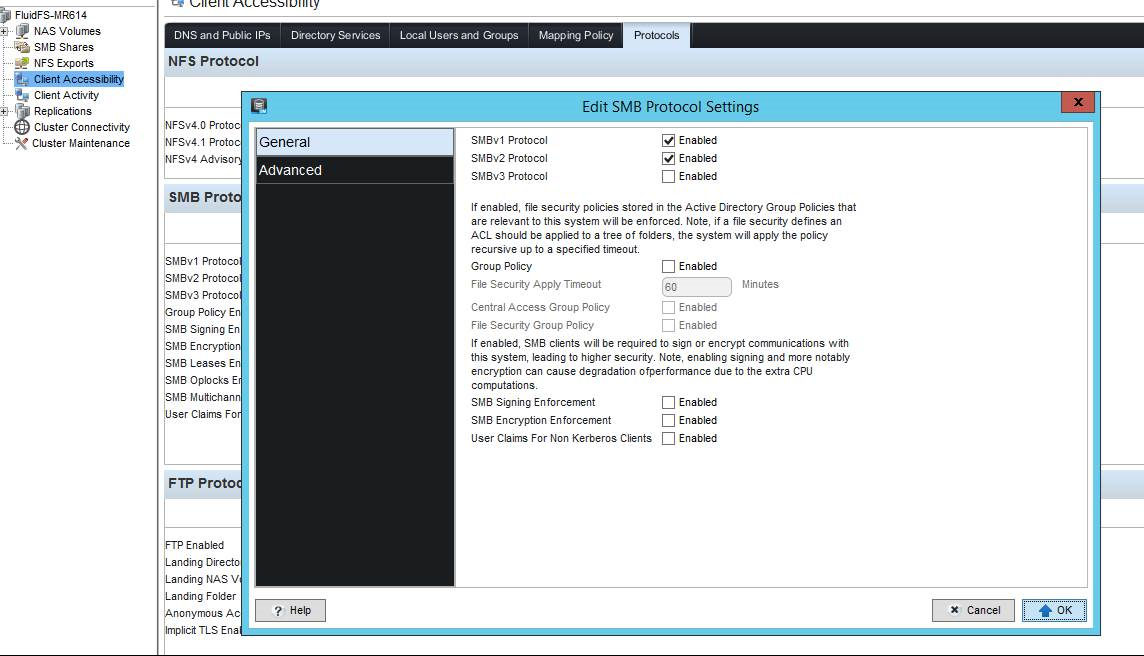
圖 1:Dell Storage Manager DSM - SMB 通訊協定設定
若要修改 SMB 版本 在最新的 MR630 中使用 cli:
輸入以下命令:
CLI/client-access/authentication/protocols/SMB-settings> view
SMBv1 Enabled                               = Yes
SMBv2 Enabled                               = Yes
SMBv3 Enabled                               = Yes
Is Required Message Signing                 = No
Is Required Message Encryption              = No
Multichannel Enabled                        = No
Leases Enabled                              = Yes
Oplocks Enabled                             = Yes
Disconnect Idle Sessions                    = No
Idle Sessions Timeout (minutes)             = 720
Idle Sessions Scan Interval (minutes)       = 720
Enable User Claims for Non-Kerberos Clients = No

CLI/client-access/authentication/protocols/SMB-settings> edit
Usage: edit [Options]


    Options:
    -EnableSMBv1 <EnableSMBv1>
    -EnableSMBv2 <EnableSMBv2>
    -EnableSMBv3 <EnableSMBv3>
    -RequireMessageSigning <RequireMessageSigning>
    -RequireMessageEncryption <RequireMessageEncryption>
    -EnableMultichannel <EnableMultichannel>
    -EnableLeases <EnableLeases>
    -EnableOplocks <EnableOplocks>
    -DisconnectIdleSessions <DisconnectIdleSessions>
    -IdleSessionsTimeout <IdleSessionsTimeout>
    -IdleSessionScanInterval <IdleSessionScanInterval>
    -EnableUserClaimsForNonKRBClients <EnableUserClaimsForNonKRBClients>
注意:如果需要最大方言 SMB 3.1.1,請將 Windows 10 版本 1903 或 Windows Server 版本 1903 安裝回復至先前的正式發行版本 (1803)。
Affected Products
Dell Compellent FS8600Article Properties
Article Number: 000130252
Article Type: Solution
Last Modified: 29 Jul 2025
Version: 6
Find answers to your questions from other Dell users
Support Services
Check if your device is covered by Support Services.