Dell FluidFS:无法在更新到 Windows 10 v1903 后使用 SMB 3.1.1 访问共享
Summary: 使用服务器消息块 (SMB) 3.1.1 更新到 Windows 10 版本 1903 后,客户端无法访问共享。
This article applies to
This article does not apply to
This article is not tied to any specific product.
Not all product versions are identified in this article.
Symptoms
更新到 Windows 10 版本 1903 后,使用 SMB 3.1.1 的 Windows 客户端无法访问 SMB 共享。
Cause
此问题是由于 FluidFS 版本 6.0.300135 和更低版本不支持 SMB 3.1.1 中发现的两个协商上下文。
Resolution
确定错误
可从以下错误消息中确定该错误:
- 客户端在访问 SMB 共享时看到以下错误消息:
Windows cannot access "\\servername" check the spelling.... Error code 0x80004005 Unspecified error - Windows 事件查看器中将显示以下错误消息:
The server does not support any dialect that the client is trying to negotiate, such as the client has SMB2/SMB3 disabled and the server has SMB1 disabled. - 如果使用通用命名约定 (UNC) 路径:
0x80070043 Network name cannot be found - 网络跟踪中的错误消息:
STATUS_INVALID_PARAMETER
提醒:SMB 客户端必须断开所有 SMB 服务器共享的连接,以根据参数值协商适当的方言。
FluidFS 版本 MR640 解决了此问题。请联系支持部门并参考本文。
可按照以下步骤禁用 SMBv3 并改用 SMB v2,从而获得替代解决方法。
这可以使用 Dell Storage Manager 或使用 CLI 完成。
要在最新的 MR630 中修改 SMB 版本 — 使用 Dell Storage Manager (DSM)
- 访问 Dell Webcam Manager。
- 转至 客户端可访问性
- 选择协议选项卡
- 选择编辑 SMB 协议设置
- 取消选中 SMBv3 协议旁的框
- 单击确定以保存设置
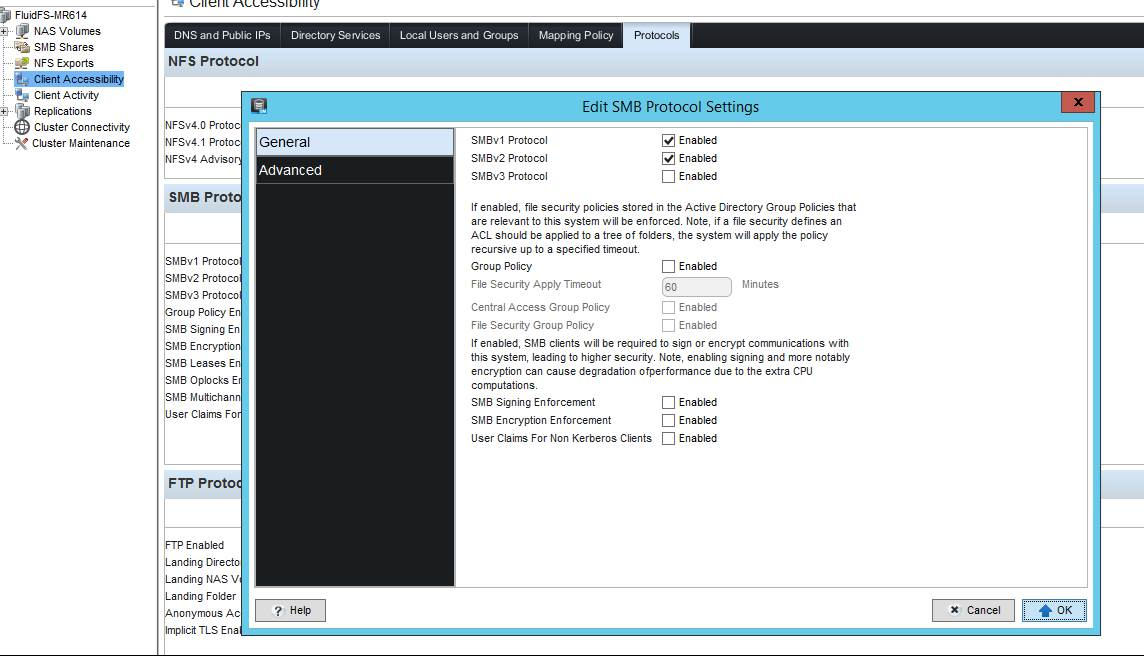
图 1:Dell Storage Manager DSM - SMB 协议设置
要修改 SMB 版本 在最新的 MR630 中,使用 cli:
Input 命令,如下所示:
CLI/client-access/authentication/protocols/SMB-settings> view
SMBv1 Enabled                               = Yes
SMBv2 Enabled                               = Yes
SMBv3 Enabled                               = Yes
Is Required Message Signing                 = No
Is Required Message Encryption              = No
Multichannel Enabled                        = No
Leases Enabled                              = Yes
Oplocks Enabled                             = Yes
Disconnect Idle Sessions                    = No
Idle Sessions Timeout (minutes)             = 720
Idle Sessions Scan Interval (minutes)       = 720
Enable User Claims for Non-Kerberos Clients = No

CLI/client-access/authentication/protocols/SMB-settings> edit
Usage: edit [Options]


    Options:
    -EnableSMBv1 <EnableSMBv1>
    -EnableSMBv2 <EnableSMBv2>
    -EnableSMBv3 <EnableSMBv3>
    -RequireMessageSigning <RequireMessageSigning>
    -RequireMessageEncryption <RequireMessageEncryption>
    -EnableMultichannel <EnableMultichannel>
    -EnableLeases <EnableLeases>
    -EnableOplocks <EnableOplocks>
    -DisconnectIdleSessions <DisconnectIdleSessions>
    -IdleSessionsTimeout <IdleSessionsTimeout>
    -IdleSessionScanInterval <IdleSessionScanInterval>
    -EnableUserClaimsForNonKRBClients <EnableUserClaimsForNonKRBClients>
提醒:如果需要最大方言 SMB 3.1.1,请将安装的 Windows 10 版本 1903 或 Windows Server 版本 1903 恢复到以前的通用 (GA) 版本 (1803)。
Affected Products
Dell Compellent FS8600Article Properties
Article Number: 000130252
Article Type: Solution
Last Modified: 29 Jul 2025
Version: 6
Find answers to your questions from other Dell users
Support Services
Check if your device is covered by Support Services.