Abnormal External Display on Dell Laptops Running the Ubuntu Operating System
Summary: The following article provides information about an external display issue on Dell laptops that are running the Ubuntu 20.04 operating system.
Symptoms
Abnormal external display on the Ubuntu 20.04 operating system
Dell laptop owners who purchase their laptop with Ubuntu 20.04 Long Term Service (LTS) may experience display issues.
You may see display issues when the external monitor resolution is above 5120x2160 120 Hz. (See Figure.1 and Figure.2)
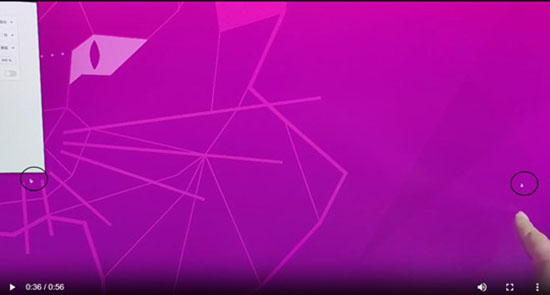
(Figure.1: Dual mouse pointers on-screen)
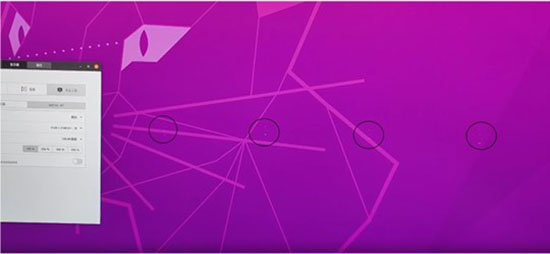
(Figure.2: Mouse pointer disappears while it is moving)
You may experience display issues such as:
- Dual mouse pointers seen on-screen
- Only part of the cursor for the mouse pointer appears on-screen
- The mouse pointer is not visible while it is in motion
- There is no display when moving the mouse to certain positions
Cause
Ubuntu 20.04 LTS does not support a refresh rate above 5120x2160 60 Hz on an external monitor.
Resolution
There are no display issues at lower refresh rates or in Ubuntu 22.04 LTS. You can resolve this issue by running through either of the following methods:
Method One Lower the resolution on the external display:
-
Go to Settings.
-
Go to Displays.
-
Select the External Display
-
Click the downward facing chevron beside the refresh rate.
-
Select a lower rate from the options in the drop-down box.
Method Two Upgrade the operating system on the laptop:
-
Ensure that you plug your AC adapter to your laptop and connect it to mains power.
-
Close down any running applications or utilities on the laptop.
-
Use the following Terminal command to start the Upgrade Wizard:
$ sudo update-manager -cand press the Enter key. -
Click the Upgrade button on the Release Notes window that appears.
-
Click the Start Upgrade button on the Do you want to start the upgrade? window.
-
Follow the on-screen prompts until the installation completes.
-
A window opens with a Restart Now button when the upgrade ends.
-
Click the button to restart the laptop.