Dell Monitor Camera Stops Responding or Stuck Issue
Summary: This article assists with recovering a camera that has stopped responding or stuck camera issue.
This article applies to
This article does not apply to
This article is not tied to any specific product.
Not all product versions are identified in this article.
Symptoms
Affected Products:
- Dell P3424WEB
- Dell P2724DEB
- Dell P2424HEB
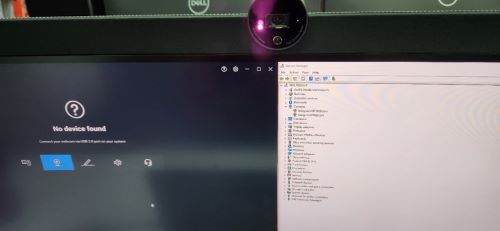
The camera may stop responding when windows hello for business is activated. It shows, No device found, the camera cannot be found or detected in Peripheral Manager or Device Manager.
Cause
The camera firmware (FW) is causing the issue.
Resolution
There are three workarounds to recover this issue:
- Unplug and plug-in upstream cable
- Turn the monitor off and back on
- Unplug the power cable from the monitor and plug it back in
Solution:
A new FW to fix the camera from stopping responding or becoming stuck issue has been released. Download the FW from Drivers & Downloads of the monitor:
Affected Products
Dell P2424HEB, Dell P2724DEB, Dell P3424WEBArticle Properties
Article Number: 000221072
Article Type: Solution
Last Modified: 22 Oct 2025
Version: 6
Find answers to your questions from other Dell users
Support Services
Check if your device is covered by Support Services.