Dell Networking SONiC Sample configuration of a basic Access List
Summary: This article explains how to configure a basic Access Control List (ACL) to block traffic to a specific subnet in Dell Networking SONiC with an example.
Instructions
PrerequisitesWe are using standard interface naming to demonstrate the Concepts. See the article Dell Networking S-Series: Basic Interface Configuration - SONiC 4.0 for more information regarding interface naming |
Index
Goal
Topology
Command syntax
Configuration
Verify
Goal
We would demonstrate a basic application of access list in this article. Consider we have two Server Farms namely Green and RED.
We must allow traffic coming into the Eth 1/1 interface from 10.0.0.0/24 subnet to be denied access to RED (50.0.0.0/24). All other traffic Should be allowed.
Topology
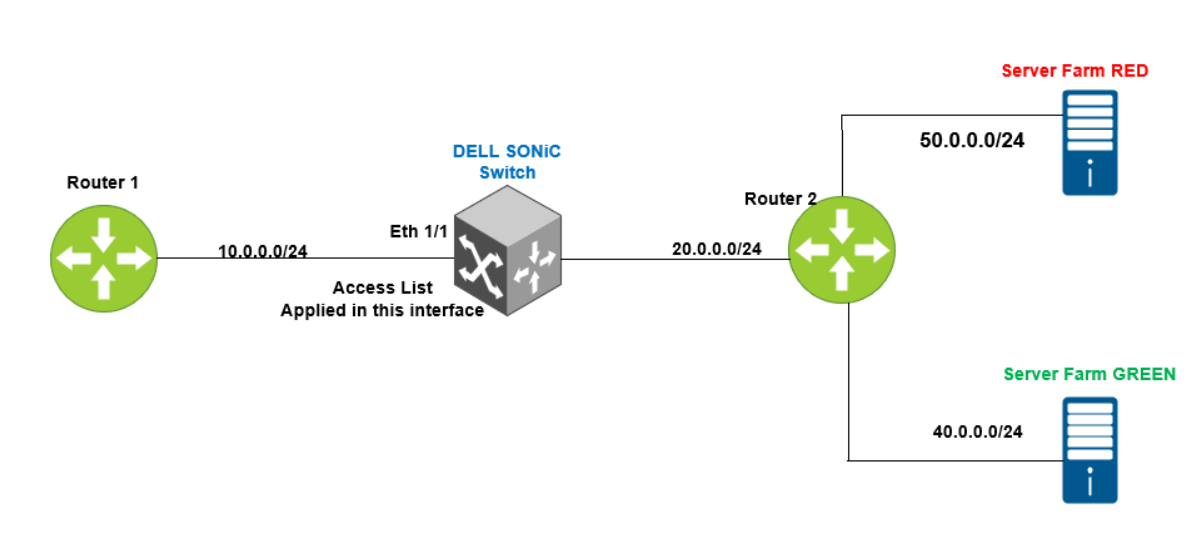
Command syntax
Configuration Syntax for IPv4 access list
admin@DELLSONiC:~$ sonic-cli
DELLSONiC# configure
DELLSONiC(config)# ip access-list {access-list-name}
DELLSONiC(conf-ipv4-acl)# seq {1-65535} {permit | deny | discard |transit | remark description } {ip | ip-protocol} {any | host source-ip-address [/source-ip-prefix-len]} {any | host dest-ip-address [/dest-ip-prefix-len]} [remark description] |
When a packet matches a statement in a L3 IPv4 Access list, one of these actions is taken:
- Permit — Packet is forwarded in the data plane. The packet is counted.
- Deny — Packet is dropped in the data plane. The packet is counted.
- Transit — Packet is forwarded in the data plane. The packet is not counted.
- Discard — Packet is dropped in the data plane. The packet is not counted.
Apply the access list under an interface
admin@DELLSONiC:~$ sonic-cli
DELLSONiC# configure
DELLSONiC(config)# interface {interface}
DELLSONiC(config-if-XXXX# ip access-group {access-lsit} {in/out} |
Some key points to remember while configuring the access list. We would be using ACL term as short form for Access list for brevity.
- The remark is putting a description to the access list. It has no impact on traffic.
- Access list does not filter traffic destined for the switch like loopback IP address, interface IP address, Vlan IP address.
- Global ACLs (ACLs not assigned to a specific interface or interfaces) filter all traffic that is bridged or routed on switch interfaces. Global ACLs support MAC, IPv4, and IPv6 rules.
- ACLs applied on an Ethernet or port-channel interface process L2 and L3 packets to determine whether to forward or drop a packet based on the permit or denied criteria in the ACL.
- ACLs applied to a VLAN filter all traffic that is bridged within the same VLAN, or that is routed in or out of a VLAN. Apply VLAN ACLs to both bridged and routed traffic. VLAN ACLs support MAC, IPv4, and IPv6 ACLs.
- ACLs are processed in sequential order from the first to the last numbered entry. When a match is found, no further ACL processing is performed.
- By default, all L2 MAC, IPv4, and IPv6 ACLs contain a deny any rule at the end. The deny any rule drops all traffic that does not match preceding permit or deny entries in the ACL.
- Add a permit any any rule to the end of an ACL to permit all packets that are not denied by other criteria.
Use the Following commands to verify the access list configuration.
Show details of all access list in switch DELLSONiC# show ip access-lists |
Show details of specific access list in switch DELLSONiC# show ip access-lists <access-list-name> |
Show details of access list and applied interface DELLSONiC# show ip access-group |
Configuration
Let us configure the access list. The remark is putting a description to the access list. It has no impact on traffic.
admin@DELLSONiC:~$ sonic-cli DELLSONiC# configure DELLSONiC(config)# ip access-list DENY-RED DELLSONiC(config-ipv4-acl)# remark "DENY IP of RED" DELLSONiC(config-ipv4-acl)# seq 1 deny ip 10.0.0.0/24 50.0.0.0/24 remark "DENY RED" DELLSONiC(config-ipv4-acl)# seq 10 permit ip any any remark "Permit Everything else" DELLSONiC(config-ipv4-acl)# end DELLSONiC# |
Now lets apply the access list under interface Eth 1/1.
admin@DELLSONiC:~$ sonic-cli DELLSONiC# configure DELLSONiC(config)# interface Eth 1/1 DELLSONiC(config-if-Eth1/1)# ip access-group DENY-RED in DELLSONiC(config-if-Eth1/1)# end DELLSONiC# |
Verify
Use the following command to verify the access list configuration.
DELLSONiC# show ip access-lists
ip access-list DENY-RED
  remark "DENY IP of RED"
    seq 1 deny ip 10.0.0.0/24 50.0.0.0/24 (332 packets) [33864 bytes]
      remark "DENY RED"
    seq 10 permit ip any any (0 packets) [0 bytes]
      remark "Permit Everything else"
DELLSONiC#

We can see the packets/bytes is counted when a condition is matched when deny is configured. If we had configured discard, the counters will not increment.
|
DELLSONiC# show ip access-group Ingress IP access-list DENY-RED on Eth1/1 DELLSONiC# |