データ保護検索 - OpenLDAP構成がRedhat Identity Managementで機能しない
Summary: Redhat Identity Managementを使用したDPSearch OpenLDAP設定は、デフォルトの構成では機能しません。
This article applies to
This article does not apply to
This article is not tied to any specific product.
Not all product versions are identified in this article.
Symptoms
DPSearchは、DPSearchでLDAPを使用してRedhat Identity Managementに接続できません。
LDAP接続が追加され、次のエラー メッセージが表示されます。
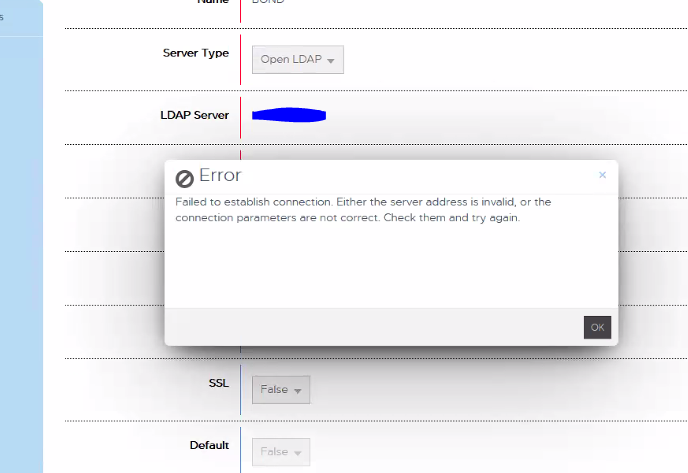
「Failed to establish connection.サーバー アドレスが無効であるか、接続パラメーターが正しくありません。確認して、もう一度やり直してください。」
CIS.log は 次の情報を報告します。
P1C68|2023/01/06 15:35:31:419|DEBUG|cislockbox.rb(79)|Binding to ldap using: [Server=domain.com, Port:389, User=CN=user_1,OU=users,OU=accounts,DC=domain,DC=com, Pwd: ***************]
P1C68|2023/01/06 15:35:31:420|DEBUG|cisconfigldap.rb(128)|Binding to [domain.com:389 as CN=user_1,OU=users,OU=accounts,DC=domain,DC=com]
P1C68|2023/01/06 15:35:31:482|ERROR|ldap_internal.rb(248)|ldap bind_as CN=user_1,OU=users,OU=accounts,DC=domain,DC=com entries: false, result: #
P1C68|2023/01/06 15:35:31:483|INFO|ldap_internal.rb(253)|ldap bind_as CN=user_1,OU=users,OU=accounts,DC=domain,DC=com entry: , result: #
P1C68|2023/01/06 15:35:31:483|ERROR|ldap_provider.rb(164)|ldap validate_user, bind_as user CN=user_1,OU=users,OU=accounts,DC=domain,DC=com failed on LDAP Host domain.com with #
P1C68|2023/01/06 15:35:31:483|ERROR|ldap_provider.rb(182)|ldap validate_user failed, entry or id is null, user: CN=user_1,OU=users,OU=accounts,DC=domain,DC=com, entry: null, result: #
P1C68|2023/01/06 15:35:31:484|ERROR|cislockbox.rb(99)|PUT /cis/lockbox/ldap/_test : LDAP binding failed. ldap validate_user failed, entry or id is null, user: CN=user_1,OU=users,OU=accounts,DC=domain,DC=com, entry: null, result: #
Cause
Redhat Identity Managementは、Searchが構成されている標準OpenLDAPと同じLDAPオブジェクト クラス フィールドを使用しません。
Resolution
RedHat Identity Management LDAPがDPSearchと連携するには、LDAPフィルター構成を変更する必要があります。
次の手順で問題を解決します。
実装に応じて、異なるフィルター構成が必要になる場合があります。
/usr/local/search/cis/Common/ldap/ldap.confの organizationalRole からOPENLDAPセクション フィルターを削除します。
FROM
"objectclass" : { "users" : ["inetOrgPerson", "person", "organizationalRole"],
TO
"objectclass" : { "users" : ["inetOrgPerson", "person"]
次に search-cis-core サービスの再起動:
service search-cis-core restart
これが完了すると、RedHat Identity Management LDAPを追加できます。
ユーザーは正常に認証する必要があります。
次の手順で問題を解決します。
実装に応じて、異なるフィルター構成が必要になる場合があります。
/usr/local/search/cis/Common/ldap/ldap.confの organizationalRole からOPENLDAPセクション フィルターを削除します。
FROM
"objectclass" : { "users" : ["inetOrgPerson", "person", "organizationalRole"],
TO
"objectclass" : { "users" : ["inetOrgPerson", "person"]
次に search-cis-core サービスの再起動:
service search-cis-core restart
これが完了すると、RedHat Identity Management LDAPを追加できます。
ユーザーは正常に認証する必要があります。
Affected Products
Data Protection SearchArticle Properties
Article Number: 000208643
Article Type: Solution
Last Modified: 23 May 2023
Version: 2
Find answers to your questions from other Dell users
Support Services
Check if your device is covered by Support Services.