資料保護搜尋 - OpenLDAP 組態無法使用 Redhat 身分識別管理
Summary: 具有 Redhat 身分識別管理的 DPSearch OpenLDAP 組態無法與預設組態搭配使用。
This article applies to
This article does not apply to
This article is not tied to any specific product.
Not all product versions are identified in this article.
Symptoms
DPSearch 無法在 DPSearch 中使用 LDAP 連線到 Redhat 身分識別管理。
新增 LDAP 連線,並顯示下列錯誤訊息:
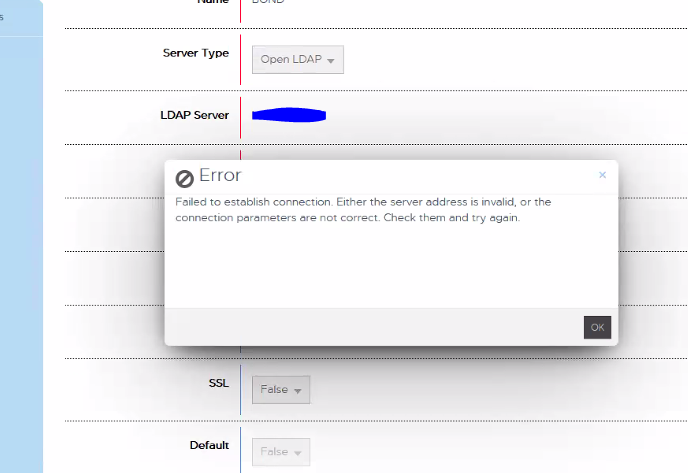
「無法建立連線。伺服器位址無效或連線參數不正確。檢查並再試一次。」
CIS.log報告以下內容:
P1C68|2023/01/06 15:35:31:419|DEBUG|cislockbox.rb(79)|Binding to ldap using: [Server=domain.com, Port:389, User=CN=user_1,OU=users,OU=accounts,DC=domain,DC=com, Pwd: ***************]
P1C68|2023/01/06 15:35:31:420|DEBUG|cisconfigldap.rb(128)|Binding to [domain.com:389 as CN=user_1,OU=users,OU=accounts,DC=domain,DC=com]
P1C68|2023/01/06 15:35:31:482|ERROR|ldap_internal.rb(248)|ldap bind_as CN=user_1,OU=users,OU=accounts,DC=domain,DC=com entries: false, result: #
P1C68|2023/01/06 15:35:31:483|INFO|ldap_internal.rb(253)|ldap bind_as CN=user_1,OU=users,OU=accounts,DC=domain,DC=com entry: , result: #
P1C68|2023/01/06 15:35:31:483|ERROR|ldap_provider.rb(164)|ldap validate_user, bind_as user CN=user_1,OU=users,OU=accounts,DC=domain,DC=com failed on LDAP Host domain.com with #
P1C68|2023/01/06 15:35:31:483|ERROR|ldap_provider.rb(182)|ldap validate_user failed, entry or id is null, user: CN=user_1,OU=users,OU=accounts,DC=domain,DC=com, entry: null, result: #
P1C68|2023/01/06 15:35:31:484|ERROR|cislockbox.rb(99)|PUT /cis/lockbox/ldap/_test : LDAP binding failed. ldap validate_user failed, entry or id is null, user: CN=user_1,OU=users,OU=accounts,DC=domain,DC=com, entry: null, result: #
Cause
Redhat 身分識別管理不會使用與標準 OpenLDAP 相同的 LDAP 物件類別欄位,為此設定了搜尋。
Resolution
必須變更 LDAP 篩選器組態,才能使用 RedHat 身分識別管理 LDAP 與 DPSearch 搭配使用,
請透過下列步驟解決問題。
視實作而定,可能需要不同的篩選器組態。
從/usr/local/search/cis/Common/ldap/ldap.conf中的組織Role移除 OPENLDAP 區段篩選器。
「
objectclass」:{ 「users」:[「inetOrgPerson」,「person」,「organizationalRole」],
「
objectclass」:{ 「users」:[「inetOrgPerson」,「個人」]
接著重新開機search-cis-core服務:
服務搜尋-cis-core 重新開機
完成後,可以新增 RedHat 身分識別管理 LDAP。
使用者應成功驗證。
請透過下列步驟解決問題。
視實作而定,可能需要不同的篩選器組態。
從/usr/local/search/cis/Common/ldap/ldap.conf中的組織Role移除 OPENLDAP 區段篩選器。
「
objectclass」:{ 「users」:[「inetOrgPerson」,「person」,「organizationalRole」],
「
objectclass」:{ 「users」:[「inetOrgPerson」,「個人」]
接著重新開機search-cis-core服務:
服務搜尋-cis-core 重新開機
完成後,可以新增 RedHat 身分識別管理 LDAP。
使用者應成功驗證。
Affected Products
Data Protection SearchArticle Properties
Article Number: 000208643
Article Type: Solution
Last Modified: 23 May 2023
Version: 2
Find answers to your questions from other Dell users
Support Services
Check if your device is covered by Support Services.