安全連線閘道:如何取得序號
Summary: 本文說明兩種不同的方法,可用於收集安全連線閘道的序號。
This article applies to
This article does not apply to
This article is not tied to any specific product.
Not all product versions are identified in this article.
Instructions
若要取得安全連線閘道的序號,請遵循下列步驟操作:
1.連線至閘道

2.按一下關於:

3。在此處查找序列號:

4。要複製序列號,請按兩下序列號以將其選中。然後按下 ctrl-C 將序列號複製到剪貼簿。
1.使用 putty 或其他 ssh 用戶端登入 SCG (在此範例中我們使用 Putty)。
2.針對 5.18 及更早版本執行下列命令:
3.在 5.18 及更新版本執行下列命令: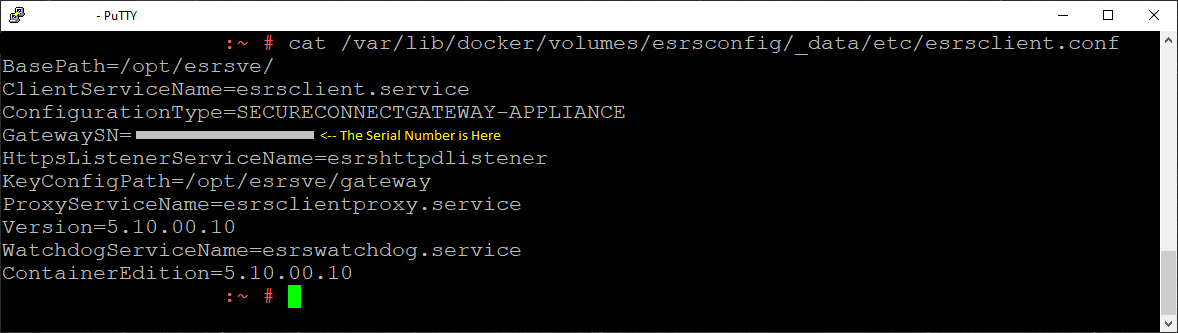
7.請注意以 GatewaySN 開頭的行。序列號出現在等號 (=) 之後。
8.要複製序列號,請按兩下序列號以將其選中。在 Putty 中,選取的任何文字都會放在本機系統剪貼簿中,以供您貼上至其他文件。
9.尚未預配的閘道將沒有序列號。

使用使用者介面取得安全連線閘道序號。
1.連線至閘道
Example url:
https://<gateway IP>:5700
2.登入閘道:
2.按一下關於:
3。在此處查找序列號:
4。要複製序列號,請按兩下序列號以將其選中。然後按下 ctrl-C 將序列號複製到剪貼簿。
使用命令行介面取得安全連線閘道序號。
1.使用 putty 或其他 ssh 用戶端登入 SCG (在此範例中我們使用 Putty)。
2.針對 5.18 及更早版本執行下列命令:
# cat /var/lib/docker/volumes/esrsconfig/_data/etc/esrsclient.conf
3.在 5.18 及更新版本執行下列命令:
# cat /var/lib/docker/volumes/esrsconfig/_data/opt/esrsve/version/esrsclient.conf
4.如果上述命令未傳回您要尋找的檔案,請使用 find 命令搜尋檔案:
# find / -name esrsclient.conf
5.使用 cat 讀取從 find 命令傳回的檔案:
# cat /path/to/esrsclient.conf
6.上面的 cat 命令應返回與以下輸出基本類似的內容:
7.請注意以 GatewaySN 開頭的行。序列號出現在等號 (=) 之後。
8.要複製序列號,請按兩下序列號以將其選中。在 Putty 中,選取的任何文字都會放在本機系統剪貼簿中,以供您貼上至其他文件。
9.尚未預配的閘道將沒有序列號。
Affected Products
Secure Connect Gateway - Virtual EditionArticle Properties
Article Number: 000200099
Article Type: How To
Last Modified: 16 Jul 2024
Version: 5
Find answers to your questions from other Dell users
Support Services
Check if your device is covered by Support Services.