Funktionaliteten i Dells pålidelige enhed påvirkes af utilstrækkelige eller manglende netværksforbindelser
Summary: Denne artikel indeholder vejledning i at identificere almindelige problemer med Dell Trusted Device-funktionalitetens påvirkning ved utilstrækkelig eller ingen netværksforbindelse.
This article applies to
This article does not apply to
This article is not tied to any specific product.
Not all product versions are identified in this article.
Symptoms
Berørte produkter:
- Dell Trusted Device
Påvirkede operativsystemer:
- Windows 11
- Windows 10
Dell Trusted Device er afhængig af tilslutningsmuligheder til Dell Technologies cloud-tjenester til specifikke opgaver. Utilstrækkelig eller ingen forbindelse kan påvirke Dell Trusted Device's funktionalitet.
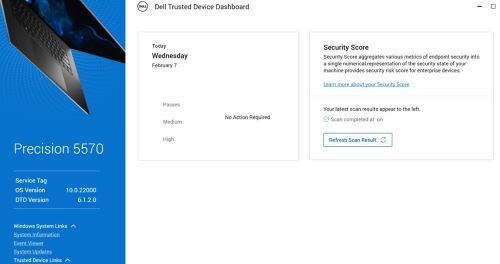
Bemærk: En sikkerhedsvurdering kører femten minutter efter opstart af Windows.
Windows Logbog kan indeholde følgende hændelser:
- BIOS-verifikation : 13 (Netværksforbindelsesfejl)
Bemærk: Se filen Dell Trusted Device service.log for at få flere oplysninger.
- Dell Trusted Device har gennemført en Intel ME-verifikationsscanning af computeren med servicekode 123XYZ0 på <Dato\Klokkeslæt>.
Resultat: FEJL. Der opstod en netværksforbindelsesfejl
- Dell Trusted Device har gennemført en Common Vulnerabilities and Exposures (CVE)-scanning af computeren med servicekode 123XYZ0 på <Dato\Klokkeslæt>.
Resultat: FEJL. Der opstod en netværksforbindelsesfejl
I Dell Trusted service.log til Dell Trusted-enhed, der findes i:
%programdata%\Dell\TrustedDevice\services.log du kan få vist fejl som nedenfor:
CVEVERIFY: Inner exception - The underlying connection was closed: Could not establish trust relationship for the SSL/TLS secure channel.
CVEVERIFY: Inner exception - The remote certificate is invalid according to the validation procedure.
CVEVERIFY: CVE Verification: ERROR. A network connection error occurred
CVEVERIFY: Final CVE Verification result: NetworkConnectionError
BIOSSERVER: Network issue - The underlying connection was closed: Could not establish trust relationship for the SSL/TLS secure channel. (exception status: UnknownError)
BIOSSERVER: Failed to perform the BIOS Server, status=0
BIOS: BIOS Verification : ERROR. A network connection error occurred
BIOS: Unable to trigger live image capture due to missing server response data
BIOS: BIOS Verification: 13 (Network Connectivity Error)
Cause
Computeren kan have haft begrænset eller ingen forbindelse til Dells cloud-tjenester til valideringsopgaver uden for værten.
Resolution
- Sørg for, at alle porte og netværksnavne er tilladt som defineret i afsnittet Krav> til installation og administrator> for Dells pålidelige enheder Porte.
- Dell Trusted Device bruger certifikatfastgørelse op imod et kendt certifikat, der er integreret i programmet Dell Trusted Device. Nogle trafikformende sikkerhedsløsninger kan forhindre denne validering. Tilladelseslistedell.trusteddevice.service.exe i dit trafikformningsprogram eller proxykonfiguration.
For at kontakte support kan du bruge internationale supporttelefonnumre til Dell Data Security.
Gå til TechDirect for at oprette en anmodning om teknisk support online.
Hvis du vil have yderligere indsigt og ressourcer, skal du tilmelde dig Dell Security Community-forummet.
Affected Products
Dell Threat DefenseArticle Properties
Article Number: 000225839
Article Type: Solution
Last Modified: 07 Apr 2025
Version: 4
Find answers to your questions from other Dell users
Support Services
Check if your device is covered by Support Services.