ネットワーク接続が不十分または無い場合に影響を受けるDell Trusted Device機能
Summary: この記事では、ネットワーク接続が不十分またはまったくない場合のDell Trusted Deviceの機能への影響に関する一般的な問題を特定するためのガイダンスを提供します。
This article applies to
This article does not apply to
This article is not tied to any specific product.
Not all product versions are identified in this article.
Symptoms
対象製品:
- Dell Trusted Device
対象オペレーティング システム:
- Windows 11
- Windows 10
Dell Trusted Deviceは、特定のタスクをDell Technologiesクラウド サービスへの接続に依存しています。接続が不十分または無いと、Dell Trusted Deviceの機能に影響する可能性があります。
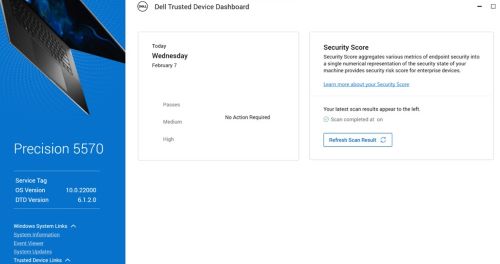
注:セキュリティ評価は、Windows の起動後 15 分後に実行されます。
Windowsイベント ビューアー には、次のイベントが含まれる場合があります。
- BIOS検証: 13 (ネットワーク接続エラー)
注:詳細については、 Dell Trusted Device service.log ファイルを参照してください。
- Dell Trusted Deviceは、 <Date\Time>にサービス タグ123XYZ0のコンピューターのインテルME検証スキャンを完了しました。
結果:エラー。ネットワーク接続エラーが発生しました
- Dell Trusted Deviceは、 <Date\Time>にサービス タグ123XYZ0のコンピューターの共通脆弱性識別子(CVE)スキャンを完了しました。
結果:エラー。ネットワーク接続エラーが発生しました
Dell Trusted DeviceのDell Trusted service.log で、次の操作を実行します。
%programdata%\Dell\TrustedDevice\services.log のようなエラーが表示される場合があります。
CVEVERIFY: Inner exception - The underlying connection was closed: Could not establish trust relationship for the SSL/TLS secure channel.
CVEVERIFY: Inner exception - The remote certificate is invalid according to the validation procedure.
CVEVERIFY: CVE Verification: ERROR. A network connection error occurred
CVEVERIFY: Final CVE Verification result: NetworkConnectionError
BIOSSERVER: Network issue - The underlying connection was closed: Could not establish trust relationship for the SSL/TLS secure channel. (exception status: UnknownError)
BIOSSERVER: Failed to perform the BIOS Server, status=0
BIOS: BIOS Verification : ERROR. A network connection error occurred
BIOS: Unable to trigger live image capture due to missing server response data
BIOS: BIOS Verification: 13 (Network Connectivity Error)
Cause
コンピューターは、オフホスト検証タスクのためにDellのクラウド サービスへの接続が制限されているか、接続されていない可能性があります。
Resolution
- すべてのポートとネットワーク名が、『Dell Trusted Deviceインストールおよび管理者ガイド』>「要件>ポート」セクションで定義されているように許可リストに登録されていることを確認します。
- Dell Trusted Deviceは、Dell Trusted Deviceアプリケーションに組み込まれている既知の証明書に対して証明書ピンニングを使用します。一部のトラフィックシェーピングセキュリティソリューションでは、この検証が妨げられる可能性があります。トラフィック シェーピング アプリケーションまたはプロキシ構成でdell.trusteddevice.service.exeを許可リストに登録します。
サポートに問い合わせるには、「Dell Data Securityのインターナショナル サポート電話番号」を参照してください。
TechDirectにアクセスして、テクニカル サポート リクエストをオンラインで生成します。
さらに詳しい情報やリソースについては、「デル セキュリティ コミュニティー フォーラム」に参加してください。
Affected Products
Dell Threat DefenseArticle Properties
Article Number: 000225839
Article Type: Solution
Last Modified: 07 Apr 2025
Version: 4
Find answers to your questions from other Dell users
Support Services
Check if your device is covered by Support Services.