受网络连接不足或无网络连接影响的戴尔可信设备功能
Summary: 本文提供有关识别戴尔可信设备功能的常见问题的指导,以及网络连接不足或无网络连接的影响。
This article applies to
This article does not apply to
This article is not tied to any specific product.
Not all product versions are identified in this article.
Symptoms
受影响的产品:
- 戴尔可信设备
受影响的操作系统:
- Windows 11
- Windows 10
戴尔可信设备依赖与戴尔科技云平台服务的连接来执行特定任务。连接不足或未连接可能会影响戴尔可信设备的功能。
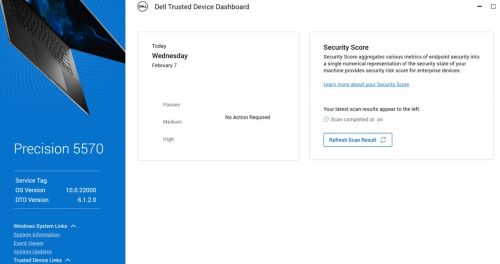
提醒:安全评估将在 Windows 启动后 15 分钟内运行。
Windows 事件查看器 可能包含以下事件:
- BIOS 验证:13(网络连接错误)
提醒:有关更多信息,请参阅 戴尔可信设备service.log 文件。
- 戴尔可信设备已于 <日期\时间>完成对服务编号为 123XYZ0 的计算机的 Intel ME 验证扫描。
结果:错误。发生网络连接错误
- 戴尔可信设备已于 <日期\时间>完成对服务编号为 123XYZ0 的计算机的常见漏洞和披露 (CVE) 扫描。
结果:错误。发生网络连接错误
在戴尔 可信设备的戴尔可信service.log 中,位于:
%programdata%\Dell\TrustedDevice\services.log ,您可能会看到如下错误:
CVEVERIFY: Inner exception - The underlying connection was closed: Could not establish trust relationship for the SSL/TLS secure channel.
CVEVERIFY: Inner exception - The remote certificate is invalid according to the validation procedure.
CVEVERIFY: CVE Verification: ERROR. A network connection error occurred
CVEVERIFY: Final CVE Verification result: NetworkConnectionError
BIOSSERVER: Network issue - The underlying connection was closed: Could not establish trust relationship for the SSL/TLS secure channel. (exception status: UnknownError)
BIOSSERVER: Failed to perform the BIOS Server, status=0
BIOS: BIOS Verification : ERROR. A network connection error occurred
BIOS: Unable to trigger live image capture due to missing server response data
BIOS: BIOS Verification: 13 (Network Connectivity Error)
Cause
对于主机外验证任务,计算机与戴尔云服务的连接可能有限或没有连接。
Resolution
- 确保所有端口和网络名称均已按照戴尔可信设备安装和管理 指南>要求>端口 部分中的定义加入允许列表。
- 戴尔可信设备对戴尔可信设备应用程序中嵌入的已知证书使用证书固定。某些流量整形安全解决方案可能会阻止此验证。在流量整形应用程序或代理配置中将dell.trusteddevice.service.exe列入允许列表。
要联系支持部门,请参阅 Dell Data Security 国际支持电话号码。
转至 TechDirect,在线生成技术支持请求。
要获得更多见解和资源,请加入戴尔安全社区论坛。
Affected Products
Dell Threat DefenseArticle Properties
Article Number: 000225839
Article Type: Solution
Last Modified: 07 Apr 2025
Version: 4
Find answers to your questions from other Dell users
Support Services
Check if your device is covered by Support Services.