Dell Networking:使用 VLTi 接口的 VLT 环境中的 OS10 PBR 布线错误
Summary: 用户在使用 Dell OS10 交换机的虚拟链路中继 (VLT) 环境中遇到基于策略的路由 (PBR) 问题。当流量使用 VLTi 接口路由到 VLT 辅助交换机时,会导致“通信”错误。通过在 VLT 域上禁用 PBR 解决了此问题。解决方法是使用两个访问控制列表 (ACL) 来重构路由图配置,以分隔流量路径。
This article applies to
This article does not apply to
This article is not tied to any specific product.
Not all product versions are identified in this article.
Symptoms
信息收集
使用以下命令进行实时故障处理:
show mac address-table
show ip arp
show ip route
show running-config route-map
show running-config access-list
show running-config vlt
考虑创建 ACL 以匹配流量(源/目标),并验证流量是否采用预期路径。
收集支持包以进行进一步分析。
问题识别
- 当存在使用 VLTi 接口的非对称流量时,通信将失败。
- 可能会观察到超过生存时间 (TTL) 的消息。
- 仅使用一台 VLT 对等交换机时,流量可正常工作。
Cause
根本原因
在非对称通信中,当流量通过交换机 1 上的 VLTi 进行路由时,交换机 2 可能会将流量发送到错误的目标,从而导致通信问题。这是因为 PBR 与交换机 2 的 VLTi 接口上的流量匹配。
Resolution
Dell SmartFabric OS10 用户指南,版本 10.6.0
- 在 VLT 域上禁用 PBR:
ip pbr disable
ipv6 pbr disable
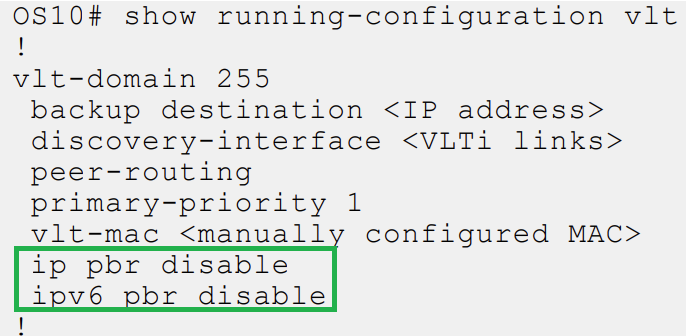
临时解决方法
- 使用两个 ACL 重新配置路由映射:
- ACL1:允许使用传统路由进入子网。
- ACL2: ip permit any any for traffic to be filtered.
- 路由图:
route-map ToDefaultRoute deny 10
  match ip address ACL1
route-map ToFwPbr permit 20
  match ip address ACL2
  set ip next-hop next-hop IP
Affected Products
SmartFabric OS10 SoftwareArticle Properties
Article Number: 000357162
Article Type: Solution
Last Modified: 20 Aug 2025
Version: 1
Find answers to your questions from other Dell users
Support Services
Check if your device is covered by Support Services.