Avamar: Putty connection fails due to "Couldn't agree a client-to-server cipher"
Summary: Unable to make a putty connection due to error "Couldn't agree a client-to-server cipher."
This article applies to
This article does not apply to
This article is not tied to any specific product.
Not all product versions are identified in this article.
Symptoms
Unable to use PuTTY to connect to an Avamar grid after an upgrade.
Connections fail with the following error:
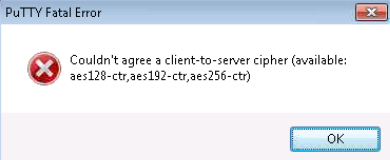
Note: This issue has also been observed with other Dell Products.
Cause
When the Operating System (OS) is upgraded, it updates the /etc/ssh/ssh_config file with ciphers that older versions of PuTTY do not support.
PuTTY versions earlier than v.59 do not include the CTR layer encryption mode required to communicate with the updated Avamar grid.
Resolution
Update the version of PuTTY to a later version (the recommended version is v.67 or higher):
1. Go to the PuTTY download page. http://www.chiark.greenend.org.uk/~sgtatham/putty/download.html (External Link)
2. Select an applicable version (and type) of PuTTY for your environment.
3. Download and install PuTTY.
Note: If the download page is blocked, or elevated privileges are required to install programs, customers must seek assistance from their local IT teams to update the PuTTY version.
4. Test the connection to the Avamar grid.
Affected Products
Avamar, Avamar Server, Dell EMC Unity FamilyProducts
AvamarArticle Properties
Article Number: 000169727
Article Type: Solution
Last Modified: 02 Oct 2025
Version: 10
Find answers to your questions from other Dell users
Support Services
Check if your device is covered by Support Services.