IDPA:如何在 DP4400 上扩展存储
Summary: 本文介绍如何扩展 DP4400 融合备份一体机 (IDPA) 上的存储。
This article applies to
This article does not apply to
This article is not tied to any specific product.
Not all product versions are identified in this article.
Instructions
本文介绍如何扩展 DP4400 融合备份一体机 (IDPA) 上的存储容量。
DP4400 的容量升级不需要额外的硬件;升级由 ELMS 许可控制。
确保容量升级许可证有效且适用于所需的升级。
直接从 Appliance Configuration Manager (ACM) 控制面板执行容量升级。
- 登录到 ACM 控制面板
-
https://<ACM hostname or IP>:8543/dataprotection/#/dashboard
-
- 从 ACM 控制面板上的“Protection Storage”选项按钮中选择“Expand Storage”
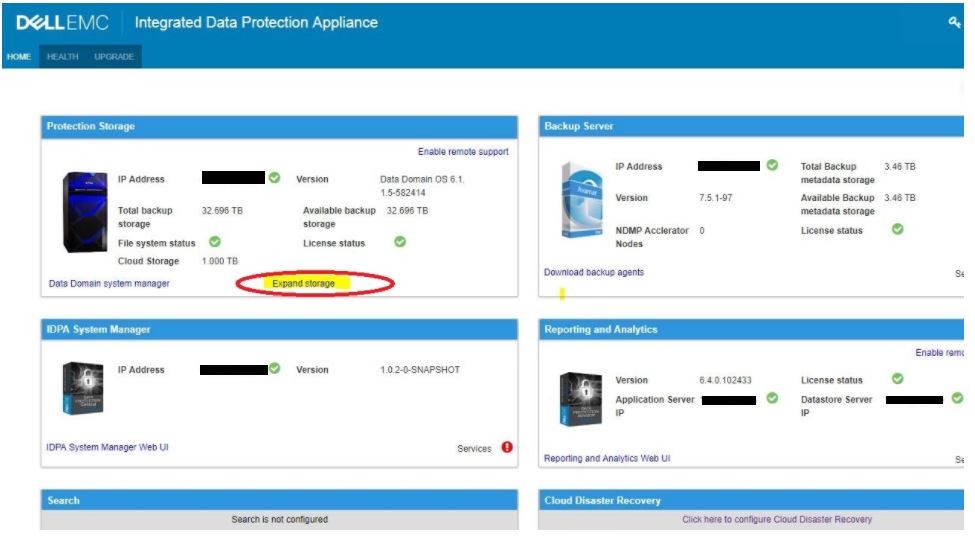
或者 (取决于安装的版本)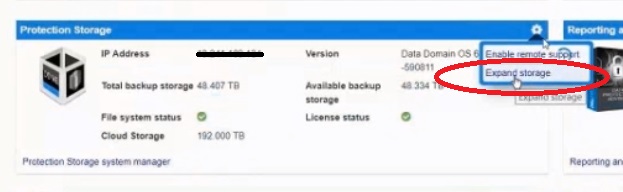
- “许可证升级”窗口已打开
- 浏览到存储的 ELMS 许可证文件,然后单击“Expand”
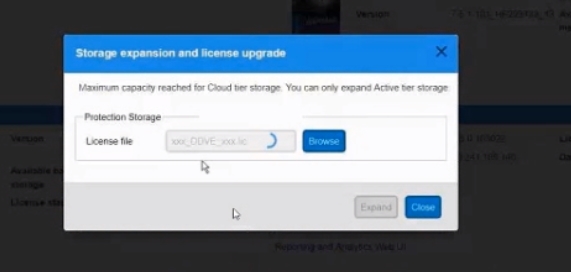
- 这将提交请求的容量升级。
- “Storage Expansion”窗口中会报告进度/状态/错误
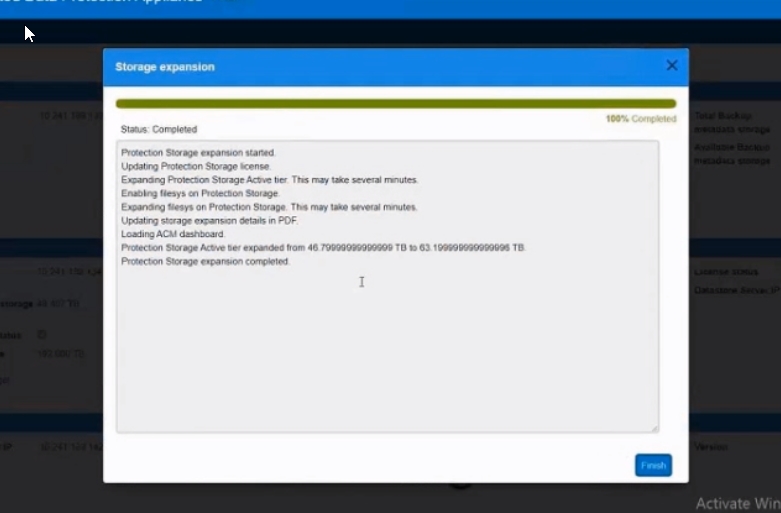
- 升级完成后,单击“Finish”。
Additional Information
容量升级选项:
请参阅此视频:
- 以 12 TB 为增量提供 24 TB、36 TB、48 TB、60 TB、72 TB、84 TB、96 TB
- 任何容量点均可从工厂订购
- 可以升级到现场任何受支持的容量点
- 升级只需要启用许可证(ELMS 许可证)
- Cloud Tier 和 Cloud DR 是可选购买的产品,可在工厂或现场升级中启用
最大扩展容量
活动层可以扩展到 96 TB。
Cloud Tier 可以扩展到 192 TB。
请参阅此视频:
Affected Products
PowerProtect DP4400, Integrated Data Protection Appliance Family, Integrated Data Protection Appliance SoftwareArticle Properties
Article Number: 000010659
Article Type: How To
Last Modified: 26 Sep 2025
Version: 9
Find answers to your questions from other Dell users
Support Services
Check if your device is covered by Support Services.