Dell Unity: What Is The Difference Between FAST VP and FAST Cache
Summary: This article aims to provide a comprehensive overview of the key differences between FAST VP and FAST Cache.
This article applies to
This article does not apply to
This article is not tied to any specific product.
Not all product versions are identified in this article.
Instructions
Both FAST VP and FAST Cache are included in Dell's Fully Automated Storage Tiering (FAST) Suite. These features enable our customers to:
- Leverage SAS Flash 2 drives as additional read/write cache for improved performance (FAST Cache).
- Dynamically tier data across different types of drives (FAST VP). FAST VP can use all supported drive types except SAS Flash 4.
Interoperability Considerations
You can use FAST Cache and FAST VP functionality together to yield high performance and improve Total Cost of Ownership (TCO) for the storage system. It is recommended that you:
- Use available SAS Flash 2 drives for the FAST Cache first, because this can benefit all storage resources in the storage system.
- Supplement performance as needed by adding additional SAS Flash 2 drives to pool tiers for use by FAST VP.
FAST VP
- Dell Unity Fully Automated Storage Tiering for Virtual Pools = FAST VP
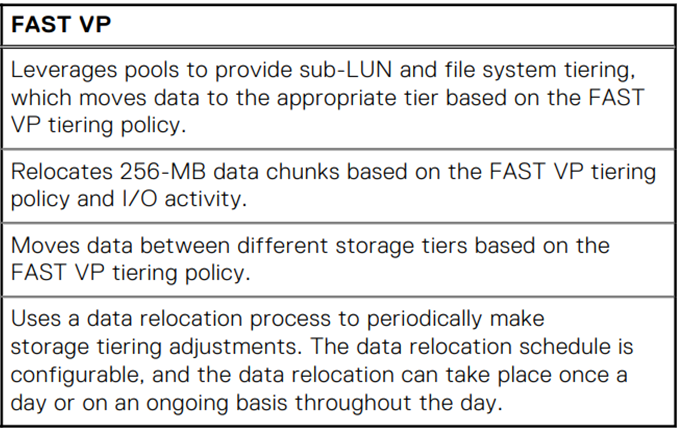
- Executive Summary: When FAST VP is enabled, the FAST VP software will measure and record performance statistics on each slice within a Pool. Later, FAST VP analyzes this data and makes decisions to move data across multiple tiers in a Pool to maximize Pool performance and efficiently use the space within the Pool. Slices that are highly accessed are automatically moved to the higher tiers within a Pool, while slices with less activity move to lower tiers within a Pool. Data already residing on Flash within a Pool will not promote to FAST Cache, allowing more data within the system to take advantage of Flash.
- FAST VP accelerates performance of a specific storage pool by automatically moving data within that pool to the appropriate drive technology, based on data access patterns. FAST VP is only applicable to hybrid pools within a Dell Unity hybrid system.
- The default and recommended FAST VP policy for all storage objects is “Start High then Auto-tier". This policy places initial allocations for the storage object in the highest tier available, and monitors activity to this storage object to determine the correct placement of data as it ages.
- FAST VP is most effective if data relocations occur during or immediately after normal daily processing. Dell Technologies recommends scheduling FAST VP relocations to occur before backups or nightly batch processing. For applications which are continuously active, consider configuring FAST VP relocations to run constantly. It is also recommended to schedule snapshot operations after any FAST VP relocations have been completed.
- Dell Technologies recommends maintaining at least 10% free capacity in storage pools, so that FAST VP relocations can occur efficiently. FAST VP relocations cannot occur if the storage pool has no free space.
- Performance of a hybrid pool can be improved by increasing the amount of capacity in the Flash tier, so that more of the active dataset resides on and is serviced by the Flash drives.
- Hybrid pools can have up to 3 tiers (Extreme Performance, Performance, and Capacity). Dell Technologies recommends using only a single drive speed, size, and RAID width within each tier of a hybrid pool
FAST Cache
- FAST Cache does not stand for a specific acronym.
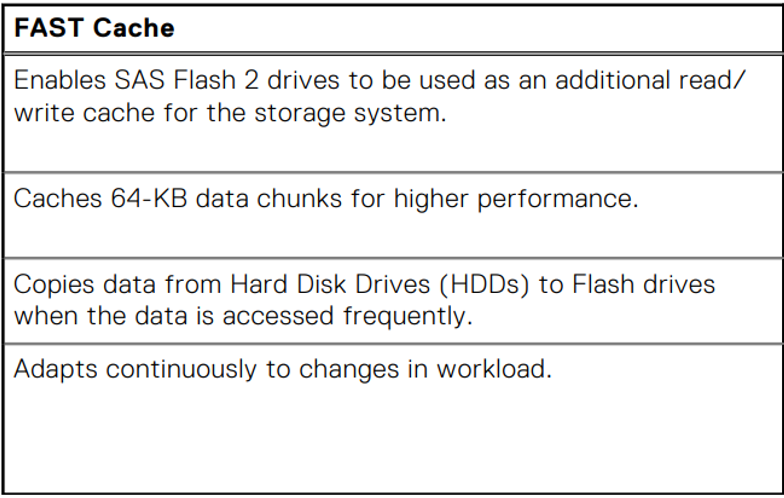
- Executive Summary: FAST Cache is a high capacity secondary cache which logically sits below System Cache, and above the drives in the system. FAST Cache complements the System Cache by using Flash drives to service highly active data being requested from the drives. Frequently accessed data located on spinning drives in the Pool is copied into FAST Cache for higher performance and lower response time. As FAST Cache copies data onto Flash in 64 KB chunks, FAST Cache is efficient at using Flash. It is not uncommon for an entire active dataset within a small capacity to reside in FAST Cache. With large maximum capacities on the higher end Unity models, FAST Cache can be configured to handle most of the I/O on a system.
- FAST Cache is a single global resource that can improve performance of one or more hybrid pools within a Dell Unity hybrid system. FAST Cache can only be created with SAS Flash 2 drives and is only applicable to hybrid pools. It is recommended to place a Flash tier in the hybrid pool before configuring FAST Cache on the pool. FAST Cache can improve access to data that is resident in the HDD tiers of the pool.
- Enable FAST Cache on the hybrid pool if the workload in that pool is highly transactional and has a high degree of locality that changes rapidly.
- For applications that use larger I/O sizes, have lower skew, or do not change locality as quickly, it may be more beneficial to increase the size of the Flash tier rather than enable FAST Cache.
- FAST Cache can increase the IOPS achievable from the Dell Unity system, and this will result in higher CPU utilization (to service the additional I/O). Before enabling FAST Cache on additional pools or expanding the size of an existing FAST Cache, monitor the average system CPU utilization to determine if the system can accommodate the additional load.
Additional Information
- Dell Unity: Best Practices Guide (March 2025)
- Dell Unity™ Family Configuring Pools Version 5.x (September 2024)
- Dell Unity™ Family Unisphere® Command Line Interface User Guide Version 5.5.1 (July 2025)
- Dell Storage Compatibility Matrix Support Policy Statement
- Dell EMC Unity: FAST Technology Overview (February 2021)
- Dell Unity: Basic FAST Cache Management
Affected Products
Dell EMC Unity, Dell EMC Unity XT 380, Dell EMC Unity 400, Dell EMC Unity XT 480, Dell EMC Unity 500, Dell EMC Unity 600, Dell EMC Unity XT 680, Dell EMC Unity XT 880, Dell EMC Unity HybridArticle Properties
Article Number: 000010691
Article Type: How To
Last Modified: 27 Oct 2025
Version: 5
Find answers to your questions from other Dell users
Support Services
Check if your device is covered by Support Services.