VxRail: iDRAC의 루트 비밀번호를 재설정하는 방법
Summary: VxRail: iDRAC의 루트 비밀번호를 재설정하는 방법
This article applies to
This article does not apply to
This article is not tied to any specific product.
Not all product versions are identified in this article.
Instructions
iDRAC의 루트 PW 재설정:
1. 노드
2에 SSH를 연결합니다. 루트 사용자의 ID를 확인하십시오.
3. iDRAC의 루트를 사용하여 새 비밀번호를 재설정합니다.
예를 들어 TestCalvin을 새 PW로 설정합니다.
1. 노드
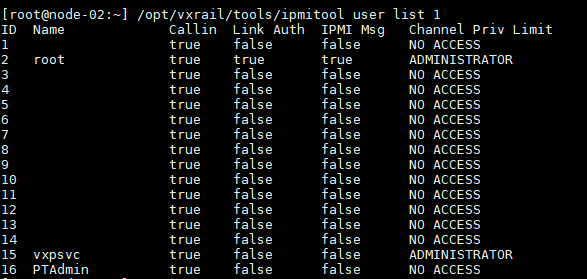
2에 SSH를 연결합니다. 루트 사용자의 ID를 확인하십시오.
/opt/vxrail/tools/ipmitool user list 1
ID  Name             Callin  Link Auth  IPMI Msg   Channel Priv Limit
1                    true    false      false      NO ACCESS
2   root             true    true       true       ADMINISTRATOR
3                    true    false      false      NO ACCESS
4                    true    false      false      NO ACCESS
5                    true    false      false      NO ACCESS
6                    true    false      false      NO ACCESS
7                    true    false      false      NO ACCESS
8                    true    false      false      NO ACCESS
9                    true    false      false      NO ACCESS
10                   true    false      false      NO ACCESS
11                   true    false      false      NO ACCESS
12                   true    false      false      NO ACCESS
13                   true    false      false      NO ACCESS
14                   true    false      false      NO ACCESS
15  vxpsvc           true    false      false      ADMINISTRATOR
16  PTAdmin          true    false      false      NO ACCESS
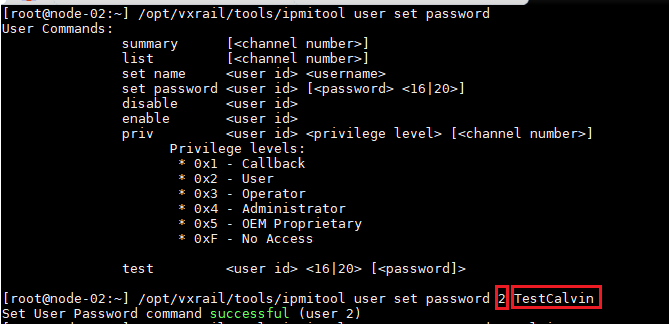
3. iDRAC의 루트를 사용하여 새 비밀번호를 재설정합니다.
/opt/vxrail/tools/ipmitool user set password <Root user ID> <NEW PASSWORD>
예를 들어 TestCalvin을 새 PW로 설정합니다.
[root@node-02:~] /opt/vxrail/tools/ipmitool user set password 2 TestCalvin
Set User Password command successful (user 2)
Affected Products
iDRAC9Products
VxRail SoftwareArticle Properties
Article Number: 000013629
Article Type: How To
Last Modified: 06 Dec 2024
Version: 7
Find answers to your questions from other Dell users
Support Services
Check if your device is covered by Support Services.