PowerFlex ScaleIO VxRack: TLA番号を取得するためにipmitoolをインストールする方法
Summary: この記事では、IPMIツールをインストールする方法について説明します。
This article applies to
This article does not apply to
This article is not tied to any specific product.
Not all product versions are identified in this article.
Instructions
Windows OS: IMPMI ツールは BMC ユーティリティの一部です。
BMCユーティリティーは、DellのWebサイトからダウンロードできます。BMCユーティリティーをダウンロードするためのリンク https://www.dell.com/support/home/in/en/indhs1/Drivers/DriversDetails?driverId=6MR62
ファイルを解凍し、パッケージをインストールします。インストールが完了したら、昇格したコマンド プロンプトを開き、ipmitoolがインストールされているフォルダーに移動します。この例では、パスはC:\Program Files (x86)\Dell\SysMgt\bmc >> です。
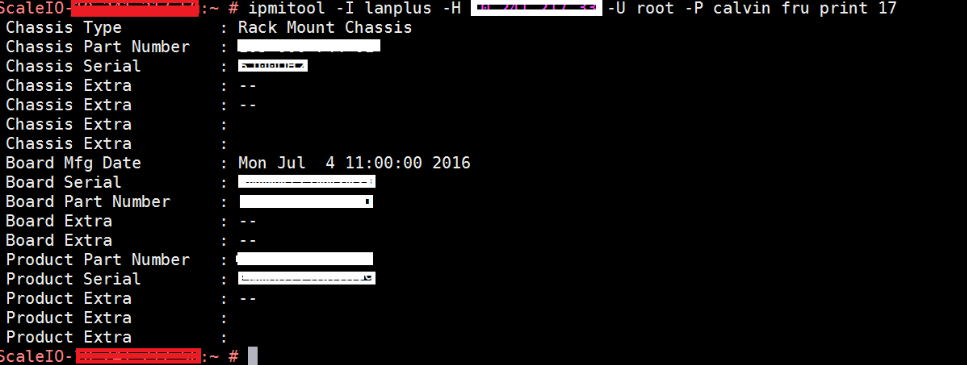
サーバーのTLA番号(ボード パーツ ナンバー)とサービス タグ(シャーシ シリアル)を取得するには、次のコマンドを実行します。
ipmitool -I lanplus -H -U root -P calvin fru print 17
出力は次のようになります。

Linux OS:
ipmitoolソフトウェアをインストールするには、rootシェルから次のコマンドを実行します。
Enterprise Linux 5.x/CentOS 5.x:
#yum install OpenIPMI OpenIPMI-tools
Enterprise Linux 6.x/CentOS 6.xまたはFedora:
# yum install OpenIPMI ipmitool
Enterprise Linux 7.x/CentOS 7.xまたはFedora:
# yum install OpenIPMI ipmitool
Ubuntu 14.04 LTS:
# apt-get install ipmitool
Ubuntu以外のディストリビューションに対してIPMIアクセスを有効にするには、ルート シェルから次のコマンドを実行します。
# /sbin/chkconfig ipmi on # service ipmi start
Ubuntuはデーモンを自動的に起動します。
メモ:ipmitoolはSVM(2.0.1.X以降)にデフォルトでインストールされます
サーバーのTLA番号(ボード パーツ ナンバー)とサービス タグ(シャーシ シリアル)を取得するには、SVMで次のコマンドを実行します。
ipmitool -I lanplus -H -U root -P calvin fru print 17
出力は次のようになります。
Additional Information
IpmitoolはUDPポート623を使用します。このポートがファイアウォール/iptablesで開いていることを確認してください。
Affected Products
VxFlex Product FamilyProducts
PowerFlex Software, VxFlex Product Family, VxRack SDDCArticle Properties
Article Number: 000014374
Article Type: How To
Last Modified: 16 Nov 2024
Version: 3
Find answers to your questions from other Dell users
Support Services
Check if your device is covered by Support Services.