PowerFlex ScaleIO VxRack: TLA 번호를 얻기 위해 ipmitool을 설치하는 방법
Summary: 이 문서에서는 IPMI 툴을 설치하는 방법에 대해 설명합니다.
This article applies to
This article does not apply to
This article is not tied to any specific product.
Not all product versions are identified in this article.
Instructions
Windows OS: IMPMI 툴은 BMC 유틸리티의 일부입니다.
BMC 유틸리티는 Dell 웹사이트에서 다운로드할 수 있습니다. BMC 유틸리티 https://www.dell.com/support/home/in/en/indhs1/Drivers/DriversDetails?driverId=6MR62 다운로드할 수 있는 링크입니다.
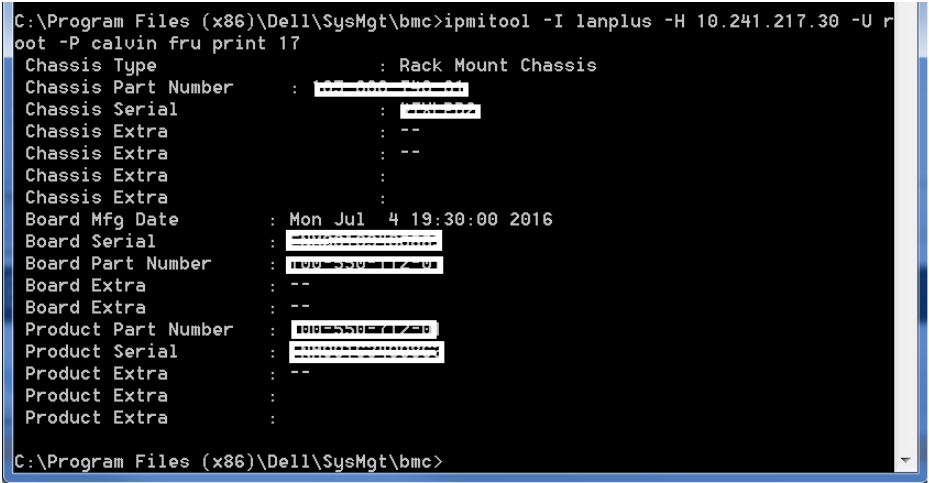
파일의 압축을 풀고 패키지를 설치합니다. 설치가 완료되면 관리자 권한 명령 프롬프트를 열고 ipmitool이 설치된 폴더로 이동합니다. 이 예에서 경로는 C:\Program Files (x86)\Dell\SysMgt\bmc입니다 >> .
서버의 TLA 번호(보드 부품 번호), 서비스 태그(섀시 직렬)를 얻으려면 다음 명령을 실행합니다.
ipmitool -I lanplus -H -U root -P calvin fru print 17
출력은 다음과 유사합니다.
Linux OS:
ipmitool 소프트웨어를 설치하려면 루트 셸에서 다음 명령을 실행합니다.
Enterprise Linux 5.x/CentOS 5.x:
#yum install OpenIPMI OpenIPMI-tools
Enterprise Linux 6.x/CentOS 6.x 또는 Fedora:
# yum install OpenIPMI ipmitool
Enterprise Linux 7.x/CentOS 7.x 또는 Fedora:
# yum install OpenIPMI ipmitool
Ubuntu 14.04 LTS:
# apt-get install ipmitool
Ubuntu가 아닌 배포판에 대해 IPMI 액세스를 활성화하려면 루트 셸에서 다음 명령을 실행합니다.
# /sbin/chkconfig ipmi on # service ipmi start
Ubuntu가 데몬을 자동으로 시작합니다.
참고: ipmitool은 기본적으로 SVM(2.0.1.X 이상)에 설치됩니다.
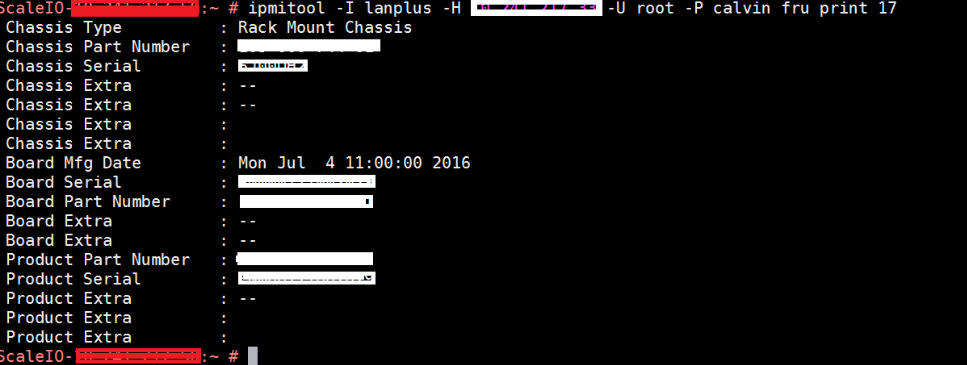
서버의 TLA 번호(보드 부품 번호) 및 서비스 태그(섀시 직렬)를 얻으려면 SVM에서 명령을 실행합니다.
ipmitool -I lanplus -H -U root -P calvin fru print 17
출력은 다음과 유사합니다.
Additional Information
Ipmitool은 UDP 포트 623을 사용하므로 이 포트가 방화벽/iptables에서 열려 있는지 확인하십시오.
Affected Products
VxFlex Product FamilyProducts
PowerFlex Software, VxFlex Product Family, VxRack SDDCArticle Properties
Article Number: 000014374
Article Type: How To
Last Modified: 16 Nov 2024
Version: 3
Find answers to your questions from other Dell users
Support Services
Check if your device is covered by Support Services.