PowerFlex ScaleIO VxRack:如何安裝 ipmitool 以取得 TLA 編號
Summary: 本文說明如何安裝 IPMI 工具。
This article applies to
This article does not apply to
This article is not tied to any specific product.
Not all product versions are identified in this article.
Instructions
Windows 作業系統:IMPMI 工具是 BMC 公用程式的一部分。
BMC 公用程式可從 Dell 網站下載。下載 BMC 公用程式的連結 https://www.dell.com/support/home/in/en/indhs1/Drivers/DriversDetails?driverId=6MR62
解壓縮檔案並安裝套件。安裝完成後,開啟提升權限的命令提示字元,然後前往安裝 ipmitool 的資料夾,在此範例中,路徑為 >> C:\Program Files (x86)\Dell\SysMgt\bmc。
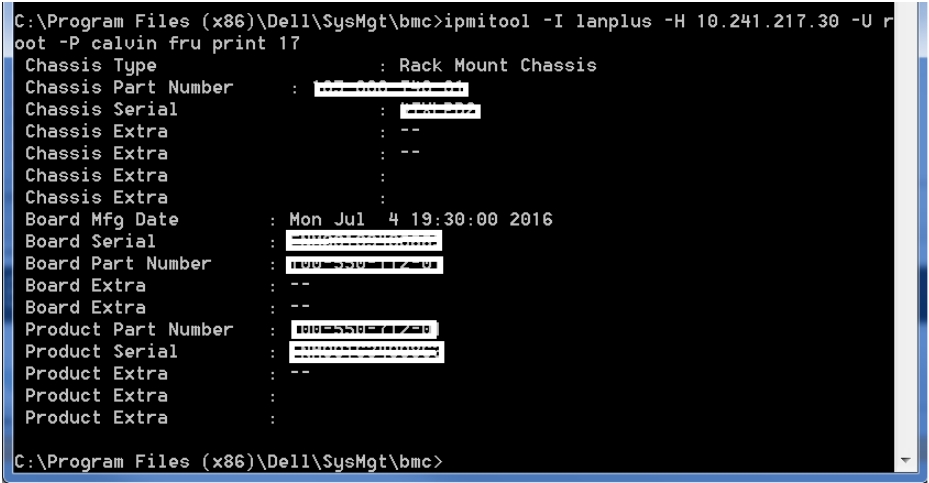
若要取得伺服器的 TLA 編號 (電路板零件編號)、產品服務編號 (機箱序號),請執行命令。
ipmitool -I lanplus -H -U root -P calvin fru print 17
輸出類似於。
Linux 作業系統:
若要安裝 ipmitool 軟體,請從根殼層執行下列命令:
Enterprise Linux 5.x/CentOS 5.x:
#yum install OpenIPMI OpenIPMI-tools
Enterprise Linux 6.x/CentOS 6.x 或 Fedora:
# yum install OpenIPMI ipmitool
Enterprise Linux 7.x/CentOS 7.x 或 Fedora:
# yum install OpenIPMI ipmitool
Ubuntu 14.04 LTS:
# apt-get install ipmitool
若要啟用非 Ubuntu 版本的 IPMI 存取,請從根 Shell 執行下列命令:
# /sbin/chkconfig ipmi on # service ipmi start
Ubuntu 會自動啟動精靈。
注意:預設情況下會在 SVM(2.0.1.X 及更高版本)上安裝 ipmitool
若要取得伺服器的 TLA 編號 (電路板零件編號) 和產品服務編號 (機箱序號),請在 SVM 上執行命令。
ipmitool -I lanplus -H -U root -P calvin fru print 17
輸出類似於。

Additional Information
Ipmitool 使用 UDP 連接埠 623,請確定此連接埠已在防火牆/iptables 中開啟。
Affected Products
VxFlex Product FamilyProducts
PowerFlex Software, VxFlex Product Family, VxRack SDDCArticle Properties
Article Number: 000014374
Article Type: How To
Last Modified: 16 Nov 2024
Version: 3
Find answers to your questions from other Dell users
Support Services
Check if your device is covered by Support Services.