ECS: Setting up CAS support in ECS
Summary: This article is about how to set up Content-Addressable Storage (CAS) support in ECS.
This article applies to
This article does not apply to
This article is not tied to any specific product.
Not all product versions are identified in this article.
Instructions
This article is about how to set up CAS support in ECS and it is an extract from ECS Data Access Guide that can be found and downloaded at the ECS Product Page.
Setting up CAS support in ECS:
Storage pool configuration
To establish a cold archive from the portal, Select Cold Storage when you create a storage pool. Once a storage pool has been created, this setting cannot be changed.
Setting up CAS support in ECS:
This chapter describes how to modify your basic configuration to support CAS.
ECS CAS enables CAS SDK-based client applications to store, retrieve, and delete fixed content objects from ECS storage.
The underlying ECS storage must be provisioned before you can configure your ECS set-up. Provisioning is completed when a new ECS rack is installed. This includes setting up a storage pool, VDC, and replication group.
For your storage pools, you might consider setting up a cold archive. See Cold Storage.
Next, set up your namespaces, users, and buckets using the standard documentation. See the ECS Administration Guide which is available from the ECS Product Documentation page for these steps and provisioning steps.
Cold Storage
Describes cold storage archives.
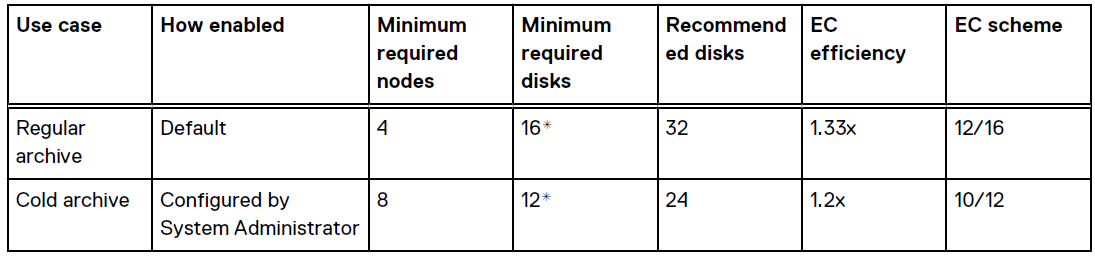
Cold archives store objects that do not change frequently and do not require the robust default EC scheme. The EC scheme used for a cold archive is 10 data fragments plus two coding fragments (10/12). The efficiency is 1.2.x.
You can specify a cold archive (Cold Storage) when creating a new storage pool. After the storage pool is created, the EC scheme cannot be changed. This scheme can support the loss of a single node. It also supports loss of one drive out of six or two drives out of 12 on two separate nodes.
EC requirements
The table shows the description for regular and cold archives comparison.
Note: Since the minimum deployable configuration for the C-Series appliance is two appliances with 12 disks each, 24 disks is the effective minimum.
Storage pool configuration
To establish a cold archive from the portal, Select Cold Storage when you create a storage pool. Once a storage pool has been created, this setting cannot be changed.
Affected Products
ECS ApplianceProducts
Centera, ECS Appliance, Elastic Cloud StorageArticle Properties
Article Number: 000014668
Article Type: How To
Last Modified: 25 Nov 2025
Version: 6
Find answers to your questions from other Dell users
Support Services
Check if your device is covered by Support Services.