ECS: Come eliminare un bucket S3 contenente molti oggetti
Summary: Un bucket S3 ha molti oggetti, ma deve essere eliminato. Questo articolo descrive come rimuovere tutti gli oggetti da un bucket ed eliminare infine il bucket.
This article applies to
This article does not apply to
This article is not tied to any specific product.
Not all product versions are identified in this article.
Instructions
ATTENZIONE: Questa procedura svuota tutti gli object nel bucket di destinazione. I dati non possono essere ripristinati, utilizzarli con cautela.
Limitazioni alle operazioni riportate di seguito:
- Non è possibile eliminare gli oggetti sottoposti a retention ECS .
- Gli oggetti sottoposti a retention Object Lock non possono essere eliminati.
- I bucket abilitati per il file system richiedono la versione 3.8.1 o successiva.
Opzione consigliata: Versione 3.8 o successiva:
Nella versione 3.8 del software ECS, Dell ha introdotto l'eliminazione semplificata dei bucket. Ora gli oggetti e il bucket possono essere eliminati utilizzando l'API REST o una stringa S3 del bucket vuoto utilizzando x-emc-headers. Dell Technologies consiglia di eseguire l'aggiornamento alla versione 3.8. utilizzando l'eliminazione semplificata dei bucket durante l'eliminazione del ciclo di vita.
Utilizzo dell'"eliminazione semplificata dei bucket" tramite l'interfaccia utente di ECS (richiede la versione 3.8.1.0 o successiva)
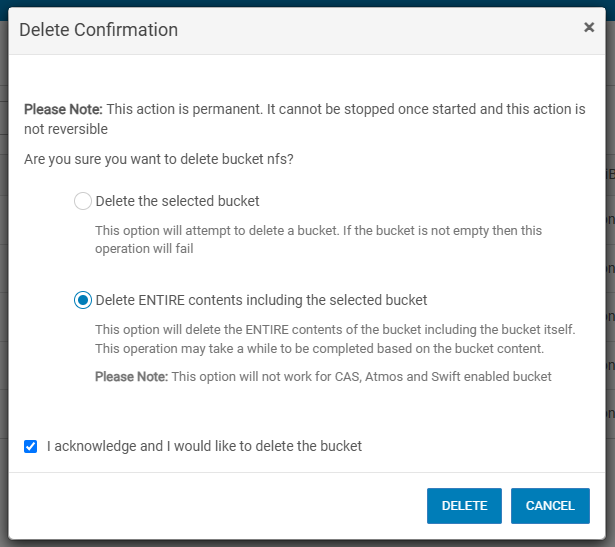
La versione 3.8.1.x e successive consente l'eliminazione del bucket con contenuto dall'interfaccia utente di ECS con le autorizzazioni appropriate. Individuare il bucket e selezionare delete dal menu a discesa. Selezionare Delete ENTIRE content, incluso il bucket selezionato e confermare.
Utilizzo dell'eliminazione semplificata dei bucket tramite API REST.
Per riferimento, consultare la Guida alle API REST più recente.
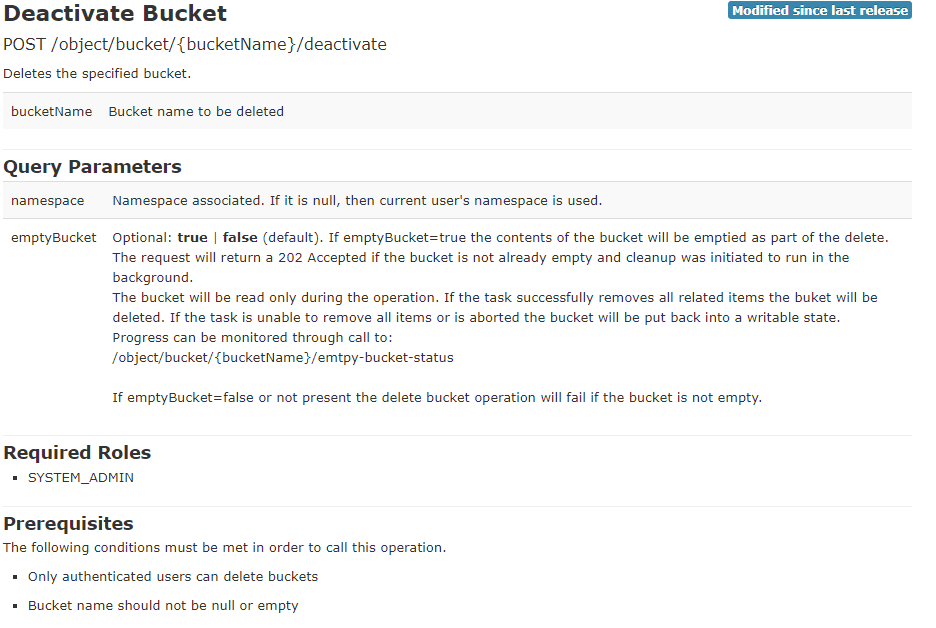
Esempio per l'invio della chiamata API rest utilizzando curl da ECS:
Comando:
# curl -k -H "$token" -X POST https://<hostname-or-ip>:4443/object/bucket/<bucketname>/deactivate?namespace=<namespace>\&emptyBucket=true
Esempio:
curl -v -k -H "$token" -X POST https://10.60.x.xx:4443/object/bucket/ExampleBucketRest/deactivate?namespace=b_mathias_ns\&emptyBucket=true
Per monitorare:
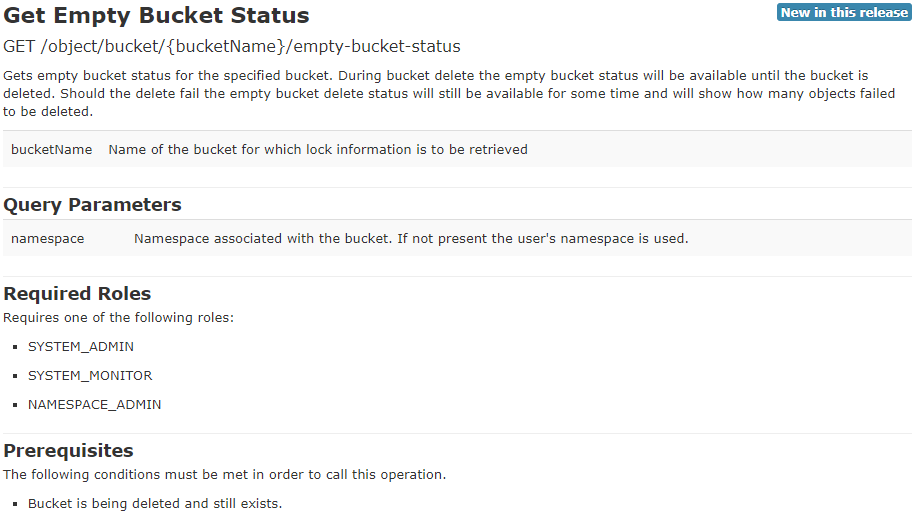
Comando:
# curl -k -H "$token" -X GET https://<hostname-or-ip>:4443/object/bucket/<bucketname>/empty-bucket-status?namespace=<namespace> |xmllint --format -
Esempio:
Started:
mathias@client:/usr/share/s3curl$ curl -k -H "$token" -X GET https://10.60.x.xx:4443/object/bucket/ExampleBucketRest/empty-bucket-status?namespace=b_mathias_ns |xmllint --format -
<?xml version="1.0" encoding="UTF-8" standalone="yes"?>
<empty_bucket_status>
  <status>PENDING</status>
  <created>1707411798889</created>
  <last_updated>1707411798889</last_updated>
  <entries_deleted>0</entries_deleted>
  <failed_to_delete_due_to_retention>0</failed_to_delete_due_to_retention>
  <failed_to_delete_due_to_permission>0</failed_to_delete_due_to_permission>
  <failed_to_delete_due_to_dangling xmlns:xsi="http://www.w3.org/2001/XMLSchema-instance" xsi:nil="true"/>
  <failed_to_delete_due_to_other>0</failed_to_delete_due_to_other>
  <message xmlns:xsi="http://www.w3.org/2001/XMLSchema-instance" xsi:nil="true"/>
</empty_bucket_status>

Running:
mathias@client:/usr/share/s3curl$ curl -k -H "$token" -X GET https://10.60.x.xx:4443/object/bucket/ExampleBucketRest/empty-bucket-status?namespace=b_mathias_ns |xmllint --format -
  % Total    % Received % Xferd  Average Speed   Time    Time     Time  Current
                                 Dload  Upload   Total   Spent    Left  Speed
100   629  100   629    0     0   2431      0 --:--:-- --:--:-- --:--:--  2437
<?xml version="1.0" encoding="UTF-8" standalone="yes"?>
<empty_bucket_status>
  <status>IN_PROGRESS</status>
  <created>1707411798889</created>
  <last_updated>1707411828897</last_updated>
  <entries_deleted>1337</entries_deleted>
  <failed_to_delete_due_to_retention>0</failed_to_delete_due_to_retention>
  <failed_to_delete_due_to_permission>0</failed_to_delete_due_to_permission>
  <failed_to_delete_due_to_dangling xmlns:xsi="http://www.w3.org/2001/XMLSchema-instance" xsi:nil="true"/>
  <failed_to_delete_due_to_other>0</failed_to_delete_due_to_other>
  <message xmlns:xsi="http://www.w3.org/2001/XMLSchema-instance" xsi:nil="true"/>
</empty_bucket_status>

Completed:
<?xml version="1.0" encoding="UTF-8" standalone="yes"?>
<error>
  <code>1004</code>
  <description>Request parameter cannot be found</description>
  <details>Unable to find entity with the given id ExampleBucketRest</details>
  <retryable>false</retryable>
</error>
L'errore precedente è previsto poiché il bucket non viene più trovato.
Utilizzando l'eliminazione semplificata dei bucket utilizzando S3:
- Per ulteriori dettagli, consulta la guida all'accesso ai dati più recente.
- Consultare la Guida all'accesso ai dati v3.8.

Il modo più veloce per indirizzare un bucket con questa opzione è s3curl.
Attenzione: s3curl è già installato sui nodi ECS, ma non deve essere utilizzato per questa operazione. La colonna
x-emc headers non sono al momento pienamente funzionanti.
s3curl è disponibile su GitHub per le installazioni locali. Questa versione viene utilizzata per includere x-emc-headers https://github.com/EMCECS/s3curl/blob/master/s3curl.pl 
La versione modificata di
s3curl.pl è prevista l'aggiunta al codice ECS in una versione futura e questo articolo della Knowledge Base verrà aggiornato.
Quando
s3curl è configurato, procedere con i seguenti passaggi. Tieni presente che i dati non possono essere recuperati.
- Avvio di un eliminazione semplificata dei bucket mediante
s3curl:
Comando:
./s3curl --id=<alias> --DELETE -- http://<hostname-or-ip>:9020/<bucketname> -H "x-emc-empty-bucket:true"
Esempio:
mathias@client:/usr/share/s3curl$ ./s3curl.pl --id=b_mathias_iam --DELETE -- http://10.60.x.xx:9020/ExampleBucket -H "x-emc-empty-bucket:true"
Monitoraggio dell'eliminazione dei bucket:
./s3curl.pl --id=<alias> http://<hostname-or-ip>:9020/<bucketname>?empty-bucket-status |xmllint --format -
Esempio:
mathias@client:/usr/share/s3curl$ ./s3curl.pl --id=b_mathias_iam -- http://10.60.x.xx:9020/ExampleBucket?empty-bucket-status |xmllint --format -
  % Total    % Received % Xferd  Average Speed   Time    Time     Time  Current
                                 Dload  Upload   Total   Spent    Left  Speed
100   474  100   474    0     0   3128      0 --:--:-- --:--:-- --:--:--  3139
<?xml version="1.0" encoding="UTF-8" standalone="yes"?>
<EmptyBucketStatus xmlns="http://s3.amazonaws.com/doc/2006-03-01/">
  <Status>PENDING</Status>
  <Created>2024-02-08T16:21:53.849Z</Created>
  <LastUpdated>2024-02-08T16:21:53.849Z</LastUpdated>
  <EntriesDeleted>0</EntriesDeleted>
  <FailedToDeleteDueToRetention>0</FailedToDeleteDueToRetention>
  <FailedToDeleteDueToPermission>0</FailedToDeleteDueToPermission>
  <FailedToDeleteDueToOther>0</FailedToDeleteDueToOther>

Running:
mathias@client:/usr/share/s3curl$ ./s3curl.pl --id=b_mathias_iam -- http://10.60.x.xx:9020/ExampleBucket?empty-bucket-status |xmllint --format -
  % Total    % Received % Xferd  Average Speed   Time    Time     Time  Current
                                 Dload  Upload   Total   Spent    Left  Speed
100   478  100   478    0     0   3883      0 --:--:-- --:--:-- --:--:--  3886
<?xml version="1.0" encoding="UTF-8" standalone="yes"?>
<EmptyBucketStatus xmlns="http://s3.amazonaws.com/doc/2006-03-01/">
  <Status>IN_PROGRESS</Status>
  <Created>2024-02-08T16:21:53.849Z</Created>
  <LastUpdated>2024-02-08T16:22:23.899Z</LastUpdated>
  <EntriesDeleted>1304</EntriesDeleted>
  <FailedToDeleteDueToRetention>0</FailedToDeleteDueToRetention>
  <FailedToDeleteDueToPermission>0</FailedToDeleteDueToPermission>
  <FailedToDeleteDueToOther>0</FailedToDeleteDueToOther>
</EmptyBucketStatus>

Completed:
mathias@client:/usr/share/s3curl$ ./s3curl.pl --id=b_mathias_iam -- http://10.60.x.xx:9020/ExampleBucket?empty-bucket-status |xmllint --format -
  % Total    % Received % Xferd  Average Speed   Time    Time     Time  Current
                                 Dload  Upload   Total   Spent    Left  Speed
  0     0    0     0    0     0      0      0 --:--:-- --:--:-- --:--:--     0
100   180    0   180    0     0   1300      0 --:--:-- --:--:-- --:--:--  1304
<?xml version="1.0"?>
<Error>
  <Code>NoSuchBucket</Code>
  <Message>The specified bucket does not exist</Message>
  <Resource>ExampleBucket</Resource>
  <RequestId>0a3c0812:18d77e3a715:2d7:1f33</RequestId>
</Error>
Per le versioni del codice precedenti alla 3.8, eseguire l'aggiornamento per verificare la disponibilità delle opzioni di cui sopra.
Affected Products
ECS ApplianceProducts
ECS ApplianceArticle Properties
Article Number: 000014767
Article Type: How To
Last Modified: 21 Aug 2025
Version: 8
Find answers to your questions from other Dell users
Support Services
Check if your device is covered by Support Services.