Dell Unity: How to configure SNMP alerts in Unity
Summary: Steps to configure SNMP alerts on a Dell Unity array. (User Correctable)
This article applies to
This article does not apply to
This article is not tied to any specific product.
Not all product versions are identified in this article.
Instructions
Log in the Unisphere UI and select Settings-->Alerts-->SNMP to configure SNMP traps. See detailed steps below.
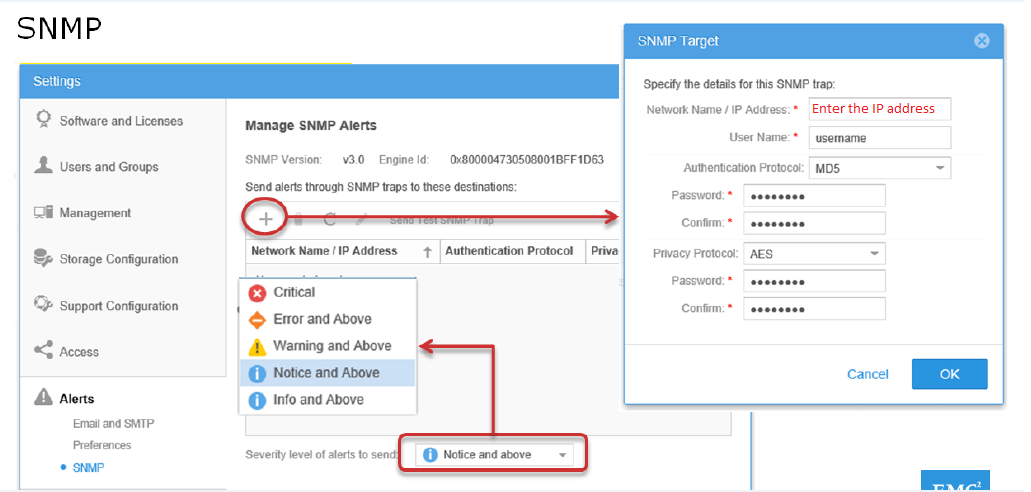
- Select SNMP from the Alerts section to configure the SNMP trap destination Target.
- On the Manage SNMP alerts page, click the Add button and enter the Hostname/ network IP address on the SNMP target window.
- Enter the Username to authenticate and select the Authentication protocol and select the severity level of alerts from the drop-down list.
- Finally Click Send Test SNMP Trap to verify the SNMP configuration and click OK.
Additional Information
The Unity MIB file can be downloaded from the dell.com/support site:
https://dl.dell.com/downloads/DL80697_Unity-Alert-MIB-(Management-Information-Base).mib
Dell Technologies Support cannot configure the SNMP for particular alerts/events. However, they can select the severity level for the alerts to be notified.
Affected Products
Dell EMC UnityArticle Properties
Article Number: 000018922
Article Type: How To
Last Modified: 17 Jul 2025
Version: 5
Find answers to your questions from other Dell users
Support Services
Check if your device is covered by Support Services.