Sådan aktiverer du REST API-logføring i Unisphere til PowerMax
Summary: Sådan aktiverer du REST API-logføring i Unisphere til PowerMax
This article applies to
This article does not apply to
This article is not tied to any specific product.
Not all product versions are identified in this article.
Instructions
Denne restapi.log genereres ikke som standard.
Følg nedenstående trin for at aktivere REST API-logføring (generer restapi-loggen) på Unisphere for PowerMax:
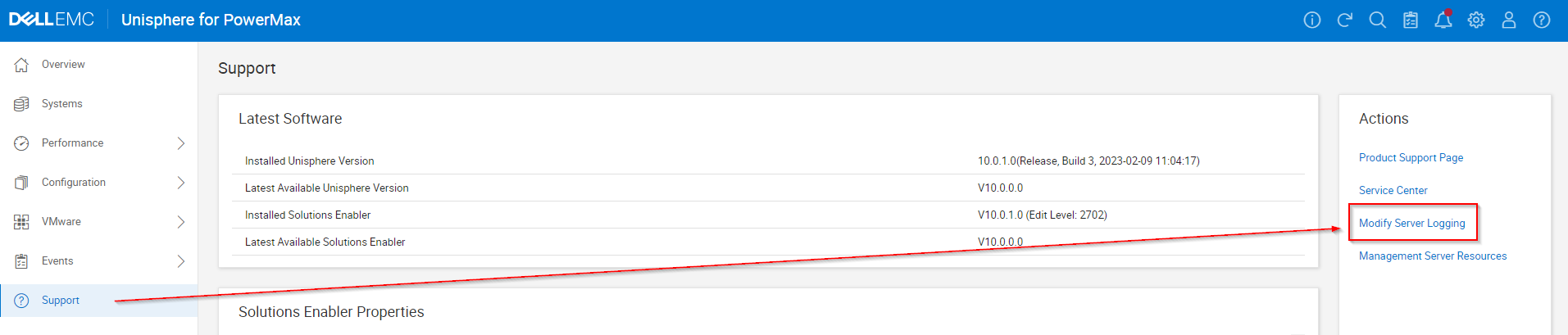
- Vælg Support, og vælg Rediger serverlogføring i panelet Handlinger:
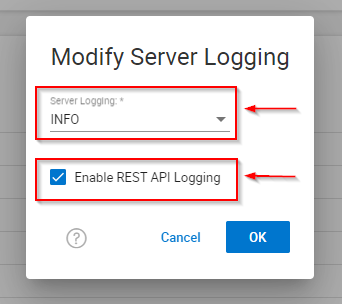
- Indstil Serverlogføring WARN til INFO , marker afkrydsningsfeltet "Enable REST API Logging", og klik på OK.
- Genskab eventuelle problemer eller test.
- Husk at fjerne markeringen i afkrydsningsfeltet "Enable REST API Logging", og klik på OK.
- Indsaml EMC-rapporter/grab.
Affected Products
Unisphere for PowerMaxArticle Properties
Article Number: 000019037
Article Type: How To
Last Modified: 21 Feb 2025
Version: 5
Find answers to your questions from other Dell users
Support Services
Check if your device is covered by Support Services.