Unisphere for PowerMax에서 REST API 로깅을 활성화하는 방법
Summary: Unisphere for PowerMax에서 REST API 로깅을 활성화하는 방법
This article applies to
This article does not apply to
This article is not tied to any specific product.
Not all product versions are identified in this article.
Instructions
이 restapi.log 기본적으로 생성되지 않습니다.
Unisphere for PowerMax에서 REST API 로깅(REST API 로그 생성)을 활성화하려면 다음 단계를 참조하십시오.
- Support를 선택하고 Actions 패널에서 Modify Server Logging을 선택합니다.

- 서버 로깅 WARN 을 INFO 로 설정하고 "Enable REST API Logging" 확인란을 선택한 다음 OK를 클릭합니다.
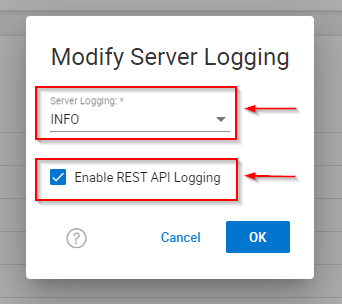
- 문제 또는 테스트를 재현합니다.
- "Enable REST API Logging" 확인란의 선택을 취소하고 OK를 클릭합니다.
- EMC 보고서 수집/Grab.
Affected Products
Unisphere for PowerMaxArticle Properties
Article Number: 000019037
Article Type: How To
Last Modified: 21 Feb 2025
Version: 5
Find answers to your questions from other Dell users
Support Services
Check if your device is covered by Support Services.