如何在 PowerMax 的 Unisphere 中啟用 REST API 紀錄
Summary: 如何在 PowerMax 的 Unisphere 中啟用 REST API 紀錄
This article applies to
This article does not apply to
This article is not tied to any specific product.
Not all product versions are identified in this article.
Instructions
默認情況下不生成此restapi.log。
若要在 PowerMax 的 Unisphere 上啟用 REST API 紀錄 (產生 restapi 記錄),請參閱以下步驟:
- 選擇 「支援」,然後在「操作」面板中,選擇 「修改伺服器日誌記錄」:

- 將伺服器記錄 警告 設為 資訊 ,然後勾選「啟用 REST API 記錄」核取方塊,然後按一下確定。
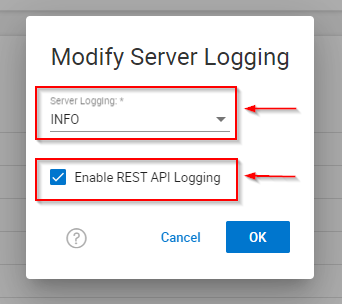
- 重現任何問題或測試。
- 請記得取消勾選「Enable REST API Logging」核取方塊,然後按一下確定。
- 收集 EMC 報告/Grab。
Affected Products
Unisphere for PowerMaxArticle Properties
Article Number: 000019037
Article Type: How To
Last Modified: 21 Feb 2025
Version: 5
Find answers to your questions from other Dell users
Support Services
Check if your device is covered by Support Services.