如何在 Unisphere for PowerMax 中启用 REST API 日志记录
Summary: 如何在 Unisphere for PowerMax 中启用 REST API 日志记录
This article applies to
This article does not apply to
This article is not tied to any specific product.
Not all product versions are identified in this article.
Instructions
默认情况下不生成此restapi.log。
要在 Unisphere for PowerMax 上启用 REST API 日志记录(生成 restapi 日志),请参阅以下步骤:
- 选择 Support,然后在Actions面板中, 选择Modify Server Logging:
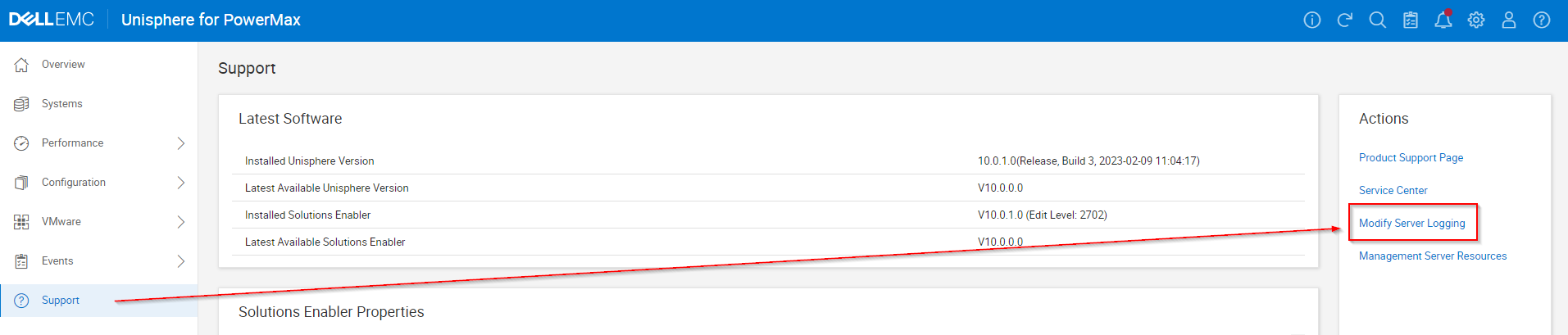
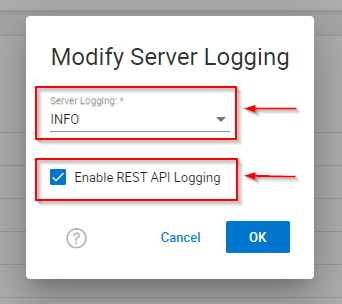
- 将“服务器日志记录 警告 ”设置为 “信息 ”,选中“启用 REST API 日志记录”复选框,然后单击“确定”。
- 重现任何问题或测试。
- 请记住取消选中“Enable REST API Logging”复选框,然后单击 OK。
- 收集 EMC 报告/抓取。
Affected Products
Unisphere for PowerMaxArticle Properties
Article Number: 000019037
Article Type: How To
Last Modified: 21 Feb 2025
Version: 5
Find answers to your questions from other Dell users
Support Services
Check if your device is covered by Support Services.