Dell Unity:NASサーバーSP所有権の変更
Summary: この記事では、NASサーバーの所有権をピアSP(ストレージ プロセッサー)に手動で変更する手順について説明します。
This article applies to
This article does not apply to
This article is not tied to any specific product.
Not all product versions are identified in this article.
Instructions
NASサーバーとそのファイル システムのSP(ストレージ プロセッサ)所有者の変更は、複数の方法で実行できます。
Unisphere:
Example: ロード バランシングの問題により、NASサーバーの「NAS_Unity_01」をSPAからSPBに変更する:
- Unisphereで、Storage>File > NAS Serversに移動します。
- 変更するNASサーバーをダブルクリックします。
- [General]タブで、[SP Owner]セクションに移動し、NASサーバーの移動先SPを選択します。
![[General]タブで、[SP Owner]セクションに移動し、NASサーバーの移動先SPを選択します](https://supportkb.dell.com/img/ka0Do000000EhssIAC/ka0Do000000EhssIAC_ja_1.jpeg)
- 画面の下部にある [変更の適用] ボタンを選択します。
注:レプリケーションが実行されている場合、この操作は失敗する可能性があります。レプリケーションを一時停止して、移動を再試行します。
- NASサーバーの[General Properties]を閉じ、リストを更新して変更が完了したことを確認します。
- すべての作業が完了したら、 レプリケーションを再開します。
NASインターフェイスのIPをピア ストレージ プロセッサーで使用できるように、ネットワーク構成が正しいことを確認してください。
正しいネットワーク構成設定が適用されていない場合、NASサーバーを別のストレージ プロセッサーに移動すると、データ欠損(DU)シナリオが発生する可能性があります。
UEMCLI:
Example: NASサーバーの「NAS_Unity_01」をSPBからSPAに変更する。
- NASサーバーIDの収集 情報:
次のコマンドを使用できます。
uemcli /net/nas/server show
上記のコマンドの実行中に、次の出力が表示されます。出力には、マシン上に存在するすべてのNASサーバーが一覧表示されます。
service@Unity spa:~/user # uemcli -u admin -p password /net/nas/server show
1:    ID                            = nas_73                   -> ID of the NAS Server
      Name                          = NAS_Unity_01             -> Name of the NAS Server
      NetBIOS name                  =
      SP                            = spb                      -> Current SP that is the owner of the NAS Server.
- NASサーバーSPの所有権を変更するには、アレイの認証情報を使用して次のコマンドを実行します。
uemcli -u <Admin_User> -p <Password> /net/nas/server -id <NAS_ID> set -sp <Destination SP>
service@Unity spa:~/user # uemcli -u admin -p password /net/nas/server -id nas_73 set -sp spa
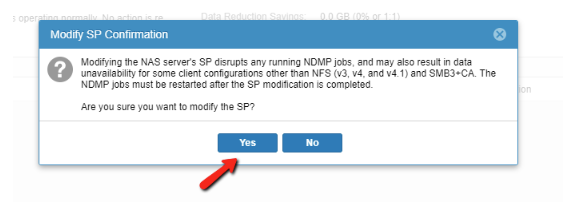
WARNING: modifying the NAS server's SP disrupts any running NDMP jobs, and may also result in data unavailability for some client configurations other than NFS (v3, v4, and v4.1) and SMB3+CA. The NDMP jobs must be restarted after the SP modification is completed.
Are you sure you want to modify the SP?
yes / no: yes
ID = nas_73
Operation completed successfully.
- ステップ1のコマンドを使用して、SP所有権が変更されていることを確認します。
service@Unity spa:~/user # uemcli -u admin -p password /net/nas/server -id nas_73 show
1:    ID                            = nas_73
      Name                          = NAS_Unity_01
      NetBIOS name                  =
      SP                            = spa                      -> New SP that is the owner of the NAS Server.
Affected Products
Dell EMC Unity FamilyProducts
Dell Unity 300, Dell EMC Unity 300F, Dell EMC Unity 350F, Dell EMC Unity 400, Dell EMC Unity 400F, Dell EMC Unity 450F, Dell EMC Unity 500, Dell EMC Unity 500F, Dell EMC Unity 550F, Dell EMC Unity 600, Dell EMC Unity 600F, Dell EMC Unity 650F
, Dell EMC Unity Family |Dell EMC Unity All Flash, Dell EMC Unity Family, Dell EMC Unity Hybrid, Dell EMC UnityVSA Professional Edition/Unity Cloud Edition
...
Article Properties
Article Number: 000019599
Article Type: How To
Last Modified: 03 Oct 2025
Version: 5
Find answers to your questions from other Dell users
Support Services
Check if your device is covered by Support Services.