PowerFlex: Sådan soft reset iDRAC 13G og 14G
Summary: PowerFlex: Sådan soft reset iDRAC 13G og 14G
This article applies to
This article does not apply to
This article is not tied to any specific product.
Not all product versions are identified in this article.
Instructions
Nulstil ved hjælp af iDRAC UI (13G)
Den grafiske brugergrænseflade (UI) i iDRAC giver mulighed for at udføre en blød nulstilling:
- Opret forbindelse til iDRAC
- Log ind på grænsefladen ved at indtaste brugernavn og adgangskode
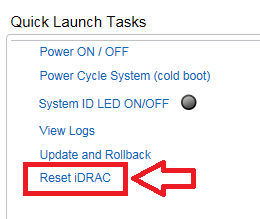
- I nederste højre hjørne af oversigtsskærmen vises hurtigstartopgaverne
- Klik på Nulstil iDRAC.
- Bekræft handlingen
- IDRAC kan først nås efter et par minutter, mens systemets ydeevne ikke påvirkes
Nulstil ved hjælp af iDRAC UI (14G)
Den grafiske brugergrænseflade (UI) i iDRAC giver mulighed for at udføre en blød nulstilling:
- Opret forbindelse til iDRAC
- Log ind på grænsefladen ved at indtaste brugernavn og adgangskode
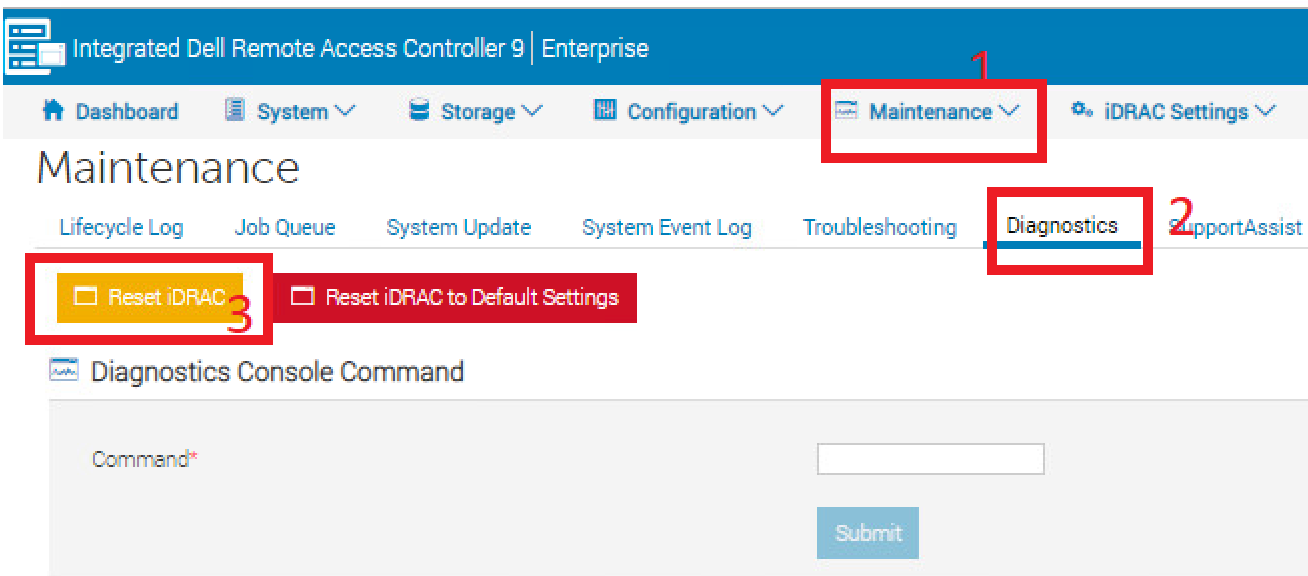
- Klik på fanen "Vedligeholdelse" øverst
- Klik på underfanen "Diagnosticering"
- Klik på Nulstil iDRAC.
- Bekræft handlingen
- IDRAC kan først nås efter et par minutter, mens systemets ydeevne ikke påvirkes
Affected Products
PowerFlex rack, VxFlex Ready Nodes, PowerFlex appliance Intelligent Catalog Software, PowerFlex Software, PowerFlex appliance R640, PowerFlex appliance R740XD, PowerFlex appliance R840Article Properties
Article Number: 000019789
Article Type: How To
Last Modified: 10 Sep 2025
Version: 4
Find answers to your questions from other Dell users
Support Services
Check if your device is covered by Support Services.