PowerFlex:iDRAC 13Gおよび14Gをソフト リセットする方法
Summary: PowerFlex:iDRAC 13Gおよび14Gをソフト リセットする方法
This article applies to
This article does not apply to
This article is not tied to any specific product.
Not all product versions are identified in this article.
Instructions
iDRAC UIを使用したリセット(13G)
iDRACのグラフィカル ユーザー インターフェイス(UI)には、ソフト リセットを実行するオプションがあります。
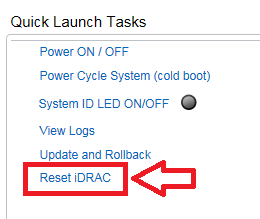
- iDRACへの接続
- ユーザー名とパスワードを入力してインターフェイスにログインします
- 概要画面の右下隅に[Quick Launch Tasks]が表示されます
- [Reset iDRAC]をクリックします。
- 処理を確定します
- iDRACは数分間アクセスできなくなりますが、システム パフォーマンスには影響しません
iDRAC UIを使用したリセット(14G)
iDRACのグラフィカル ユーザー インターフェイス(UI)には、ソフト リセットを実行するオプションがあります。
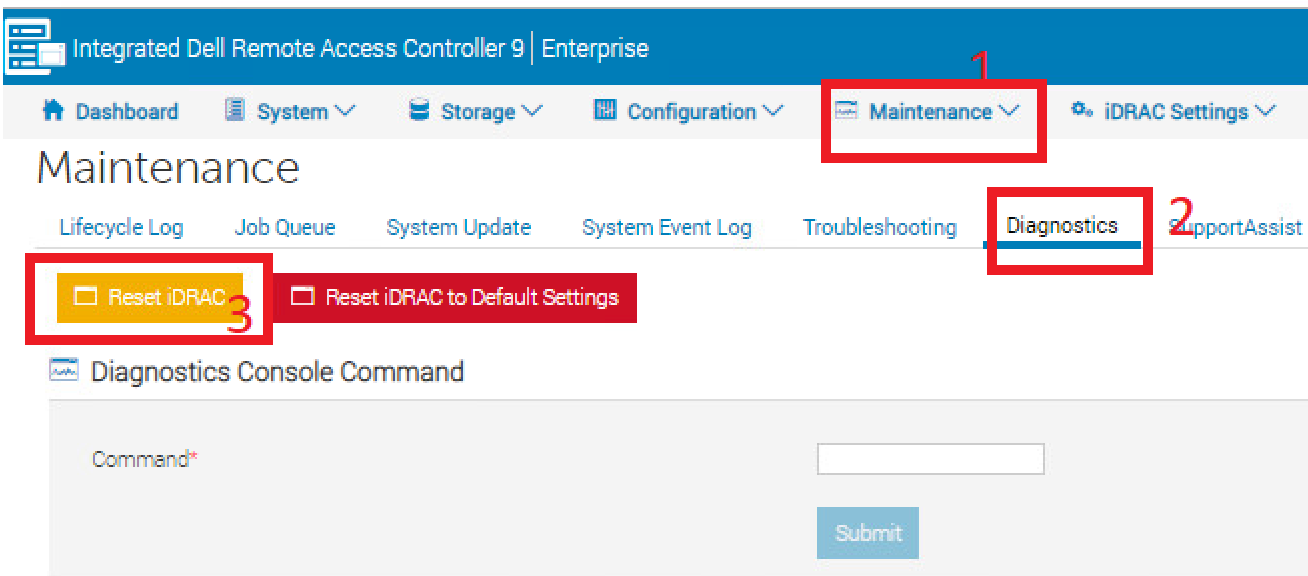
- iDRACへの接続
- ユーザー名とパスワードを入力してインターフェイスにログインします
- 上部の[Maintenance]タブをクリックします
- [Diagnostics]サブタブをクリックします
- [Reset iDRAC]をクリックします。
- 処理を確定します
- iDRACは数分間アクセスできなくなりますが、システム パフォーマンスには影響しません
Affected Products
PowerFlex rack, VxFlex Ready Nodes, PowerFlex appliance Intelligent Catalog Software, PowerFlex Software, PowerFlex appliance R640, PowerFlex appliance R740XD, PowerFlex appliance R840Article Properties
Article Number: 000019789
Article Type: How To
Last Modified: 10 Sep 2025
Version: 4
Find answers to your questions from other Dell users
Support Services
Check if your device is covered by Support Services.