PowerFlex:如何软重置 iDRAC 13G 和 14G
Summary: PowerFlex:如何软重置 iDRAC 13G 和 14G
This article applies to
This article does not apply to
This article is not tied to any specific product.
Not all product versions are identified in this article.
Instructions
使用 iDRAC UI 重置 (13G)
iDRAC 的图形用户界面 (UI) 提供了执行软重置的选项:
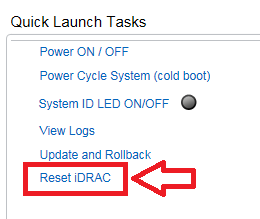
- 连接到iDRAC
- 通过输入用户名和密码登录界面
- 在概览屏幕的右下角,将显示快速启动任务
- 单击 Reset iDRAC。
- 确认操作
- iDRAC 将在几分钟内无法访问,而系统性能不受影响
使用 iDRAC UI 重置 (14G)
iDRAC 的图形用户界面 (UI) 提供了执行软重置的选项:
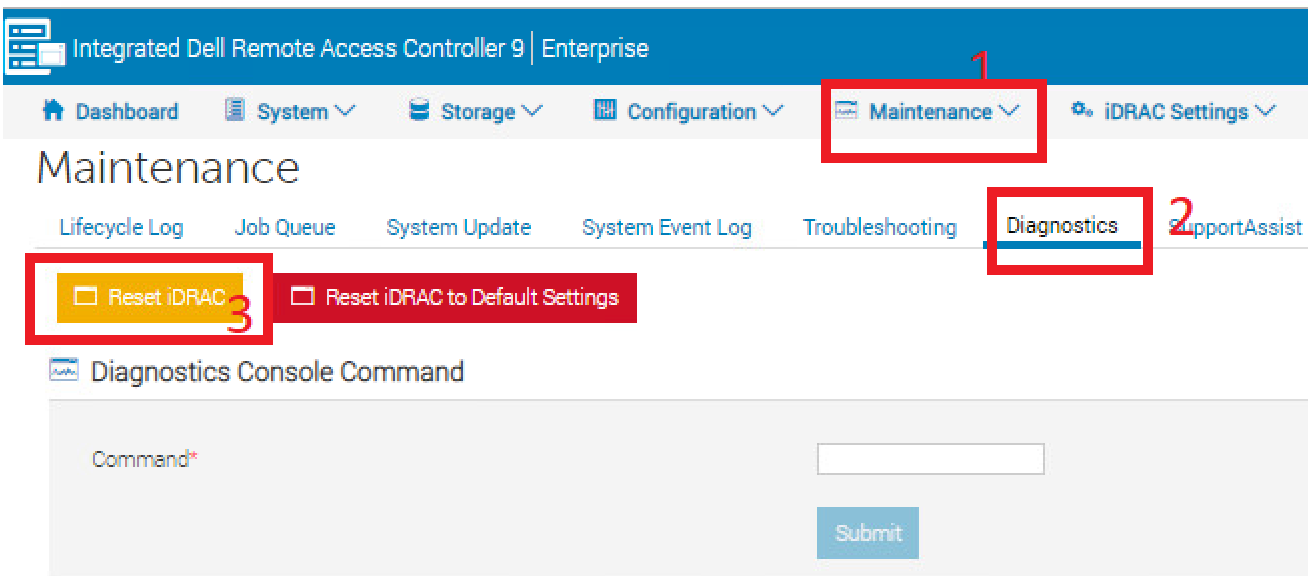
- 连接到iDRAC
- 通过输入用户名和密码登录界面
- 单击顶部的“维护”选项卡
- 单击“Diagnostics”子选项卡
- 单击 Reset iDRAC。
- 确认操作
- iDRAC 将在几分钟内无法访问,而系统性能不受影响
Affected Products
PowerFlex rack, VxFlex Ready Nodes, PowerFlex appliance Intelligent Catalog Software, PowerFlex Software, PowerFlex appliance R640, PowerFlex appliance R740XD, PowerFlex appliance R840Article Properties
Article Number: 000019789
Article Type: How To
Last Modified: 10 Sep 2025
Version: 4
Find answers to your questions from other Dell users
Support Services
Check if your device is covered by Support Services.