NMC 로그인 또는 NMC GUI 실행 문제를 해결하기 위해 Java 콘솔 디버깅을 활성화하는 방법
Summary: 이 문서에서는 NMC 로그인 실패 문제를 해결하거나 NMC GUI가 실행되지 않을 때 Java 콘솔 디버깅을 설정하는 방법에 대해 설명합니다
This article applies to
This article does not apply to
This article is not tied to any specific product.
Not all product versions are identified in this article.
Instructions
NMC 로그인 또는 NMC GUI 시작 문제를
해결하기 위해 Java 콘솔 디버깅을 활성화하는 방법 Java 제어판
을 열고 Java 캐시를 지웁니다.
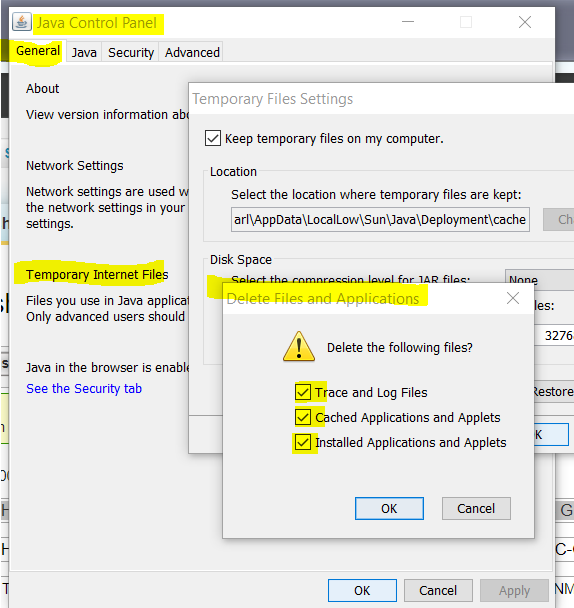
Java 콘솔을 활성화합니다.

NMC - http://NMC 서버:9000
을 시작합니다. Java 콘솔이 열립니다. Java 콘솔 상자에서 "5"를 눌러 추적 수준을 5로 설정합니다. 다음과 같은 내용이 표시되어야 합니다.

분석을 위해 Java 콘솔 창의 내용을 텍스트 파일에 복사합니다.
해결하기 위해 Java 콘솔 디버깅을 활성화하는 방법 Java 제어판
을 열고 Java 캐시를 지웁니다.
Java 콘솔을 활성화합니다.
NMC - http://NMC 서버:9000
을 시작합니다. Java 콘솔이 열립니다. Java 콘솔 상자에서 "5"를 눌러 추적 수준을 5로 설정합니다. 다음과 같은 내용이 표시되어야 합니다.
분석을 위해 Java 콘솔 창의 내용을 텍스트 파일에 복사합니다.
Additional Information
기타 관련 KB
NMC GUI 또는 디스플레이 문제를
해결하기 위해 Java UI 디버깅을 활성화하는 방법https://support.emc.com/kb/533436
NMC Java UI 디버그 로그를 파일
https://support.emc.com/kb/533564 로 리디렉션하는 방법
NMC GUI 또는 디스플레이 문제를
해결하기 위해 Java UI 디버깅을 활성화하는 방법https://support.emc.com/kb/533436
NMC Java UI 디버그 로그를 파일
https://support.emc.com/kb/533564 로 리디렉션하는 방법
Affected Products
NetWorker Management ConsoleProducts
NetWorker Management ConsoleArticle Properties
Article Number: 000019836
Article Type: How To
Last Modified: 26 Aug 2025
Version: 4
Find answers to your questions from other Dell users
Support Services
Check if your device is covered by Support Services.