Isilon OneFS: Int-b/Failover interface is not enabled on the cluster
Summary: In the WebUI, on clicking a node ID we may notice a failover interface lit amber. Also, running ifconfig on the node may show only one internal interface [int - a] having the flag ISIINTERNAL. This is because the int-b/failover interface is not enabled in the cluster. ...
This article applies to
This article does not apply to
This article is not tied to any specific product.
Not all product versions are identified in this article.
Instructions
In the OneFS WebUI, on clicking a node ID, we may notice a failover interface lit amber:
Running ifconfig on the node may show only one internal interface [int - a] having the flag ISIINTERNAL. Also you notice that if int-b/failover is not enabled, the interface does not have an IP address.
ix0: flags=1008843<UP,BROADCAST,RUNNING,SIMPLEX,MULTICAST,ISIINTERNAL> metric 0 mtu 9000
options=e407bb<RXCSUM,TXCSUM,VLAN_MTU,VLAN_HWTAGGING,JUMBO_MTU,VLAN_HWCSUM,TSO4,TSO6,LRO,VLAN_HWTSO,RXCSUM_IPV6,TXCSUM_IPV6>
        ether f8:f2:1e:3e:fb:ec
        inet 192.X.X.X netmask 0xffffff00 broadcast 192.168.1.255 zone 1     ==================> IP address for int-a
        inet6 fe80::faf2:1eff:fe3e:fbec%ix0 prefixlen 64 scopeid 0x1 zone 1
        inet6 fdfe:9042:c53d:0:faf2:1eff:fe3e:fbec prefixlen 64 zone 1
        nd6 options=21<PERFORMNUD,AUTO_LINKLOCAL>
        media: Ethernet autoselect (10Gbase-Twinax <full-duplex,rxpause>)
        status: active

ix1: flags=8843<UP,BROADCAST,RUNNING,SIMPLEX,MULTICAST> metric 0 mtu 1500
options=e407bb<RXCSUM,TXCSUM,VLAN_MTU,VLAN_HWTAGGING,JUMBO_MTU,VLAN_HWCSUM,TSO4,TSO6,LRO,VLAN_HWTSO,RXCSUM_IPV6,TXCSUM_IPV6>
        ether f8:f2:1e:3e:fb:ed
        inet6 fe80::faf2:1eff:fe3e:fbed%ix1 prefixlen 64 scopeid 0x2 zone 1    ==================> No IP seen for Int-b
        inet6 fda7:e6ee:2e09:0:faf2:1eff:fe3e:fbed prefixlen 64 zone 1
        nd6 options=21<PERFORMNUD,AUTO_LINKLOCAL>
        media: Ethernet autoselect (10Gbase-Twinax <full-duplex,rxpause>)
        status: active
You can confirm this by checking the /etc/ifs/array.xml file on the node:
<?xml version="1.0" encoding="utf-8"?>
<isilon version="0x8010000">
  <name>clustername</name>
  <joinmode>manual</joinmode>
  <interfaces>
    <interface name="int-a" flags="enabled_ok cluster_traffic" index="0">
      <netmask>255.X.X.X</netmask>
      <ipranges>
        <iprange>
          <low>192.X.X.X</low>
          <high>192.X.X.X</high>
        </iprange>
      </ipranges>
      <mtu>9000</mtu>
    </interface>
    <interface name="int-b" flags="disabled" index="1"> =============================> int-b disabled
      <netmask>255.X.X.X</netmask>
      <ipranges>
        <iprange>
          <low>192.X.X.X</low>
          <high>192.X.X.X</high>
        </iprange>
      </ipranges>
      <mtu>9000</mtu>
    </interface>
    <interface name="lpbk" flags="disabled failover" index="0"> ======================> Failover disabled
      <netmask>255.X.X.X</netmask>
      <ipranges/>
      <mtu>9000</mtu>
    </interface>
  </interfaces>
As shown in the snippet above, clicking the failover interface notifies that int-b/failover is not enable in the cluster, and no IP ranges are specified for failover: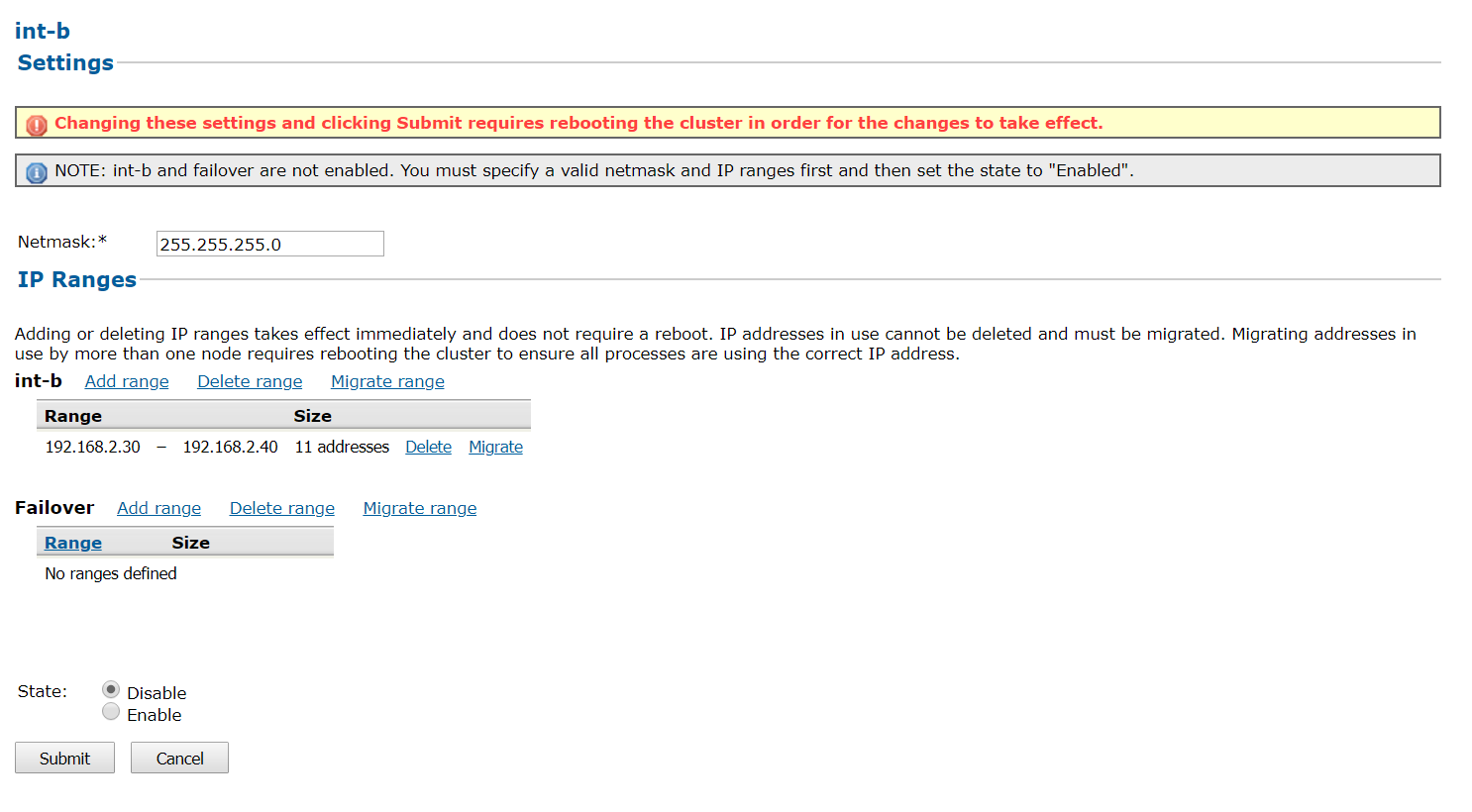
In order to rectify this, kindly specify the failover range [if int-b range is not specified, kindly populate this range as well]. Once the range is provided, enabled the state of the interface as shown below: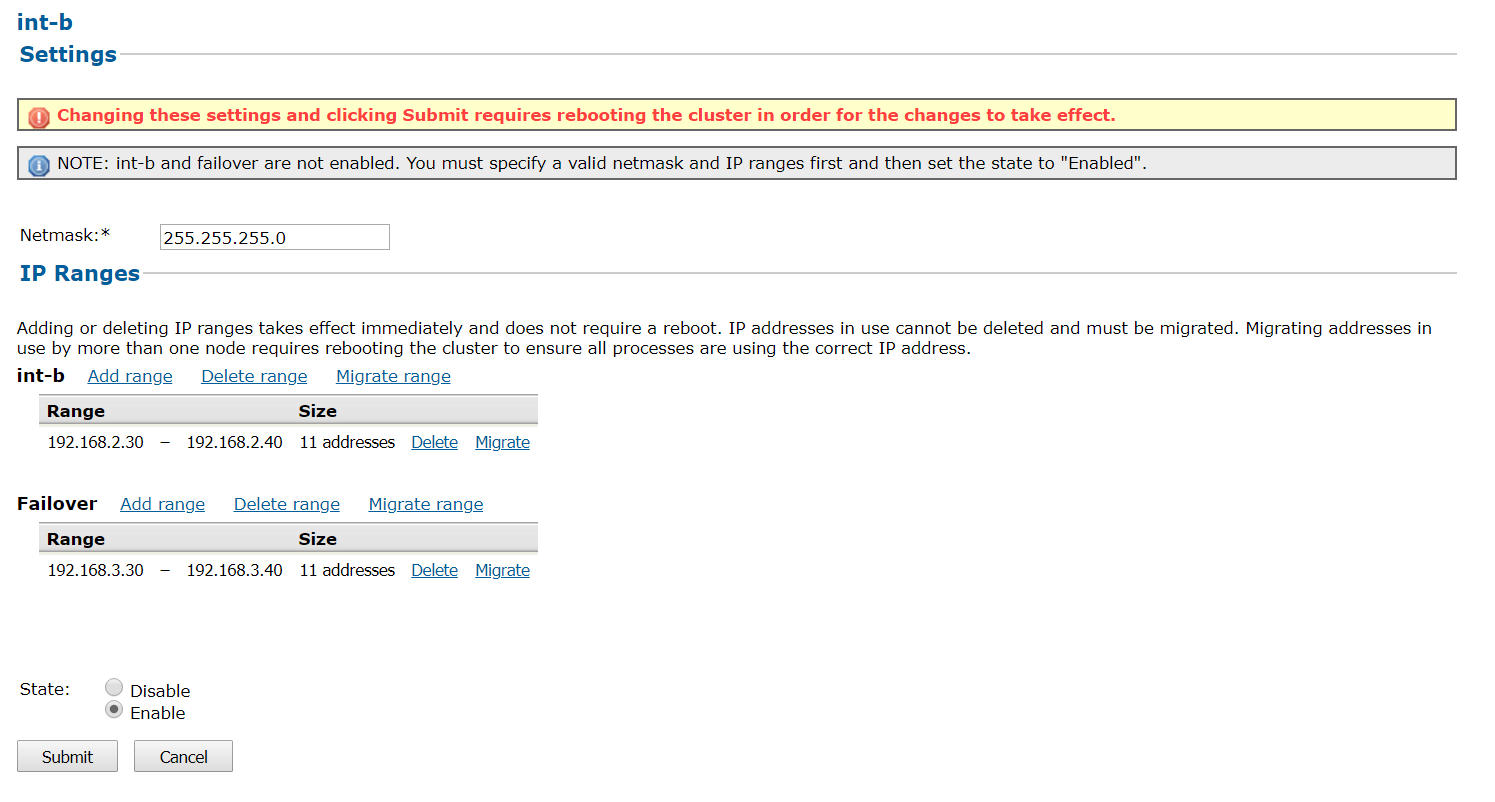
Once the state of the interface is enabled, click submit.
NOTE: When you submit the change, you are prompted for a simultaneous reboot of the entire cluster in order to commit the change. Kindly perform these steps in a maintenance window to avoid disruption to end users.
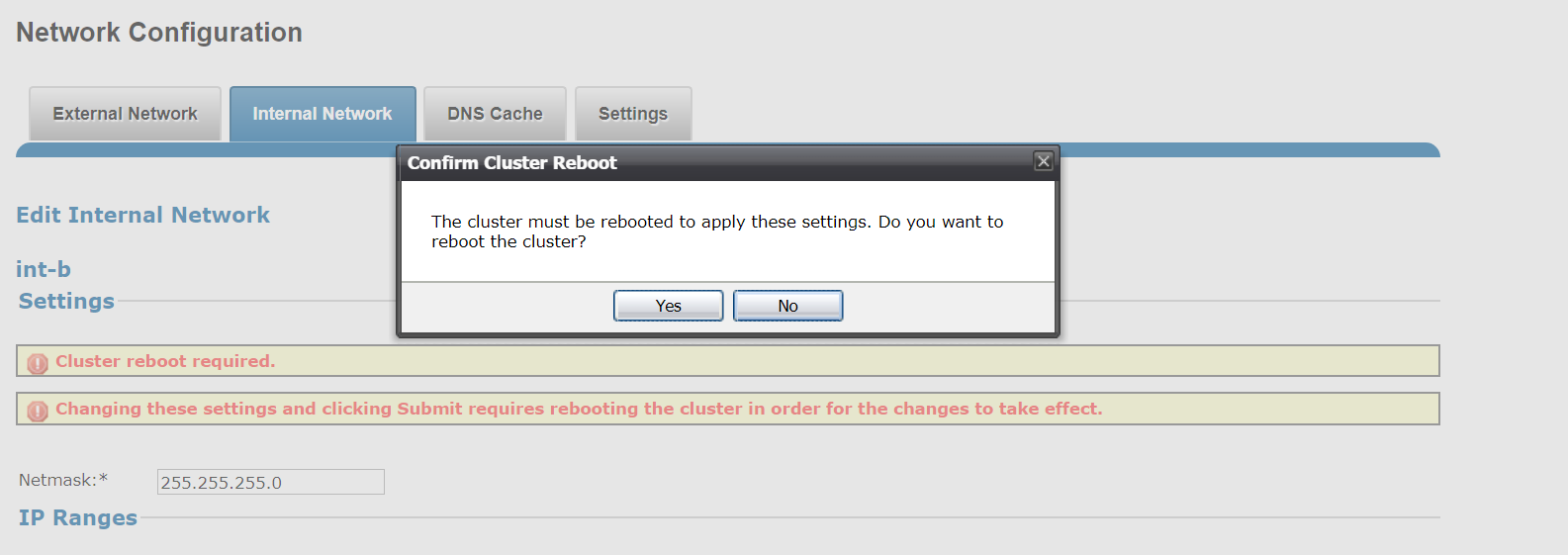
Once all the nodes are back up after the reboot, the int-b and failover interfaces should be enabled.
Additional Information
Step-by-step procedure for the above:
* OneFS 8.x:
In the WebUI:
Step 1: Cluster Management > Internal Network > int-b/Failover
Step 2: If the failover interface is lit amber, verify int-b and the failover IP range is populated. If not, specify the int-b and failover IP ranges.
Step 3: Enable the state of the interface if it is disabled.
Step 4: Submit the changes made.
NOTE: When you submit the change in Step 4, you are prompted for a simultaneous reboot of the entire cluster in order to commit the change. Kindly perform these steps in a maintenance window to avoid disruption.
Affected Products
IsilonProducts
Isilon, Isilon Gen6, Isilon HD400, Isilon NL-Series, PowerScale OneFS, Isilon S-Series, Isilon Scale-out NAS, Isilon X-SeriesArticle Properties
Article Number: 000019855
Article Type: How To
Last Modified: 27 Nov 2025
Version: 4
Find answers to your questions from other Dell users
Support Services
Check if your device is covered by Support Services.