Avamar: 클라이언트 쪽 오류 팝업 알림을 비활성화하는 방법
Summary: Avamar에 대한 클라이언트 측 오류 메시지 알림을 비활성화하는 방법
This article applies to
This article does not apply to
This article is not tied to any specific product.
Not all product versions are identified in this article.
Instructions
Avamar에서 클라이언트 측 오류 팝업 알림 비활성화
Avamar에서 클라이언트 측 오류 메시지 알림을 비활성화하려면 다음 단계를 따르십시오.
- Avamar 에이전트가 설치된 서버에 대한 RDP(Remote Desktop Protocol)
- 호출
msconfig.exe명령을 수행할 수 있는 충분한 공간이 있어야 합니다. - Startup 탭에서 Avamar Windows Client 항목을 선택 취소합니다.
- 이 변경을 수행한 후 서버를 재부팅합니다.
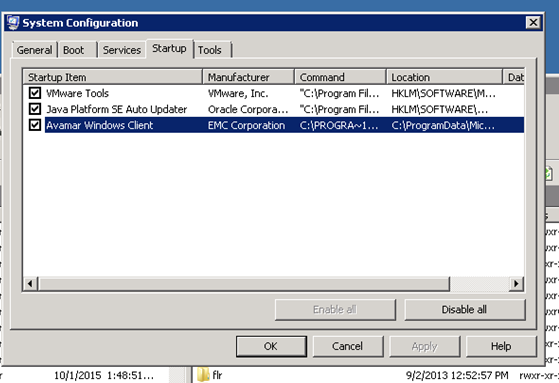
이렇게 변경하면 모든 Avamar 예약 백업이 실행되지만 오류 메시지가 더 이상 표시되지 않습니다.
Affected Products
AvamarProducts
AvamarArticle Properties
Article Number: 000019939
Article Type: How To
Last Modified: 03 Oct 2025
Version: 5
Find answers to your questions from other Dell users
Support Services
Check if your device is covered by Support Services.