Avamar: Hoe pop-upmeldingen met fouten aan de clientzijde uit te schakelen
Summary: Foutmeldingen aan de clientzijde uitschakelen voor Avamar.
This article applies to
This article does not apply to
This article is not tied to any specific product.
Not all product versions are identified in this article.
Instructions
Pop-upmeldingen voor fouten aan de clientzijde uitschakelen in Avamar
Volg deze stappen om de foutmeldingen aan de clientzijde in Avamar uit te schakelen:
- Remote Desktop Protocol (RDP) naar de server waarop de Avamar Agent is geïnstalleerd.
- Aanroepen
msconfig.exe. - Wis onder het tabblad Opstarten de vermelding Avamar Windows-client.
- Start de server opnieuw op nadat u deze wijziging hebt aangebracht.
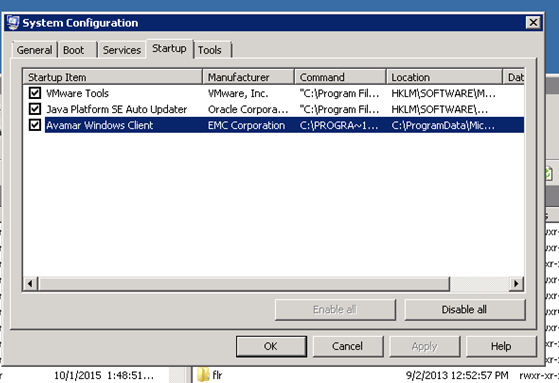
Na deze wijziging worden alle geplande Avamar-back-ups uitgevoerd, maar worden de foutmeldingen niet meer weergegeven.
Affected Products
AvamarProducts
AvamarArticle Properties
Article Number: 000019939
Article Type: How To
Last Modified: 03 Oct 2025
Version: 5
Find answers to your questions from other Dell users
Support Services
Check if your device is covered by Support Services.